
Open Source Alternatives to ColorZilla
Image Color Picker is a browser-based alternative for users who need this focused result without installing a proprietary desktop app or entering a larger hosted workflow.
This research compares that workflow with ColorZilla while keeping the outbound source link at the bottom after the analysis.
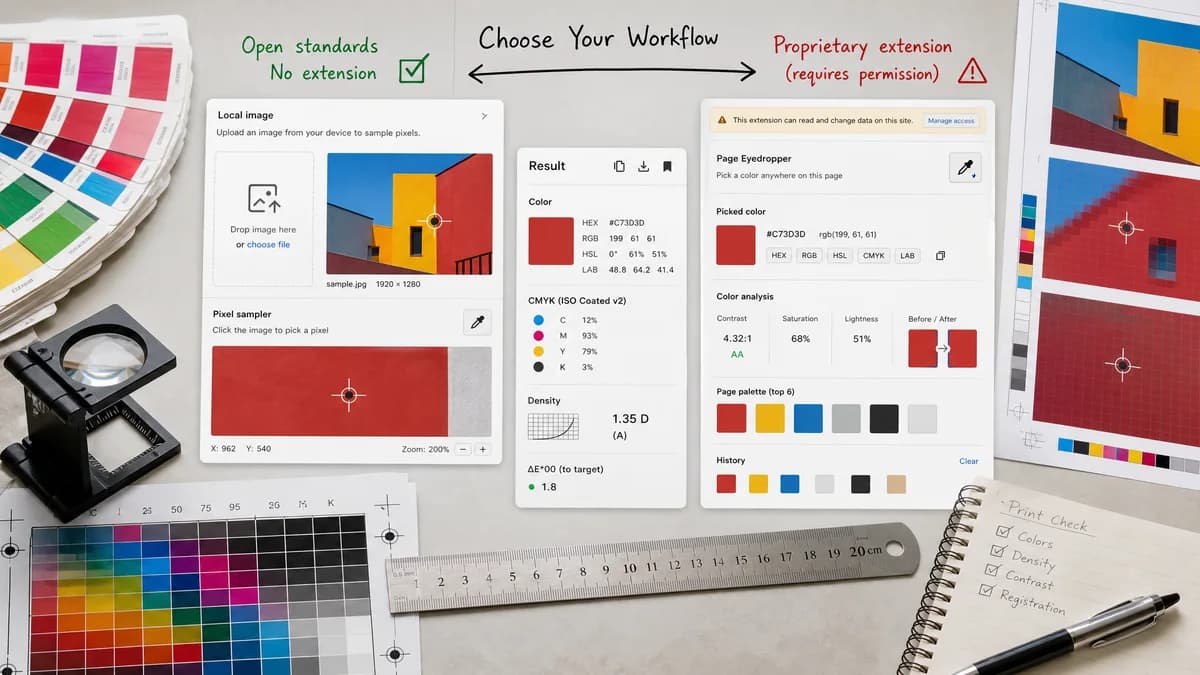
Why Image Color Picker fits
Image Color Picker should let users sample pixels from a selected local image without installing a browser extension or granting extension permissions.
What ColorZilla offers
ColorZilla provides an eyedropper for getting colors from pixels or areas on pages, an advanced color picker, and related browser color tools.
Open alternative signals
Source and openness
Image Color PickerBrowser-based and open-standards-driven; public source status is not claimed.
ColorZillaBrowser extension with private implementation details.
Install model
Image Color PickerNo extension required; use a web page.
ColorZillaRequires installing a browser extension.
Sampling target
Image Color PickerUploaded local image rendered in the tool.
ColorZillaPixels or areas on webpages and browser-visible surfaces.
Permissions
Image Color PickerAvoids extension permissions for image-only sampling.
ColorZillaExtension capabilities may require browser permissions.
Decision guide
Use Image Color Picker when the source is an image file and you want no extension install, no page-wide sampling permission, and copyable image color values.
Use ColorZilla when you need to sample colors from live webpages, browser areas, or repeated web design work across sites.
Side-by-side open source alternative comparison
| Decision point | Image Color Picker | ColorZilla | Takeaway |
|---|---|---|---|
| Alternative fit | Our workflowBest for picking from image files. | Proprietary workflowBest for picking from webpages and screen content. | They overlap on color values but not source context. |
| Setup | Our workflowOpen a page and choose an image. | Proprietary workflowInstall and use a browser extension. | No install is better for occasional use. |
| Feature parity | Our workflowImage pixel values in HEX, RGB, and HSL. | Proprietary workflowEyedropper, advanced picker, page analysis, and browser workflow tools. | ColorZilla remains broader for web inspection. |
| Privacy and permissions | Our workflowFile-scoped local processing. | Proprietary workflowExtension-based access to page or screen sampling features. | A web page can be easier to trust for single-image work. |
| Migration path | Our workflowMove image-file sampling to TextFaker. | Proprietary workflowKeep ColorZilla for live webpage colors. | Source type determines the tool. |
| Mobile use | Our workflowCan be designed for tap sampling on phones and tablets. | Proprietary workflowBrowser extension workflows are typically desktop-centered. | Mobile support can be a strong differentiator. |
Detailed research
Open-Source Alternative Fit
Image Color Picker is an alternative to ColorZilla only for image-file sampling, not for extension-level webpage inspection. That narrow framing makes the page accurate and useful.
Feature Parity and Limits
It can provide the color readout users want, but it should not claim to sample arbitrary webpages or anything outside the uploaded image unless a supported browser API is added and explained.
Data, Setup, and Pricing
A no-extension tool lowers setup for occasional users and avoids extension permissions. This matters for locked-down work devices and quick mobile checks.
Where ColorZilla Still Wins
ColorZilla is stronger for designers and developers who frequently inspect live webpages, browser UI, gradients, or page palettes.
Practical Migration Guidance
Use Image Color Picker for uploaded screenshots and image files. Keep ColorZilla for webpage sampling and extension-based browser workflows.
Research notes
- ColorZilla's official Chrome features page lists an eyedropper for any pixel or area on a page and outside the browser, plus an advanced color picker.
- ColorZilla is extension-oriented, while TextFaker should be file-oriented.
- The alternative should avoid claiming feature parity with page inspection or extension-level screen sampling.
Official source
The proprietary product link is included once here for source checking after the alternative analysis.
Official ColorZilla source