
Open Source Alternatives to Coolors Image Picker
Image Color Picker is a browser-based alternative for users who need this focused result without installing a proprietary desktop app or entering a larger hosted workflow.
This research compares that workflow with Coolors Image Picker while keeping the outbound source link at the bottom after the analysis.
Why Image Color Picker fits
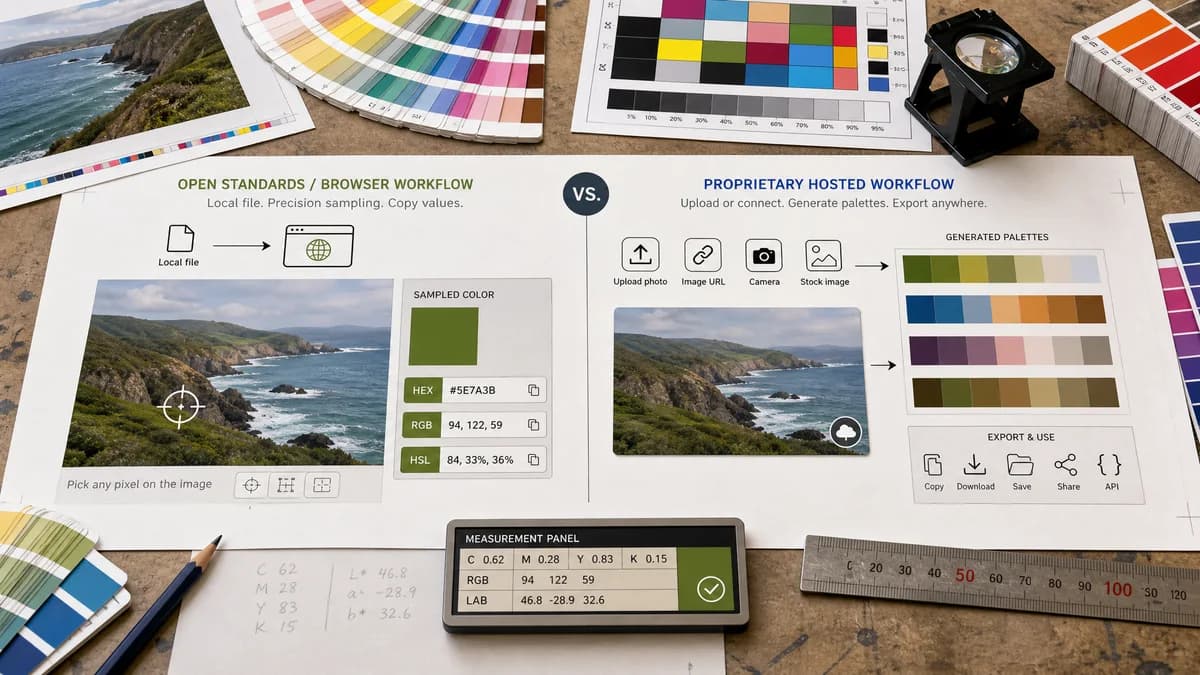
Image Color Picker should focus on local image sampling and copyable HEX, RGB, and HSL values rather than palette collections or inspiration browsing.
What Coolors Image Picker offers
Coolors Image Picker lets users create palettes from uploaded photos, URLs, camera input, or stock images, with Pro features for expanded palette and export workflows.
Open alternative signals
Source and openness
Image Color PickerBrowser-based and open-standards-driven; public source status is not claimed.
Coolors Image PickerHosted private-code app with free and paid feature tiers.
Primary job
Image Color PickerExact color values from selected pixels.
Coolors Image PickerPalette extraction, generation, saving, and export.
Data control
Image Color PickerDesigned around local image selection and no upload requirement.
Coolors Image PickerHosted workflow with multiple input sources.
Project management
Image Color PickerNo palette account or project library required.
Coolors Image PickerIncludes saved palettes, projects, collections, and Pro enhancements.
Decision guide
Use Image Color Picker for exact one-off sampling from a local image without account or project organization needs.
Use Coolors Image Picker for palette creation, inspiration, saved palettes, exports, and a broader color toolset.
Side-by-side open source alternative comparison
| Decision point | Image Color Picker | Coolors Image Picker | Takeaway |
|---|---|---|---|
| Alternative fit | Our workflowSimple pixel color picker. | Proprietary workflowFull palette and color inspiration platform. | TextFaker is leaner; Coolors is broader. |
| Manual sampling | Our workflowClick or tap exact image points. | Proprietary workflowSupports manual picker movement on images as part of palette creation. | Both can support manual picking, but the surrounding workflow differs. |
| Output | Our workflowHEX, RGB, and HSL for direct handoff. | Proprietary workflowPalettes, exports, saved colors, and related color tools. | Choose based on whether one value or a palette is needed. |
| Pricing shape | Our workflowShared TextFaker access model for focused tools. | Proprietary workflowFree features with Pro features advertised on the official page. | Users avoiding palette subscriptions may prefer a focused tool. |
| Migration path | Our workflowReplace quick sample checks. | Proprietary workflowKeep for palette exploration and color libraries. | Do not frame TextFaker as a full Coolors clone. |
| Privacy posture | Our workflowLocal processing can be central to the product promise. | Proprietary workflowHosted app with multiple source options. | No-upload handling is a meaningful differentiator. |
Detailed research
Open-Source Alternative Fit
Image Color Picker works as a Coolors alternative for users who want the open-standards portion of the job without a palette platform: read pixels and convert them into color values.
Feature Parity and Limits
The overlap is manual image color selection. Coolors remains stronger for palette generation, exports, saved collections, and inspiration workflows.
Data, Setup, and Pricing
A local one-page picker is lower friction for confidential screenshots, brand samples, and developer handoff. It should not require a project, collection, or account-oriented palette flow.
Where Coolors Still Wins
Coolors is better when users want to explore schemes, save many palettes, create collages, or use advanced export options.
Practical Migration Guidance
Use Image Color Picker for exact sampled values. Keep Coolors for palette discovery and design inspiration.
Research notes
- Coolors' official image picker page includes upload, URL, camera, and stock image entry points.
- The Coolors help article says users can drag the color picker manually on a photo.
- Coolors Pro messaging emphasizes saved palettes, more colors, advanced exports, and additional palette tooling.
Official source
The proprietary product link is included once here for source checking after the alternative analysis.
Official Coolors Image Picker source