
Open Source Alternatives to ImageColorPicker.com
Image Color Picker is a browser-based alternative for users who need this focused result without installing a proprietary desktop app or entering a larger hosted workflow.
This research compares that workflow with ImageColorPicker.com while keeping the outbound source link at the bottom after the analysis.
Why Image Color Picker fits
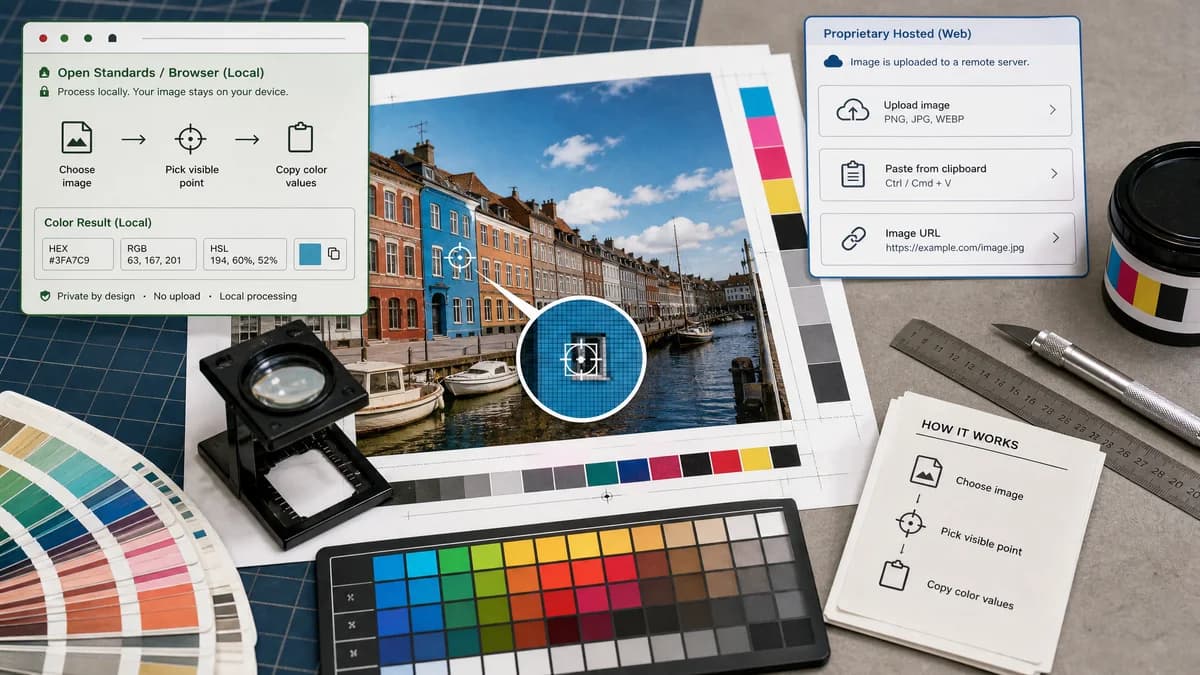
Image Color Picker should provide the same core job users expect from standalone image pickers: choose an image, select a visible point, and copy color values.
What ImageColorPicker.com offers
ImageColorPicker.com lets users upload, paste, or enter a URL, then pick colors from an image and view values such as HEX, RGB, and HSV/HSL-style color data.
Open alternative signals
Source and openness
Image Color PickerBrowser-based and open-standards-driven; public source status is not claimed.
ImageColorPicker.comHosted standalone tool with private implementation details.
Privacy posture
Image Color PickerDesigned for browser-local inspection with no server upload requirement.
ImageColorPicker.comOfficial page also states that processing happens in the browser.
Input scope
Image Color PickerLocal image upload for exact pixel sampling.
ImageColorPicker.comUpload, paste, image URL, and website thumbnail flows.
Output focus
Image Color PickerHEX, RGB, and HSL values for practical copy use.
ImageColorPicker.comHEX, RGB, and HSV/HSL-style color values plus color details.
Decision guide
Use Image Color Picker when you want a TextFaker-native, no-upload color picker with clean web color outputs.
Use ImageColorPicker.com when its existing browser picker, URL input, or color detail pages fit the workflow.
Side-by-side open source alternative comparison
| Decision point | Image Color Picker | ImageColorPicker.com | Takeaway |
|---|---|---|---|
| Alternative fit | Our workflowDirect focused replacement for local color picking. | Proprietary workflowEstablished standalone image color picker. | This is one of the closest comparison pages. |
| Privacy | Our workflowNo-upload design should be explicit. | Proprietary workflowAlso claims browser-side processing. | Differentiate on usability, not privacy alone. |
| Inputs | Our workflowPrioritize safe local files and tap or click sampling. | Proprietary workflowOffers more ways to source an image, including URLs. | URL input is convenient but can complicate the local-only message. |
| Outputs | Our workflowHEX, RGB, HSL, and copy actions. | Proprietary workflowHEX, RGB, and HSV/HSL-style values with detail pages. | Clear format labels matter for developer trust. |
| Ecosystem | Our workflowPart of TextFaker's image and metadata utilities. | Proprietary workflowDedicated color picker site. | TextFaker can appeal to users already using nearby image tools. |
| Migration path | Our workflowUse for recurring local color checks inside TextFaker. | Proprietary workflowKeep for URL-based picking if needed. | Migration depends on input preferences. |
Detailed research
Open-Source Alternative Fit
Image Color Picker can be positioned as an alternative to ImageColorPicker.com for users who want a similarly simple browser workflow inside TextFaker's tool set.
Feature Parity and Limits
Core parity should include image selection, visible point picking, color preview, and copyable HEX, RGB, and HSL values. URL-based sampling should be treated cautiously if the product promise is no upload.
Data, Setup, and Pricing
Because both workflows can claim browser processing, TextFaker should compete on clarity, mobile tap behavior, clean output, and predictable access terms.
Where ImageColorPicker.com Still Wins
It may be preferable when users want its existing URL, paste, website thumbnail, or color detail workflows.
Practical Migration Guidance
Use Image Color Picker for local files and TextFaker-centered work. Keep ImageColorPicker.com for workflows that depend on remote image URLs.
Research notes
- The official page says no data is sent and that processing happens in the browser.
- It supports uploading an image, pasting from the clipboard, entering a picture URL, or using a website URL thumbnail flow.
- This competitor has similar privacy positioning, so TextFaker should differentiate through interface clarity, exact output formats, and TextFaker's broader tool ecosystem.
Official source
The proprietary product link is included once here for source checking after the alternative analysis.
Official ImageColorPicker.com source