
Open Source Alternatives to Pixelmator Pro
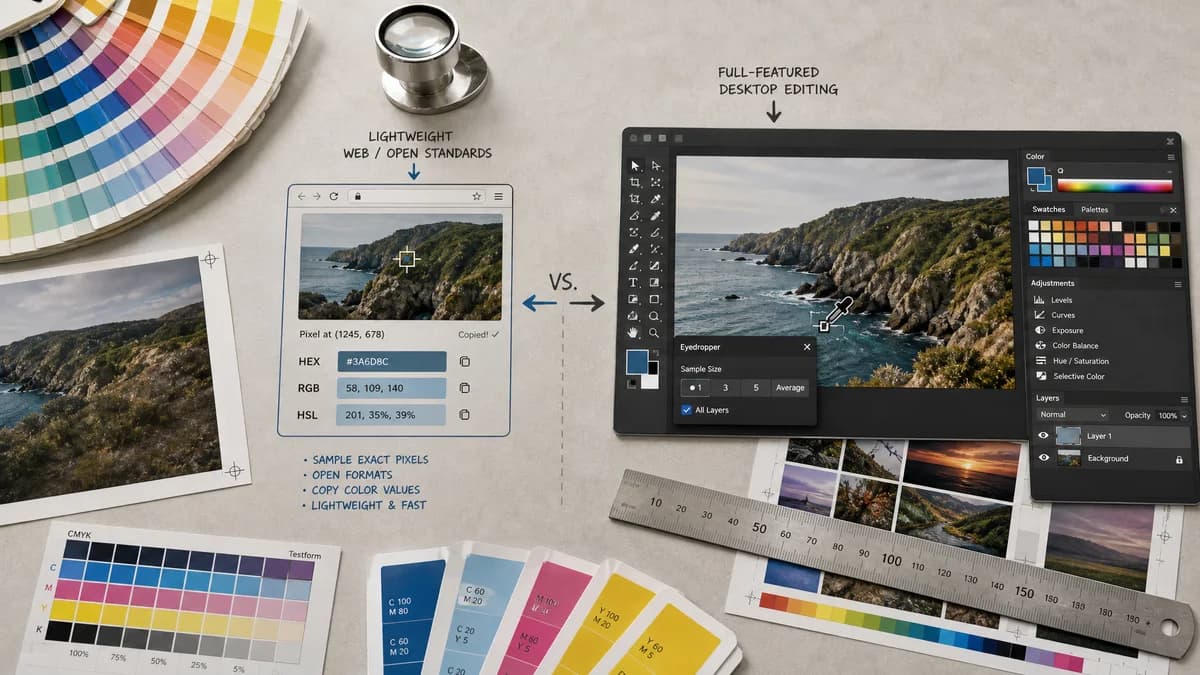
Image Color Picker is a browser-based alternative for users who need this focused result without installing a proprietary desktop app or entering a larger hosted workflow.
This research compares that workflow with Pixelmator Pro while keeping the outbound source link at the bottom after the analysis.
Why Image Color Picker fits
Image Color Picker should offer exact pixel sampling from a local image with copyable HEX, RGB, and HSL values in the browser.
What Pixelmator Pro offers
Pixelmator Pro includes color pickers, an eyedropper for image colors, HEX and RGB fields, sampling size options, palettes, and broader image editing features.
Open alternative signals
Source and openness
Image Color PickerBrowser-based and open-standards-driven; public source status is not claimed.
Pixelmator ProCommercial native app with private implementation details.
Platform
Image Color PickerWorks in a browser across desktop and mobile targets where supported.
Pixelmator ProNative Apple-platform application.
Sampling depth
Image Color PickerExact point sampling with web color values.
Pixelmator ProEyedropper with sample size options, palettes, and editor integration.
Workflow scope
Image Color PickerRead-only color extraction.
Pixelmator ProImage editing, recoloring, palettes, soft proofing, and color management.
Decision guide
Use Image Color Picker when you need quick color values from one image on any modern browser.
Use Pixelmator Pro when color sampling is part of editing, palette management, recoloring, soft proofing, or native Apple-platform image work.
Side-by-side open source alternative comparison
| Decision point | Image Color Picker | Pixelmator Pro | Takeaway |
|---|---|---|---|
| Alternative fit | Our workflowQuick browser color readout. | Proprietary workflowNative image editor with professional color tools. | TextFaker is for lookup; Pixelmator Pro is for editing. |
| Feature parity | Our workflowSelected pixel values in HEX, RGB, and HSL. | Proprietary workflowHEX and RGB fields, palette management, sample sizes, and editing features. | Pixelmator has deeper color workflow controls. |
| Setup | Our workflowNo native app install required. | Proprietary workflowRequires Pixelmator Pro on supported Apple platforms. | Browser access helps users outside the Apple app workflow. |
| Data control | Our workflowDesigned for local browser processing of the selected image. | Proprietary workflowWorks locally inside a native app environment. | Both can avoid web uploads; TextFaker wins on access, not native control. |
| Migration path | Our workflowUse for fast values before CSS, docs, or QA notes. | Proprietary workflowKeep for actual image edits and palette management. | Move only the lookup task. |
| Precision options | Our workflowShould state whether it samples one pixel or averaged areas. | Proprietary workflowOfficial docs list one-pixel and averaged sampling options. | If TextFaker adds average sampling, label it clearly. |
Detailed research
Open-Source Alternative Fit
Image Color Picker is a Pixelmator Pro alternative for the narrow color lookup use case. The honest open alternative story is browser access, open web color formats, and no unnecessary editor dependency.
Feature Parity and Limits
It can match simple color value extraction, but it should not claim parity with Pixelmator Pro's editing tools, palette collections, sample-size controls, or color-managed document workflow unless implemented.
Data, Setup, and Pricing
A browser tool is useful when the user is on a non-Apple device, a shared machine, or only needs a quick value. Since Pixelmator is also local software, the distinction should be access and scope rather than only privacy.
Where Pixelmator Pro Still Wins
Pixelmator Pro is stronger for users who need to edit the image, manage palettes, use sampling averages, soft proof, or work inside native Apple creative workflows.
Practical Migration Guidance
Use Image Color Picker for quick web color values. Use Pixelmator Pro when color sampling is one step in an image editing session.
Research notes
- Pixelmator's official support page documents eyedropper sampling from an image, HEX and RGB values, palette management, and sample sizes such as one pixel, 3 by 3, and 5 by 5 averages.
- Pixelmator Pro is a full editor, so TextFaker should not imply parity with editing, color management, or native document workflows.
- The TextFaker alternative is cross-platform browser access and narrow task focus.
Official source
The proprietary product link is included once here for source checking after the alternative analysis.
Official Pixelmator Pro source