
Image Dimensions Checker vs Fine Art Printing Image Resolution Checker
Image Dimensions Checker is the baseline in this comparison: Check an image's width, height, aspect ratio, megapixels, orientation, MIME type, extension, and file size locally in your browser.
Compare TextFaker Image Dimensions Checker with Fine Art Printing Image Resolution Checker for pixel dimensions, megapixels, file facts, and print PPI context.
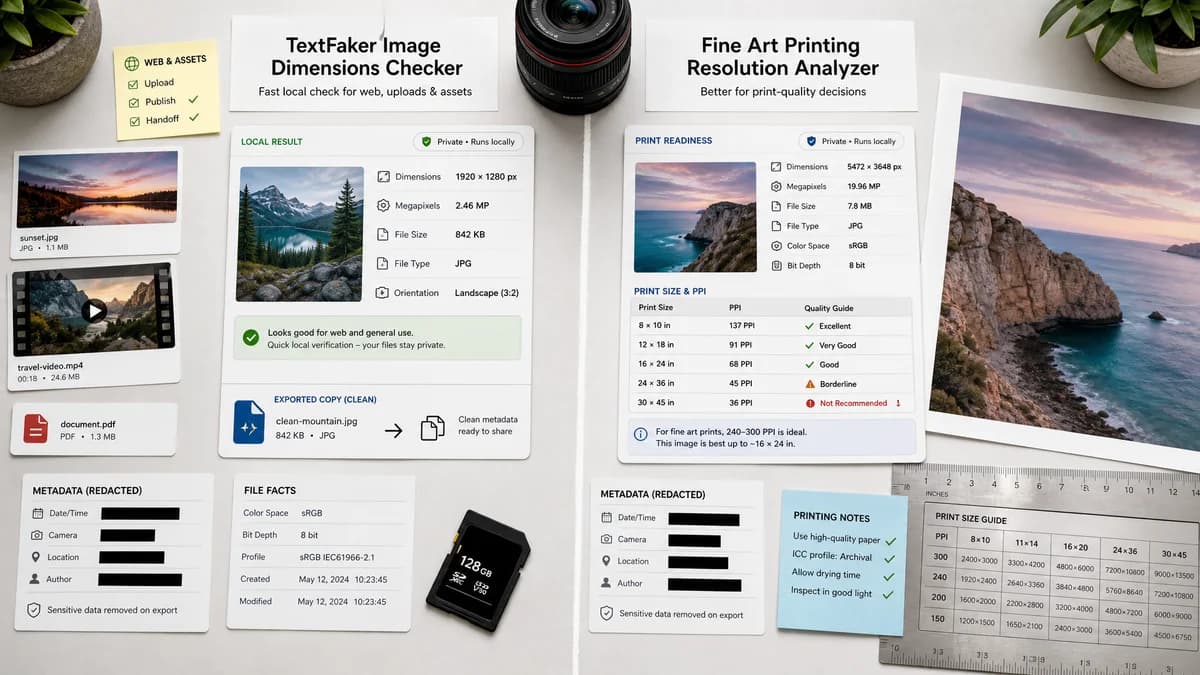
Quick verdict
Fine Art Printing is better suited to print-quality decisions; TextFaker should be better for quick local dimension verification before uploading, publishing, or handing off assets.
How Image Dimensions Checker fits
TextFaker should report image facts for general-purpose web and asset workflows, not calculate print sharpness or physical output quality.
How Fine Art Printing Image Resolution Checker fits
Fine Art Printing provides an image resolution checker that states it runs locally and reports pixel dimensions, megapixels, file size, file type, and print-size PPI context for JPG or PNG files.
Side-by-side comparison
| Decision point | Image Dimensions Checker | Fine Art Printing Image Resolution Checker | Takeaway |
|---|---|---|---|
| Primary use case | Our workflowGeneral image dimension and file facts reader. | Competitor workflowPrint-resolution and sharp-print-size checker. | TextFaker should not compete on print-quality analysis. |
| Pixel dimensions | Our workflowMain green success-card fact. | Competitor workflowThe page reports pixel dimensions. | Both support pixel dimensions, but with different end goals. |
| Megapixels | Our workflowCalculated and shown as a detailed fact. | Competitor workflowThe page reports megapixels. | Megapixels are useful in both web and print contexts. |
| Print PPI | Our workflowOut of scope for this tool; use a DPI/PPI-specific page. | Competitor workflowThe page lets users check print size and PPI context. | TextFaker should keep print analysis separate. |
| Formats | Our workflowDetect supported MIME/extension based on implementation. | Competitor workflowThe page states JPG or PNG up to 100 MB. | TextFaker can support more browser-readable formats if verified. |
| Local handling | Our workflowPlanned no-upload local file analysis. | Competitor workflowThe page states nothing leaves the browser. | Local privacy is parity in this comparison, not a unique claim. |
Use Image Dimensions Checker when
- Web teams checking pixel dimensions
- Editors and designers documenting asset facts
- Users who do not need print PPI analysis
Use Fine Art Printing Image Resolution Checker when
- Photographers checking print sharpness
- Print buyers estimating physical output quality
- Users with JPG or PNG files who need PPI context
Detailed comparison
Adjacent Intent
This is not a pure dimensions finder; it is a print-resolution analyzer. It still competes for users who start by asking whether an image is large enough.
Boundary
TextFaker should not provide physical print recommendations on this page. The dimensions checker can show megapixels, but PPI and print size require a different mental model.
- No print-quality scoring
- No recommended print size
- No DPI inference without metadata
Feature Lessons
Megapixels and file type are valuable facts even outside print. Include them in the detail section under the main dimensions result.
Comparison Angle
The comparison page should help users choose between checking raw file facts and assessing print readiness.
- Choose TextFaker for asset facts
- Choose print analyzer for print quality
Research notes
- Fine Art Printing is an adjacent competitor focused on print resolution rather than generic dimensions.
- Its official page claims local handling, pixel dimensions, megapixels, file size, file type, and PPI context for JPG/PNG. TextFaker should not use local privacy as the main differentiator here. The comparison should separate intrinsic dimensions from print suitability. Generated image idea: two columns, TextFaker facts card and print PPI slider context, without using competitor branding. Do not include competitor URL in body. No file edits. English only. Six rows and four analysis sections included. End note.
- Included because print-resolution checkers often satisfy the same early user need: checking whether an image is large enough.
Official source
The only outbound competitor link on this page is placed here for source checking after the comparison.
Official Fine Art Printing Image Resolution Checker source