
Image Dimensions Checker vs Imagy Image Size Finder
Image Dimensions Checker is the baseline in this comparison: Check an image's width, height, aspect ratio, megapixels, orientation, MIME type, extension, and file size locally in your browser.
Compare TextFaker Image Dimensions Checker with Imagy Image Size Finder for drag-and-drop width, height, and file-size checks.
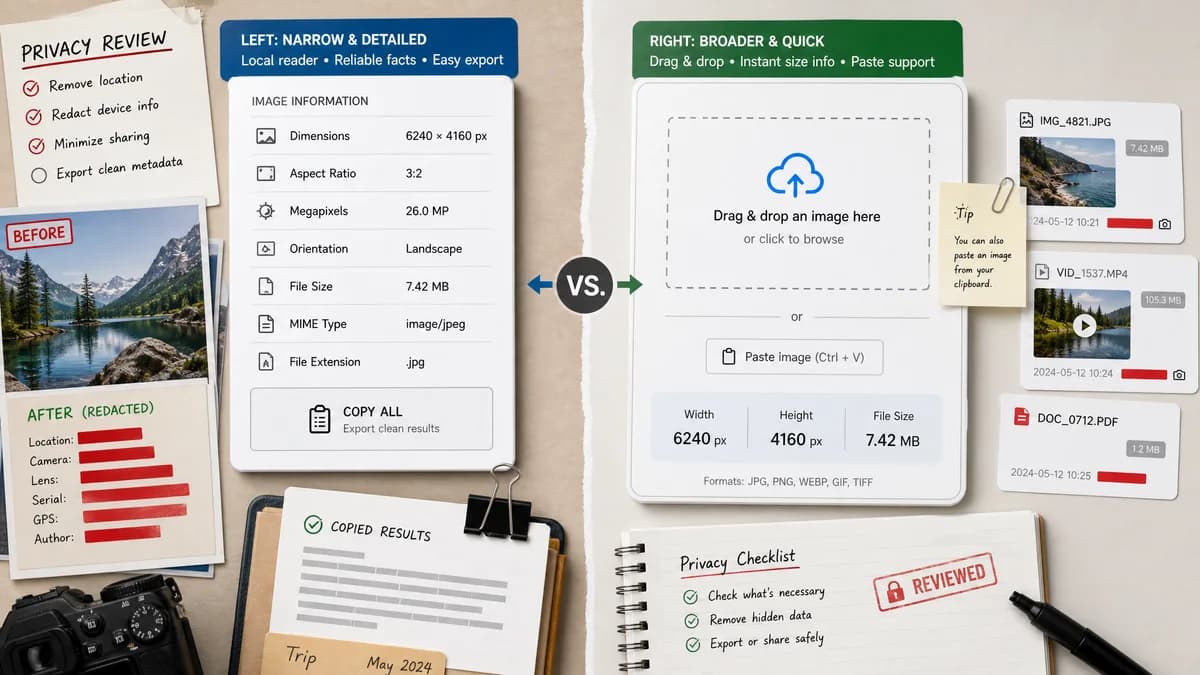
Quick verdict
Imagy covers the quick dimensions-and-size use case well; TextFaker should go deeper on calculated facts and reliable copy output while staying equally simple.
How Image Dimensions Checker fits
TextFaker should provide a narrow local reader with dimensions, ratio, megapixels, orientation, file size, MIME, extension, and one copy-all action.
How Imagy Image Size Finder fits
Imagy presents an Image Size Finder where users can drag an image into the page to display width, height in pixels, and file size, with paste support described on the page.
Side-by-side comparison
| Decision point | Image Dimensions Checker | Imagy Image Size Finder | Takeaway |
|---|---|---|---|
| Input method | Our workflowReuse existing upload and drop-zone patterns for one selected image. | Competitor workflowThe page describes drag-and-drop, file selection, and paste input. | TextFaker should match expected image input ergonomics. |
| Main facts | Our workflowWidth by height as the success-card headline. | Competitor workflowWidth, height, and file size are the core public claims. | TextFaker should add ratio and orientation without cluttering the headline. |
| Calculated facts | Our workflowAspect ratio reduction and megapixel calculation are planned and tested. | Competitor workflowThe sourced page focuses on size and dimensions in its summary. | Calculated facts can differentiate TextFaker. |
| Copy output | Our workflowOne copy-all icon button should copy a complete facts summary. | Competitor workflowThe researched page does not foreground a single copy-all action in the summary. | TextFaker should serve documentation and QA workflows. |
| Unsupported files | Our workflowUnsupported or empty files should never render the success state. | Competitor workflowThe researched page advertises broad image-format acceptance. | TextFaker should be explicit about actual decode success instead of overpromising. |
| SEO intent | Our workflowDedicated page for checking image pixel dimensions without uploading. | Competitor workflowDedicated page for finding image width, height, and file size. | The comparison should emphasize TextFaker's broader fact sheet and local handling. |
Use Image Dimensions Checker when
- Users who need aspect ratio and megapixels in addition to width and height
- People copying facts into tickets, audits, or CMS fields
- Privacy-conscious users who want local-only language on the page
Use Imagy Image Size Finder when
- Users who want a straightforward drag-and-drop dimensions display
- Users who paste images into an online utility
- Users already using Imagy for image tasks
Detailed comparison
Search Intent
This comparison targets users who need a quick dimensions finder, not an editor. TextFaker should use nearly identical task language but make the result richer.
Input UX
Paste, drag, and browse are expected for image utilities. If TextFaker already has upload and drop-zone patterns, reuse them for consistency across image tools.
- One selected image
- Drop-zone reuse
- No conversion controls
Result Design
The green success card should answer the main question immediately. Details below can carry less urgent facts such as MIME, extension, byte size, total pixels, and megapixels.
Test Scope
Tests should be centered on pure functions for formatting and facts generation, with UI tests confirming success and no-success states.
- Supported MIME and extension detection
- Dimension formatting
- Copy text
Research notes
- Imagy is a direct dimensions-and-file-size competitor with a clean drag-and-drop positioning.
- The official page claims width, height, file size, all image formats, and paste input. Treat broad format claims carefully because TextFaker implementation should be tied to browser decode capability. Generated comparison image: split view of a dropped image and a compact result card. TextFaker should not add converter options here. The best differentiators are ratio, megapixels, orientation, MIME, extension, and copy-all. The competitor URL is only in the competitorUrl field. Body copy avoids URL strings. The comparison remains neutral. Tests should cover no-success for text files and zero-byte files. File size formatting should be deterministic. Orientation should be computed from width and height. Megapixels should be width times height divided by one million. Ratio should use greatest common divisor reduction. Use ASCII x if repo conventions prefer it; otherwise use a multiplication sign consistently. Do not infer Imagy privacy details beyond the official page. TextFaker should explicitly say the image is not uploaded. This page is comparison 3. Category is dimensions and file size. Competitor type is online image utility. Four analysis sections provided. Six rows provided. Research completed with official source. End note.
- Imagy was selected because its page names almost the same user task: finding image width, height, and file size.
Official source
The only outbound competitor link on this page is placed here for source checking after the comparison.
Official Imagy Image Size Finder source