
Image Dimensions Checker vs KnowledgeWalls Image Size Finder
Image Dimensions Checker is the baseline in this comparison: Check an image's width, height, aspect ratio, megapixels, orientation, MIME type, extension, and file size locally in your browser.
Compare TextFaker Image Dimensions Checker with KnowledgeWalls Image Size Finder for pixel dimensions, file size, DPI, and unit-conversion style results.
Quick verdict
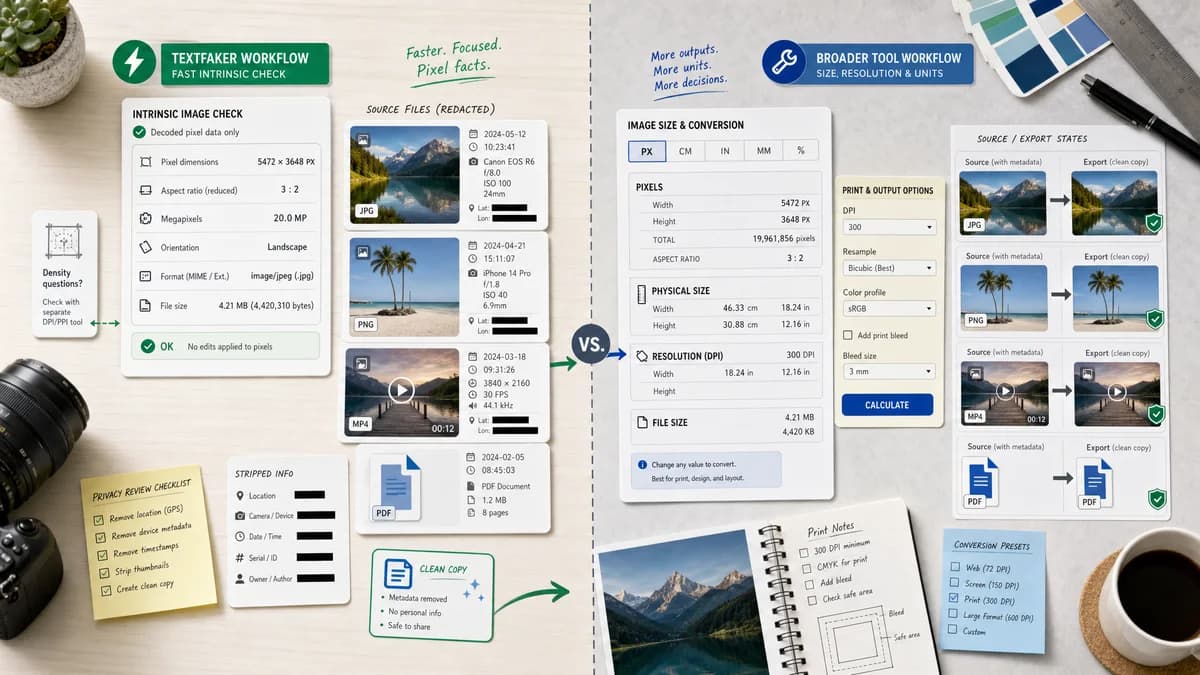
KnowledgeWalls may suit users who want physical-unit and DPI-style outputs; TextFaker should serve faster intrinsic-pixel checks and refer density questions to a dedicated DPI/PPI tool.
How Image Dimensions Checker fits
TextFaker should avoid print-unit complexity and focus on decoded pixel facts, reduced aspect ratio, megapixels, orientation, MIME/extension, and file size.
How KnowledgeWalls Image Size Finder fits
KnowledgeWalls describes an Image Size Finder that generates JPG, GIF, BMP, and PNG height and width in pixels, centimeters, inches, DPI resolution, and file size in KB or MB.
Side-by-side comparison
| Decision point | Image Dimensions Checker | KnowledgeWalls Image Size Finder | Takeaway |
|---|---|---|---|
| Pixel focus | Our workflowPixel dimensions are the primary answer. | Competitor workflowThe page includes pixel dimensions among other unit outputs. | TextFaker should be simpler for pixel-first intent. |
| Physical units | Our workflowNot core to this tool; route density questions elsewhere. | Competitor workflowThe page advertises centimeter and inch sizes. | Avoid scope creep into print-size calculators. |
| DPI | Our workflowNot a primary output unless sourced from file facts later. | Competitor workflowThe page advertises DPI resolution output. | TextFaker should link to DPI/PPI Metadata Checker. |
| File size | Our workflowDetailed file facts include byte, KB, or MB formatting as implemented. | Competitor workflowThe page mentions KB and MB file-size output. | File-size unit formatting should be tested. |
| Format list | Our workflowMIME/extension detection for supported image files. | Competitor workflowThe page names JPG, GIF, BMP, and PNG. | TextFaker should use real support checks, not only listed extensions. |
| Output hierarchy | Our workflowDimensions first, then facts below. | Competitor workflowThe competitor presents multiple unit and resolution fields. | TextFaker should be easier to scan when only pixel facts are needed. |
Use Image Dimensions Checker when
- Users checking intrinsic pixel dimensions
- Users who do not need centimeter or inch conversions
- Users who want a compact local result card
Use KnowledgeWalls Image Size Finder when
- Users who want dimensions in pixels plus centimeters or inches
- Users looking for DPI resolution context
- Users working with JPG, GIF, BMP, or PNG files
Detailed comparison
Scope Guard
Physical-unit conversion requires DPI assumptions or metadata. TextFaker should not mix that into a generic dimensions checker because it can confuse users who only need pixel dimensions.
Related Tools
Use internal links to handle print-density and metadata use cases instead of expanding this page.
- DPI/PPI Metadata Checker
- EXIF Viewer
- Image Format Converter
Result Facts
The facts list should stay compact and objective. If a fact is not available from the selected file or decoded image, it should not be invented.
Testing
This comparison highlights tests for file-size formatting and format recognition because KnowledgeWalls exposes file size and format-related expectations.
- KB and MB thresholds
- Known image extensions
- Unsupported text files
Research notes
- KnowledgeWalls is included because it covers pixel, physical unit, DPI, and file-size outputs.
- TextFaker should stay narrower. This is important because users often confuse dimensions, DPI, and print size. The comparison can position TextFaker as a pixel facts checker and point density needs to a dedicated tool. Generated image idea: pixel dimensions success card with a small note-style row saying DPI is handled separately. Do not overclaim competitor privacy or implementation details. Official URL only in competitorUrl. English only. No Markdown. Six rows and four analysis sections present. End note.
- The official page mentions JPG, GIF, BMP, PNG, pixels, centimeters, inches, DPI, KB, and MB, making it useful for scope-boundary research.
Official source
The only outbound competitor link on this page is placed here for source checking after the comparison.
Official KnowledgeWalls Image Size Finder source