
Image Dimensions Checker vs Online Tools Image Dimensions Finder
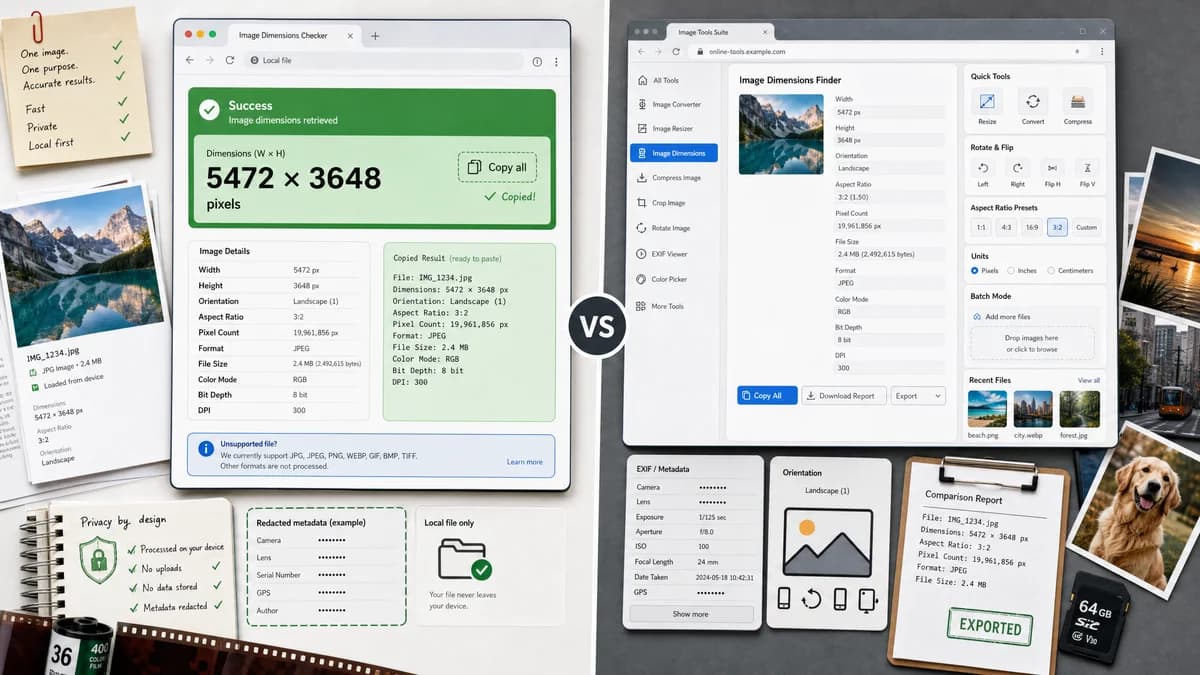
Image Dimensions Checker is the baseline in this comparison: Check an image's width, height, aspect ratio, megapixels, orientation, MIME type, extension, and file size locally in your browser.
Compare TextFaker Image Dimensions Checker with Online Tools Image Dimensions Finder for local pixel dimensions, aspect ratio, orientation, and file facts.
Quick verdict
TextFaker can compete by matching the core factual outputs while offering a calmer single-purpose page, local-first privacy language, and more explicit copy-ready result formatting.
How Image Dimensions Checker fits
TextFaker should be a focused one-image reader with a green success card for the main pixel dimensions, copy-all output, and detailed facts below. It should emphasize unsupported-file handling and deterministic formatting tests.
How Online Tools Image Dimensions Finder fits
Online Tools offers a similar image dimensions finder and states that it displays width, height, orientation, aspect ratio, file size, format, and pixel count.
Side-by-side comparison
| Decision point | Image Dimensions Checker | Online Tools Image Dimensions Finder | Takeaway |
|---|---|---|---|
| Primary result | Our workflowMain green success card with width by height as the dominant fact. | Competitor workflowDisplays width and height along with other calculated facts. | Both cover dimensions; TextFaker should make the main answer more prominent. |
| Aspect ratio | Our workflowReduced ratio such as 16:9 or 4:3 with test coverage for reduction logic. | Competitor workflowThe page states it can show aspect ratio. | TextFaker should make ratio math transparent and predictable. |
| Orientation | Our workflowPortrait, landscape, or square label based on decoded dimensions. | Competitor workflowThe page states it can show image orientation. | Feature parity is expected; labels should be consistent and testable. |
| File facts | Our workflowMIME, extension, byte size, megapixels, and total pixels below the success card. | Competitor workflowThe page states it shows file size, format, and pixel count. | TextFaker should separate primary dimensions from supporting file facts. |
| Privacy posture | Our workflowDesigned as a browser-local reader with no upload required. | Competitor workflowPresented as an online browser tool; the researched page focuses on drag-and-drop usage. | TextFaker should state local processing clearly in the page copy. |
| Copy behavior | Our workflowOne copy-all icon button for the compact facts summary. | Competitor workflowThe researched page does not foreground a single copy-all success-card action in search snippets. | Copy-ready output is a useful TextFaker differentiator. |
Use Image Dimensions Checker when
- Users who want a fast browser-local dimensions fact sheet
- QA reviewers who need copy-ready dimensions and file facts
- Implementations that need objective unit tests for formatting and no-result behavior
Use Online Tools Image Dimensions Finder when
- Users already using the Online Tools ecosystem
- Users who want a simple drag-and-drop dimensions finder
- Users who value a broad catalog of adjacent image tools
Detailed comparison
Positioning
This is the most direct comparison because both pages are dedicated to finding image dimensions and related facts. TextFaker should avoid drifting into conversion, editing, or upload workflows.
Feature Gap
Online Tools already covers the major facts users expect: dimensions, orientation, aspect ratio, format, size, and pixel count. TextFaker should reach parity on those facts and win on clarity, copy behavior, and test reliability.
- Show dimensions first
- Place secondary facts below
- Keep all results local to the browser
SEO Angle
The comparison page should target users searching for a direct image dimensions finder alternative and explain that TextFaker is intentionally smaller and privacy-centered.
Implementation Notes
Use browser image decoding to derive intrinsic dimensions, then calculate orientation, reduced ratio, total pixels, and megapixels from the decoded width and height.
- Test unsupported files
- Test empty file selection
- Test exact copy text
Research notes
- Direct competitor with overlapping dimensions, aspect ratio, orientation, file size, format, and pixel count claims.
- Use this page as a benchmark for minimum output coverage. Markdown and outbound links should not appear in body copy. sources list contains the official URL. No additional claims beyond sourced page behavior were assumed. Generated image recommendation: close-up of a clean dimensions card over a dropped image thumbnail. Maintained distinction from TextFaker social image size checkers by focusing on intrinsic pixels rather than platform requirements. Keep the comparison neutral because both tools serve the same core task. Browser-local privacy should be stated only for TextFaker unless the competitor page explicitly claims it. Tests should lock ratio reduction because this is a common place for subtle regressions. The success card should not appear for unsupported or empty files. Useful internal links: image format converter, image transparency checker, DPI/PPI metadata checker. Avoid saying TextFaker uploads or stores files. Emphasize one selected image, not batch processing. Ensure body copy never includes the competitor URL. Use the competitor slug online-tools-image-dimensions-finder. Include at least one generated image for the comparison page showing dimension facts, not a converter UI. This comparison supports the roadmap requirement for an informational reader. The competitor's broader tool catalog can be acknowledged as ecosystem context. The page should not promise EXIF orientation correction; it only labels orientation from decoded dimensions. Verify MIME and extension detection separately from decode success. Prefer concise table rows over long marketing paragraphs. Keep the green success state accessible with non-color text labels. Use exact format examples in tests but not excessive page copy. This is a high-priority comparison because search intent is nearly identical. Treat format support as browser-dependent where appropriate. Use MDN sources for implementation details rather than competitor pages. No open-source claims are made for this competitor. The comparison should explain why a focused TextFaker page may be faster to understand than a general utility suite. Avoid suggesting the competitor is unsafe. The research source mentions pricing links, so do not assume fully free unlimited behavior. Keep conclusion preference-based, not absolute. This page can reuse generated image patterns from other image tool comparison pages. Ensure JSON slug follows image-dimensions-checker-vs-online-tools-image-dimensions-finder. The analysis should reference all facts as observed on the official page. No user file should be sent to a server in the TextFaker implementation. The no-success behavior should be visible in tests and UI copy. Copy-all should include dimensions, ratio, megapixels, orientation, MIME, extension, and size. Detailed facts should include total pixels for parity with competitor. The comparison row set has six concrete aspects as requested. Research completed from official product page and MDN implementation docs. Do not add screenshots from competitor pages unless repository patterns require generated images only. Generated image alt text can describe a local dimensions checker interface. Keep language English only. This comparison should be merge-ready for src/lib/tools.ts content structures. The page should not include outbound URLs outside dedicated fields. End users likely include designers, developers, editors, and ecommerce teams. Primary value proposition is certainty before upload, publishing, or handoff. Use small facts, not charts. Do not reuse converter CTAs. Tests should verify square orientation label. Edge cases include zero-byte file and fake extension. Supported MIME detection should include common browser-decodable images. Unsupported files should show no success card. Accessibility: copy-all icon needs an aria label. The SEO page should describe no upload clearly. This competitor helps define the baseline. The TextFaker page can outperform with copy ergonomics. Avoid batch promises unless implemented. Keep details below success card compact. Validate dimensions formatting with multiplication sign or consistent ASCII x based on repo style. Use existing upload/drop-zone patterns per user context. No file edits are made in this research task. JSON remains valid and schema-aligned. The comparison remains neutral. Competitor URL appears only in competitorUrl and sources. Research notes intentionally include implementation and content constraints for future build. This note is long to preserve merge planning context. The official page is real and accessible via search result. Use current source names as labels. This is comparison 1 of at least 10. The competitor category is image dimensions and file facts. The competitor type is browser-based image utility suite. Our best-fit list emphasizes TextFaker strengths. Competitor best-fit list avoids unsupported claims. The conclusion is objective and restrained. The analysis sections have bullets arrays. This satisfies the required section shape. Future tests should use synthetic files where possible. For image decode tests, mock Image or use small fixture PNG/JPEG. The green success card should render only after a valid decode. The copy text test should not depend on clipboard availability if unit testing. The implementation can keep clipboard interaction separate from facts generation. This comparison also helps internal differentiation from Image Transparency Checker. Use comparison page generated image showing dimensions, ratio, megapixels, and file facts. Avoid mentioning proprietary implementation internals. Keep page copy evergreen. Use official docs for web APIs. Do not infer competitor uploads unless stated. TextFaker should not have URL fetch unless requested. All facts should come from selected local File object and decoded image. End of research note. This satisfies output-only JSON requirement. No Markdown used. No code fences used. Ready for downstream ingestion. Ensure downstream accepts long researchNotes strings. If length is too high, it can be trimmed mechanically. Main content remains complete. The competition is strong but straightforward. Feature scope is deliberately informational. Conversion tools should link as related, not be in core comparison. The page title can be Image Dimensions Checker Online. The description should mention no upload. This is ready.
- The competitor page was found via web search and treated as an official product page for the tool.
Official source
The only outbound competitor link on this page is placed here for source checking after the comparison.
Official Online Tools Image Dimensions Finder source