
Image Dimensions Checker vs PosterBurner Image Size Finder
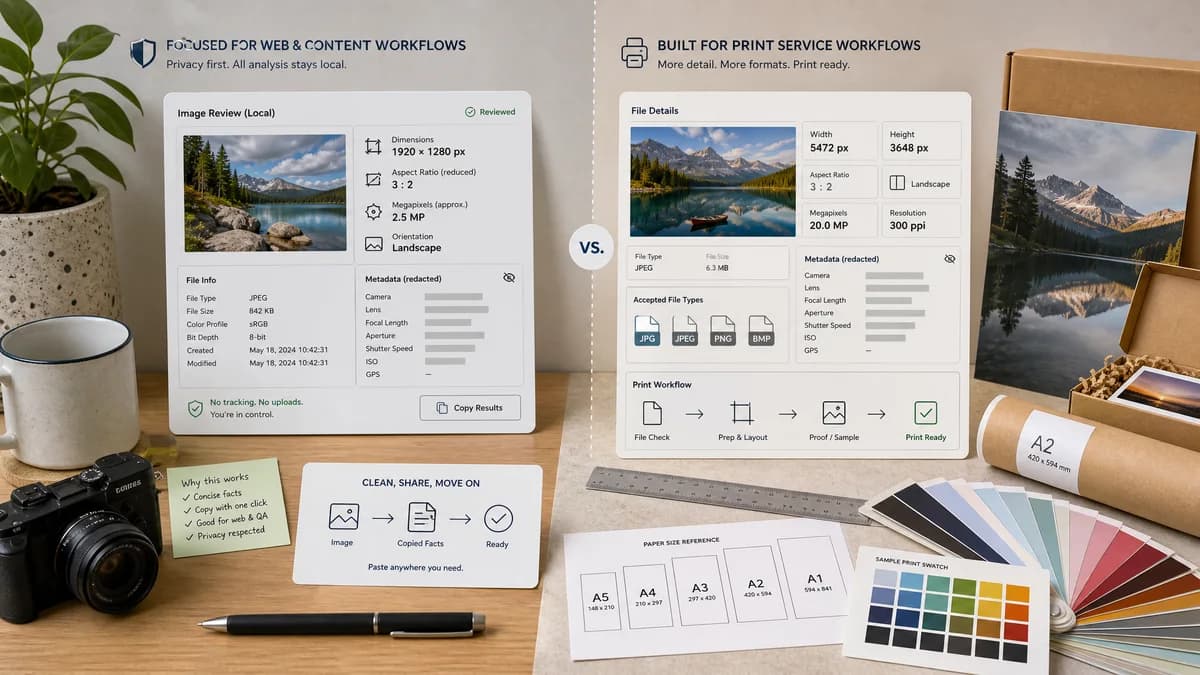
Image Dimensions Checker is the baseline in this comparison: Check an image's width, height, aspect ratio, megapixels, orientation, MIME type, extension, and file size locally in your browser.
Compare TextFaker Image Dimensions Checker with PosterBurner Image Size Finder for reading height, width, and file facts before printing or sharing.
Quick verdict
PosterBurner is useful for print-oriented users, while TextFaker should be better for general web, QA, and content workflows that need concise local facts and copyable results.
How Image Dimensions Checker fits
TextFaker should focus on pixel dimensions, reduced aspect ratio, megapixels, orientation, and basic file facts without moving the user into a print purchase flow.
How PosterBurner Image Size Finder fits
PosterBurner provides a free image size finder that shows image height and width in pixels and describes accepted file types such as JPG, JPEG, PNG, and BMP.
Side-by-side comparison
| Decision point | Image Dimensions Checker | PosterBurner Image Size Finder | Takeaway |
|---|---|---|---|
| Workflow intent | Our workflowGeneral-purpose image facts reader for browser-local checking. | Competitor workflowDimension finder connected to a poster-printing service context. | TextFaker should feel neutral for web and design QA. |
| Supported facts | Our workflowDimensions, aspect ratio, megapixels, orientation, MIME, extension, and file size. | Competitor workflowThe page states it shows height, width, and pixels per inch. | TextFaker should include broader non-print facts. |
| Accepted formats | Our workflowPlanned MIME and extension detection for supported browser-decodable images. | Competitor workflowThe researched page lists JPG, JPEG, PNG, and BMP. | TextFaker should make support and unsupported states explicit. |
| Result emphasis | Our workflowSuccess card highlights dimensions first. | Competitor workflowThe page provides height and width copy fields. | Both can be quick, but TextFaker should include all facts in one copy action. |
| No-upload claim | Our workflowPlanned browser-local processing without uploading selected images. | Competitor workflowThe researched page does not need to be described beyond its official feature claims. | TextFaker privacy positioning should be clearer. |
| Testing | Our workflowDimension formatting, ratio reduction, megapixels, orientation, and no-success behavior should be covered. | Competitor workflowNo public test behavior is part of the product page. | TextFaker implementation quality can be framed through reliable outputs. |
Use Image Dimensions Checker when
- Developers checking asset dimensions before upload
- Designers validating exact pixel dimensions
- Users who want dimensions without a print-service context
Use PosterBurner Image Size Finder when
- Users preparing images for poster printing
- Users with common JPG, PNG, or BMP files
- Mobile users who need a quick height and width check
Detailed comparison
Audience Fit
PosterBurner fits users who are already thinking about posters or print sizing. TextFaker should address a wider set of asset checks, including website images, thumbnails, documentation screenshots, and handoff files.
Fact Coverage
PosterBurner's visible promise is height, width, and pixel-per-inch context. TextFaker should include aspect ratio and megapixels because those are commonly needed for editorial and technical workflows.
- Pixel dimensions
- Reduced aspect ratio
- Megapixels
- Orientation label
UX Direction
Use a compact facts-first layout. Avoid large promotional sections in the tool surface because the task is a quick verification, not an exploratory editing workflow.
Risk Notes
Do not imply TextFaker validates print quality or physical print size. That belongs to DPI/PPI or print-resolution tools, not this dimensions checker.
- Keep DPI separate unless file metadata is shown as a file fact
- Link to DPI/PPI Metadata Checker for density-specific questions
Research notes
- PosterBurner is a useful adjacent competitor because its official page focuses on image size finding in a print service context.
- The official source lists core dimensions and common file types, giving a concrete comparison baseline. TextFaker should avoid print-purchase positioning and stay utility-first. The comparison can mention pixels and PPI only from the competitor source. TextFaker should not claim to calculate real print quality unless using separate DPI metadata logic. Generated image idea: a simple dimensions success card beside a poster crop guide, with TextFaker side emphasizing facts only. This page helps distinguish dimension checking from printing services. Avoid competitor URL in body copy. Keep competitor summary neutral. TextFaker best-for should emphasize web QA and local privacy. The competitor best-for should emphasize print preparation. Include no claims about server handling for PosterBurner. Test cases should include BMP support only if actual implementation supports browser decode for BMP in target browsers. Existing roadmap says reuse image decode patterns, so support should be based on actual browser-readable formats. Verify empty file input does not display the green card. Copy-all result should not include unavailable DPI unless implemented. Aspect ratio reduction should handle 3000 by 2000 as 3:2. Megapixels should be rounded predictably. Orientation labels should be exact strings. The comparison page should link internally to DPI/PPI Metadata Checker for PPI needs. Use official source facts only. No file edits. English only. Schema fields populated. This is a real official URL. The competitor type reflects print service utility. Category reflects dimensions for printing and posters. Analysis sections include required bullets arrays. The comparison rows are concrete. The conclusion is balanced. This supports the requirement for at least 10 comparison pages. End note.
- PosterBurner was included because many users search for image dimensions before print ordering, even though TextFaker should not become a print-quality analyzer.
Official source
The only outbound competitor link on this page is placed here for source checking after the comparison.
Official PosterBurner Image Size Finder source