
Image Format Converter vs CloudConvert
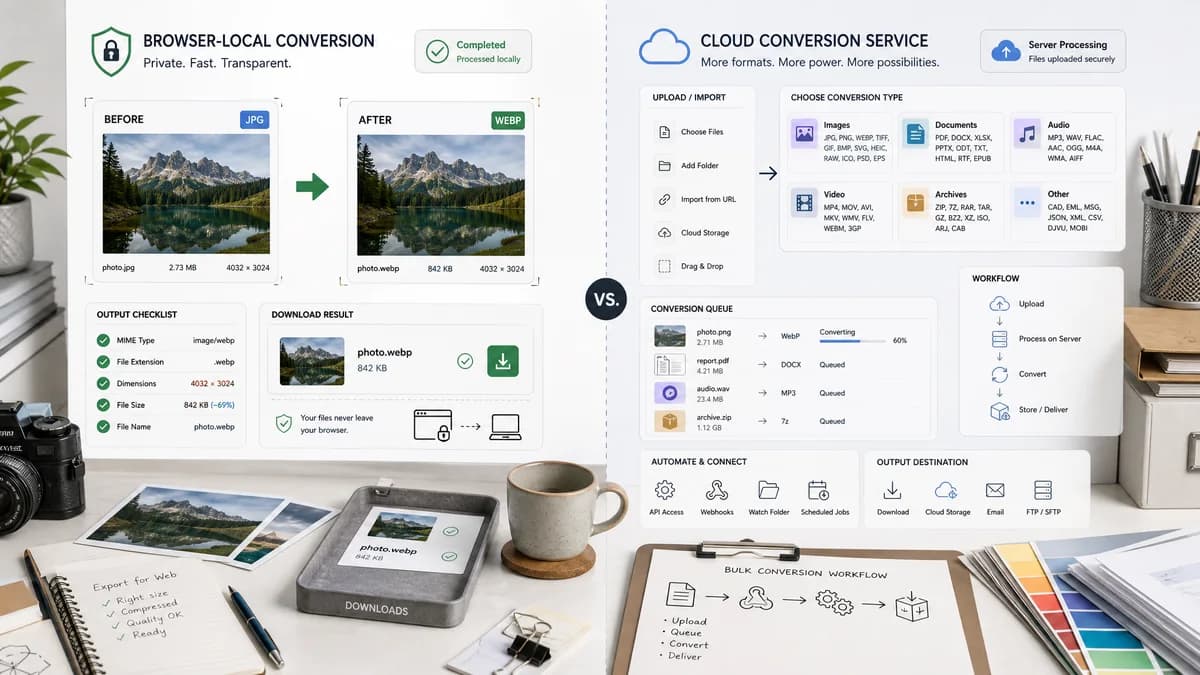
Image Format Converter is the baseline in this comparison: Convert images between common web formats in your browser and confirm the output MIME type, extension, dimensions, file size, and generated filename before download.
CloudConvert is a broad hosted file converter for images, documents, audio, video, archives, and other formats.
Quick verdict
Use TextFaker when privacy, local execution, and transparent validation matter more than maximum format breadth. Use CloudConvert when server-side conversion breadth and API workflows are the priority.
How Image Format Converter fits
TextFaker Image Format Converter focuses on browser-local image conversion with deterministic checks after Blob generation, including output MIME, extension, dimensions, size, and filename.
How CloudConvert fits
CloudConvert is better suited to users who need many file categories, uncommon formats, cloud imports, and conversion automation through a hosted service.
Side-by-side comparison
| Decision point | Image Format Converter | CloudConvert | Takeaway |
|---|---|---|---|
| Processing location | Our workflowRuns locally in the browser when using browser-decodable inputs and supported encoders. | Competitor workflowRuns conversion through a hosted cloud service. | TextFaker has the stronger privacy story; CloudConvert has broader backend capabilities. |
| Format breadth | Our workflowCan start with browser-supported image outputs and feature-detect each encoder. | Competitor workflowAdvertises broad file-format conversion across many categories. | CloudConvert wins on breadth; TextFaker wins on predictable local scope. |
| Validation model | Our workflowCan make validation a visible product feature: MIME, extension, dimensions, size, filename, and Blob success. | Competitor workflowReturns converted files but does not center deterministic browser-local validation as the main workflow. | TextFaker can differentiate through audit-friendly conversion results. |
| Privacy posture | Our workflowNo upload needed for supported conversions. | Competitor workflowRequires files to be sent to the service for conversion. | TextFaker is better for private drafts, client images, and location-sensitive photos. |
| Automation | Our workflowPrimarily an interactive browser tool, with reusable core for future TextFaker pages. | Competitor workflowOffers a hosted conversion platform suited to API and workflow integrations. | CloudConvert is stronger for backend automation. |
| Output naming | Our workflowCan use deterministic filenames based on original basename and selected format. | Competitor workflowDownload naming is service-controlled and workflow-dependent. | TextFaker makes file naming more transparent for repeatable tests. |
Use Image Format Converter when
- Converting personal or sensitive images without upload
- Simple JPG, PNG, WebP, and AVIF browser-supported output flows
- Deterministic browser test coverage for output MIME, extension, dimensions, size, filename, and Blob creation
- Reusable local conversion UI patterns for later TextFaker image tools
Use CloudConvert when
- Users needing many non-image file categories
- Teams needing hosted conversion automation
- Cloud-source file imports and server-side processing
- Rare or complex conversion types outside browser encoders
Detailed comparison
Positioning
CloudConvert is a general-purpose hosted conversion platform. TextFaker does not try to match its full format matrix; the sharper angle is private, inspectable browser conversion for common image outputs.
Implementation Implications
The TextFaker core exposes conversion capability detection, quality options where supported, Blob generation, and output verification as reusable primitives.
- Detect encoder support instead of assuming JPG or WebP.
- Treat a PNG fallback as a failed target-format conversion when the user asked for another MIME.
- Keep dimensions unchanged unless a resize option is explicitly introduced.
SEO Angle
The comparison emphasizes local conversion, no upload for supported images, and deterministic output checks rather than broad enterprise conversion.
Risks
Browser encoders vary. The page can explain unsupported target formats through capability checks without promising formats that the current browser cannot create.
Research notes
- Official CloudConvert material positions it as a broad hosted converter, not a browser-local image-only tool.
- MDN confirms canvas Blob export can fall back to PNG if an unsupported MIME is requested, so TextFaker must verify actual Blob type.
- CloudConvert is a real competitor for users searching generic image format conversion, even though its value proposition is broader than image-only conversion.
Official source
The only outbound competitor link on this page is placed here for source checking after the comparison.
Official CloudConvert source