
Image Format Converter vs iLoveIMG Convert to JPG
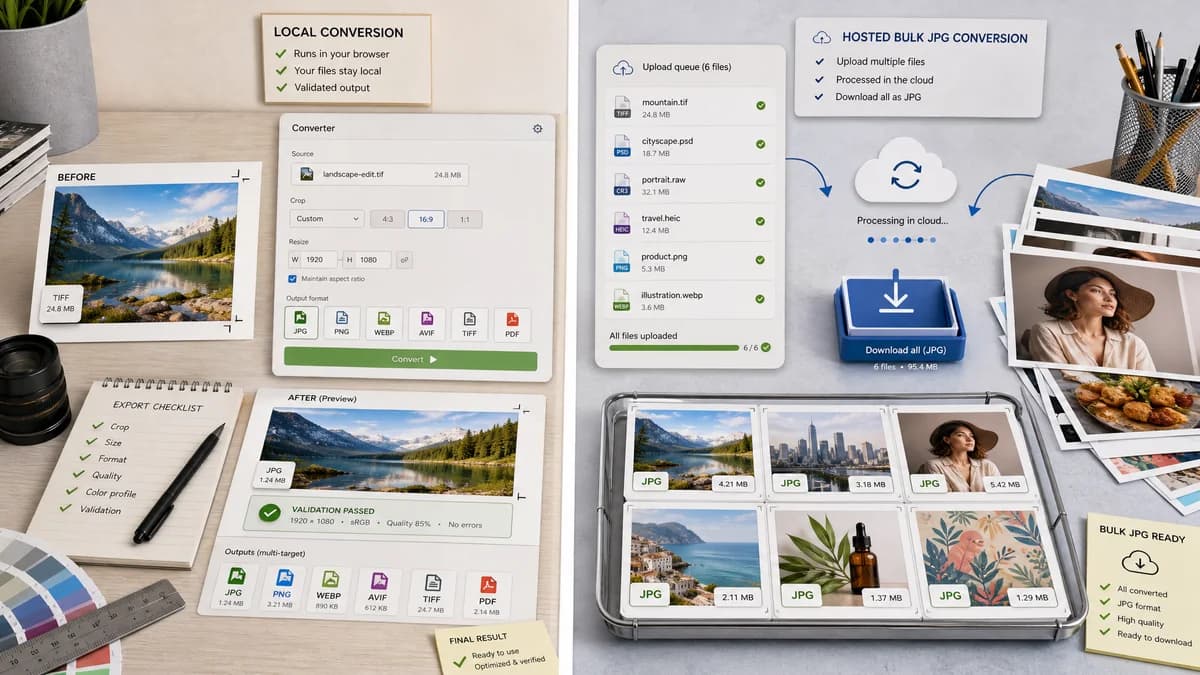
Image Format Converter is the baseline in this comparison: Convert images between common web formats in your browser and confirm the output MIME type, extension, dimensions, file size, and generated filename before download.
iLoveIMG Convert to JPG turns several image formats into JPG and supports bulk online conversion.
Quick verdict
Use TextFaker for local, validated common-format conversion; use iLoveIMG when the job is specifically hosted bulk conversion to JPG from its supported input list.
How Image Format Converter fits
TextFaker Image Format Converter can be multi-target within browser-supported outputs and can validate the generated file rather than only providing a converted download.
How iLoveIMG Convert to JPG fits
iLoveIMG is stronger for users who specifically need bulk conversion to JPG through an online hosted tool.
Side-by-side comparison
| Decision point | Image Format Converter | iLoveIMG Convert to JPG | Takeaway |
|---|---|---|---|
| Target formats | Our workflowCan support multiple browser-detected targets such as PNG, JPG, and WebP where available. | Competitor workflowOfficial Convert to JPG tool focuses on JPG output. | TextFaker is broader within browser-supported targets. |
| Bulk workflow | Our workflowMay start with one file but uses reusable patterns that can later support batch conversion. | Competitor workflowOfficial page emphasizes converting many images to JPG at once. | iLoveIMG is stronger for immediate JPG bulk conversion. |
| Privacy | Our workflowLocal processing for supported conversions. | Competitor workflowHosted online processing. | TextFaker is better for sensitive files. |
| Validation | Our workflowMakes output MIME, extension, dimensions, byte size, and filename visible. | Competitor workflowFocuses on conversion options and download. | TextFaker is more QA-oriented. |
| Input formats | Our workflowLimited to what the browser can decode unless local codecs are added. | Competitor workflowLists several inputs including formats beyond standard browser decoding. | iLoveIMG may handle inputs TextFaker does not initially promise. |
| Quality choices | Our workflowCan expose quality only when the selected encoder supports it and report output size. | Competitor workflowOffers recommended and premium quality choices for its hosted JPG conversion flow. | TextFaker can make quality behavior explicit and measurable. |
Use Image Format Converter when
- No-upload conversion for supported files
- Multi-target common image conversion
- Output validation and deterministic naming
- Technical users checking dimensions and MIME after conversion
Use iLoveIMG Convert to JPG when
- Bulk conversion specifically to JPG
- Users with inputs listed by the hosted tool
- People who also need adjacent image editing utilities
- Hosted workflows using cloud storage integrations
Detailed comparison
Use Case Split
iLoveIMG is strong for JPG-specific batch work. TextFaker can be a general common-format converter with local validation.
First-Version Scope
A single-file first version is acceptable if the conversion core is batch-ready and the UI pattern does not block future multi-file support.
- Represent conversion results as an array internally even for one file.
- Use deterministic names per input file.
- Keep error handling per file.
Validation Requirements
JPG output can be verified as image/jpeg, with a .jpg or .jpeg naming policy chosen consistently.
Limitations
Inputs such as RAW or PSD can be excluded from TextFaker unless a proven local decoder is implemented.
Research notes
- iLoveIMG's official Convert to JPG page lists PNG, GIF, TIF, PSD, SVG, WebP, HEIC, and RAW as inputs for hosted JPG conversion.
- This makes it a strong search competitor but not a direct privacy-local equivalent.
- TextFaker can choose a deterministic .jpg extension for JPG output and test it.
Official source
The only outbound competitor link on this page is placed here for source checking after the comparison.
Official iLoveIMG Convert to JPG source