
Image Format Converter vs XnConvert
Image Format Converter is the baseline in this comparison: Convert images between common web formats in your browser and confirm the output MIME type, extension, dimensions, file size, and generated filename before download.
XnConvert is a cross-platform desktop batch image converter with broad input/output support and many image operations.
Quick verdict
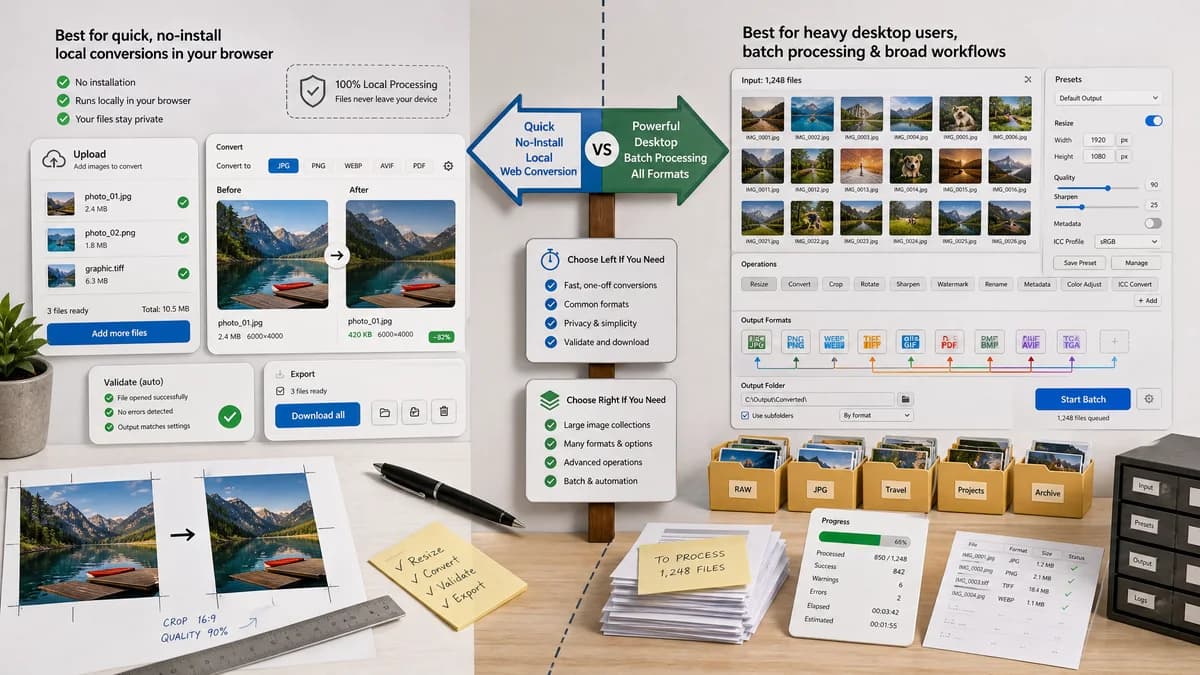
TextFaker is better for quick no-install local web conversion; XnConvert is better for heavy desktop batch processing and broad format workflows.
How Image Format Converter fits
TextFaker provides no-install browser-local conversion for common formats, with objective output validation and a reusable web UI pattern.
How XnConvert fits
XnConvert is better for desktop users who need bulk conversion, presets, many formats, and processing operations across large image collections.
Side-by-side comparison
| Decision point | Image Format Converter | XnConvert | Takeaway |
|---|---|---|---|
| Installation | Our workflowNo install; runs in the browser. | Competitor workflowDesktop application install for Windows, macOS, or Linux. | TextFaker is easier for quick access; XnConvert is stronger for dedicated workflows. |
| Batch power | Our workflowCan be designed for future batch support but starts with reliable conversion primitives. | Competitor workflowOfficially positioned as a batch converter with many operations. | XnConvert wins for large batches. |
| Format support | Our workflowLimited by browser decoding and encoding unless local codecs are bundled. | Competitor workflowOfficial page claims compatibility with hundreds of formats and export to many formats. | XnConvert is much broader. |
| Privacy | Our workflowLocal browser processing for supported files. | Competitor workflowLocal desktop processing. | Both can avoid hosted upload; TextFaker avoids installation. |
| Validation | Our workflowShows output MIME, extension, dimensions, size, filename, and Blob success. | Competitor workflowDesktop conversion focuses on operations and output files rather than web-style validation reporting. | TextFaker is more transparent for single-file QA. |
| Reusable web core | Our workflowBuilt to power later TextFaker converter pages. | Competitor workflowA standalone desktop product. | TextFaker's implementation can optimize for maintainability across the site. |
Use Image Format Converter when
- Quick conversion on a device with a modern browser
- Users who do not want to install desktop software
- Single-file or lightweight local workflows
- Deterministic output checks in a web page
Use XnConvert when
- Large batch conversion jobs
- Desktop preset workflows
- Many image operations beyond conversion
- Very broad image format support
Detailed comparison
Adjacent Category
XnConvert is not a hosted web tool, but it is a real competitor for people who search for image format conversion and batch processing.
TextFaker Angle
TextFaker can be the lightweight no-install option, not the full desktop batch replacement.
- Keep copy honest about browser memory limits.
- Consider batch later after the core is proven.
- Use per-file validation objects to make batch expansion easy.
Privacy Comparison
Both tools can process locally. The distinction is browser convenience versus installed desktop power.
Scope Guard
Do not compete with XnConvert's operation count. Keep the first TextFaker page centered on format conversion and verified output.
Research notes
- XnConvert's official page describes a free cross-platform batch image converter with broad format compatibility and many operations.
- It is a strong adjacent option for users who need batch processing more than a browser utility.
- TextFaker can still compete for quick no-install local conversion.
Official source
The only outbound competitor link on this page is placed here for source checking after the comparison.
Official XnConvert source