
Open Source Alternatives to Adobe Express
Image Format Converter is a browser-based alternative for users who need this focused result without installing a proprietary desktop app or entering a larger hosted workflow.
This research compares that workflow with Adobe Express while keeping the outbound source link at the bottom after the analysis.
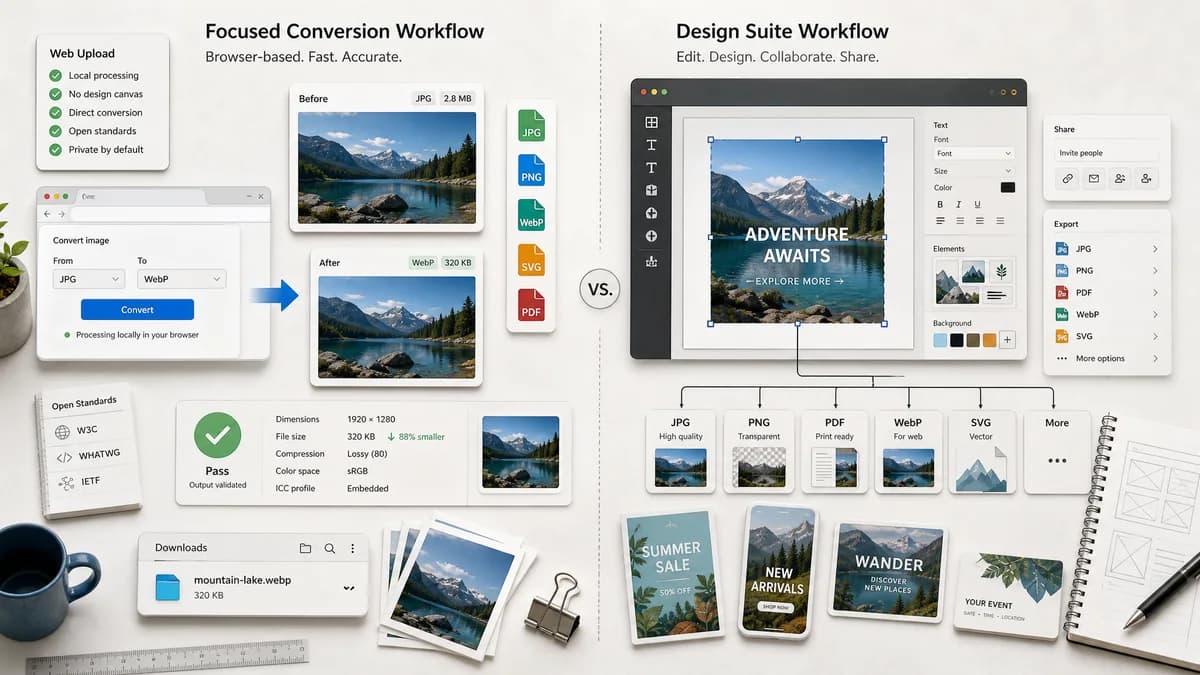
Why Image Format Converter fits
Image Format Converter can provide direct file-in, file-out conversion with measurable output validation and no design-canvas workflow.
What Adobe Express offers
Adobe Express offers online image conversion alongside editing, sharing, and design features, with conversion paths for JPG, PNG, PDF, WebP-related flows, and SVG options.
Open alternative signals
Workflow shape
Image Format ConverterDirect conversion task
Adobe ExpressConversion plus design editor workflow
Processing promise
Image Format ConverterBrowser-local for supported conversions
Adobe ExpressAdobe web app upload workflow
Output certainty
Image Format ConverterExplicit technical output report
Adobe ExpressDownload and continue editing flow
Best user
Image Format ConverterDeveloper, content editor, or designer needing file format output
Adobe ExpressCreator already working inside Adobe Express
Decision guide
Users who want a converted file with explicit MIME, extension, dimensions, byte size, and deterministic filename checks.
Users who want to keep editing the image in a broader Adobe design environment after conversion.
Side-by-side open source alternative comparison
| Decision point | Image Format Converter | Adobe Express | Takeaway |
|---|---|---|---|
| Product scope | Our workflowSingle-purpose image format conversion. | Proprietary workflowCreative design app with conversion tools. | A focused tool can be faster for users who only need a file. |
| Validation | Our workflowReport generated file properties objectively. | Proprietary workflowEmphasizes conversion and continued editing. | TextFaker can make the technical result central. |
| Format messaging | Our workflowSeparate raster conversion from vectorization or PDF workflows. | Proprietary workflowIncludes conversion paths such as JPG, PNG, PDF, WebP, and SVG actions. | Avoid blurring SVG vector conversion with raster format export. |
| UI | Our workflowUploader, target format picker, quality/matte settings, output card. | Proprietary workflowDesign-app upload and editing interface. | Keep the first screen task-oriented. |
| Local privacy | Our workflowSupported files need not leave the browser. | Proprietary workflowOfficial page describes uploading to Adobe Express. | This matters for personal or internal images. |
| Reuse | Our workflowConversion components can become a family pattern. | Proprietary workflowAdobe Express is a broad product suite. | Build modular TextFaker controls. |
Detailed research
Positioning
The Adobe Express comparison can focus on users who do not need templates, edits, or brand design tools. They need a correct output file.
- Use direct conversion language.
- Avoid competing with Adobe's editor features.
- Highlight transparent output metadata.
Implementation Notes
Since Adobe mentions several output paths, TextFaker can be precise about which outputs are generated through the browser encoder and which are not supported.
- Keep SVG conversion out unless implemented as a real raster-to-vector or SVG export feature.
- Treat PDF output as separate unless specifically implemented.
- Use JPG matte handling for alpha sources.
Test Strategy
Tests can confirm output properties rather than visual similarity because encoder quality can vary between browsers.
- Do not use subjective visual validation.
- Verify extension, MIME, dimensions, byte count, and Blob presence.
- Test transparent PNG to JPG flattening with a known matte.
Content Notes
Use Adobe Express as the design-suite comparison. This gives the TextFaker page a clear alternative role: focused, local, measurable conversion.
- Mention that design editing is not the goal.
- Name the tool as browser-based, not open source.
- Include a when-to-use-both style comparison.
Research notes
- Adobe Express is proprietary software and part of a larger design ecosystem.
- Official pages describe upload, conversion, download, and continued editing in Adobe Express.
- TextFaker can differentiate on single-purpose conversion and local validation rather than design features.
Official source
The proprietary product link is included once here for source checking after the alternative analysis.
Official Adobe Express source