
Open Source Alternatives to CloudConvert
Image Format Converter is a browser-based alternative for users who need this focused result without installing a proprietary desktop app or entering a larger hosted workflow.
This research compares that workflow with CloudConvert while keeping the outbound source link at the bottom after the analysis.
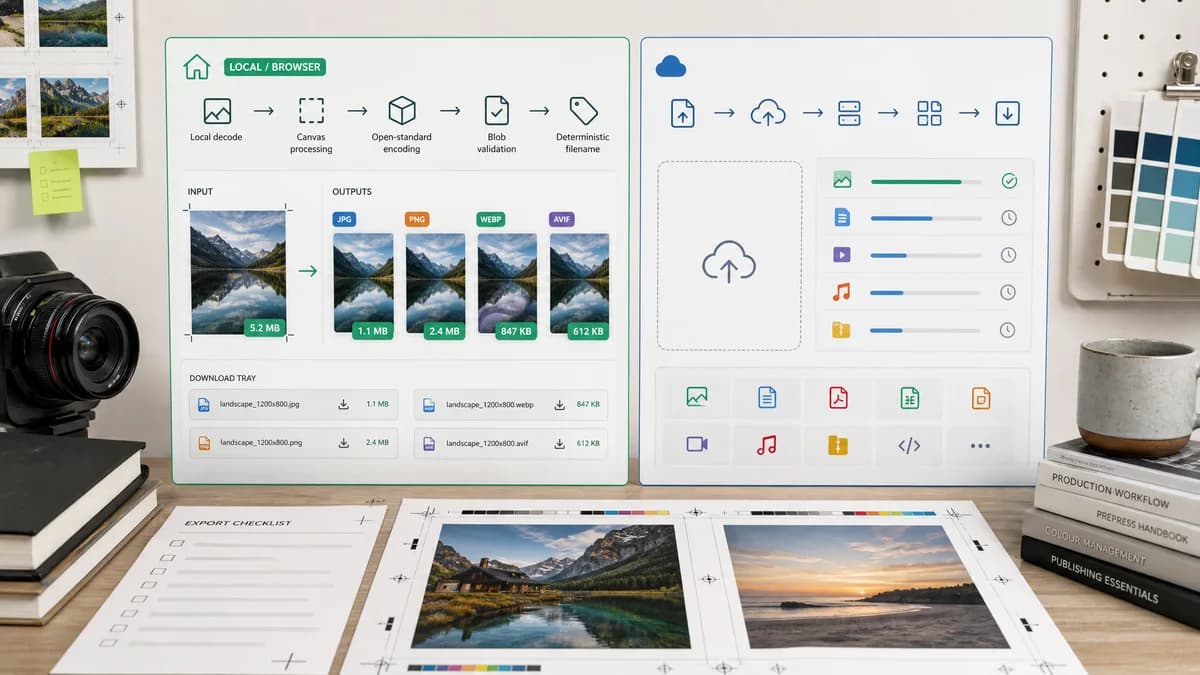
Why Image Format Converter fits
Image Format Converter can focus on local decode, canvas or open-standard encoding, Blob validation, deterministic filenames, and downloadable outputs for common browser-supported formats.
What CloudConvert offers
CloudConvert is a broad cloud file conversion service covering images, documents, videos, audio, archives, and many other format families.
Open alternative signals
Processing model
Image Format ConverterBrowser-local conversion for supported formats
CloudConvertCloud conversion service
Validation style
Image Format ConverterBlob MIME, extension, dimensions, size, and filename checks
CloudConvertDownload result after cloud job completion
Scope
Image Format ConverterReusable image conversion core for TextFaker image tools
CloudConvertGeneral-purpose file conversion platform
Account/API fit
Image Format ConverterBest for one-off local browser use
CloudConvertStronger for API and high-volume automation
Decision guide
Fast private conversions of browser-decodable images to common outputs such as PNG, JPG, and WebP with objective output checks.
Wide file-type coverage, API workflows, and conversions that need formats outside normal browser encoding support.
Side-by-side open source alternative comparison
| Decision point | Image Format Converter | CloudConvert | Takeaway |
|---|---|---|---|
| Privacy posture | Our workflowFiles can remain in the browser for supported conversions. | Proprietary workflowFiles are submitted to a cloud conversion platform. | Lead with local processing for personal photos, screenshots, and quick asset handoff. |
| Format breadth | Our workflowConstrain support to formats the browser and bundled open-source codecs can decode and encode reliably. | Proprietary workflowSupports many more file families and conversion pairs. | Avoid overpromising; make supported input and output formats explicit. |
| Testing | Our workflowAutomated tests can verify Blob creation, MIME, extension, dimensions, byte size, and filename. | Proprietary workflowExternal service behavior is validated by successful job and download. | TextFaker makes conversion behavior easier to regression test. |
| Reuse | Our workflowCore can be reusable by future JPG, PNG, WebP, AVIF, and compression-specific pages. | Proprietary workflowCloudConvert exposes a broad platform workflow and API. | Build a shared local conversion foundation before specialized pages. |
| User control | Our workflowExpose quality, matte, preserve dimensions, and deterministic naming where appropriate. | Proprietary workflowProvides conversion settings through a cloud UI and API. | Keep controls compact but transparent. |
| Failure handling | Our workflowReport unsupported decode, unsupported encode, tainted canvas, and Blob generation failures separately. | Proprietary workflowCloud job errors are service-mediated. | Specific local error states are a differentiator. |
Detailed research
Positioning
The strongest comparison angle is not universal format coverage. It is local, predictable conversion for common image work where a user wants a file now and does not need a cloud job queue.
- Say browser-based and open-source-powered, not open source unless the TextFaker code license is public and verified.
- Make supported formats visible before upload.
- Use CloudConvert as the broad-platform comparison, not the direct feature target.
Implementation Notes
The conversion core can normalize file metadata, decode to bitmap or canvas, encode to a selected MIME type, and return a structured result object suitable for later converter pages.
- Validate output MIME and extension together.
- Keep original dimensions unless the user explicitly changes size.
- Generate deterministic names such as original-name.converted.webp.
- Return byte size and dimensions from the generated output, not from assumptions.
SEO Angle
The page can attract users searching for alternatives to cloud converters by emphasizing no-upload conversion for common image formats and objective validation.
- Avoid saying unlimited formats.
- Mention browser-local conversion prominently.
- Use plain comparisons around privacy, output certainty, and workflow speed.
Risks
Some users will expect obscure input formats, RAW decoding, or vector conversion. Those can be routed to future specialized pages or clearly marked unsupported.
- Do not imply SVG vectorization from raster input.
- Avoid subjective image quality claims.
- Document browser differences for AVIF and WebP output support.
Research notes
- CloudConvert is proprietary software delivered as a cloud service, so image files are typically handled through its online conversion workflow.
- Official materials emphasize broad multi-format coverage rather than a narrow browser-local image-only workflow.
- TextFaker does not claim to replace every CloudConvert format; it can emphasize local common image conversion and deterministic validation.
Official source
The proprietary product link is included once here for source checking after the alternative analysis.
Official CloudConvert source