
Open Source Alternatives to FreeConvert
Image Format Converter is a browser-based alternative for users who need this focused result without installing a proprietary desktop app or entering a larger hosted workflow.
This research compares that workflow with FreeConvert while keeping the outbound source link at the bottom after the analysis.
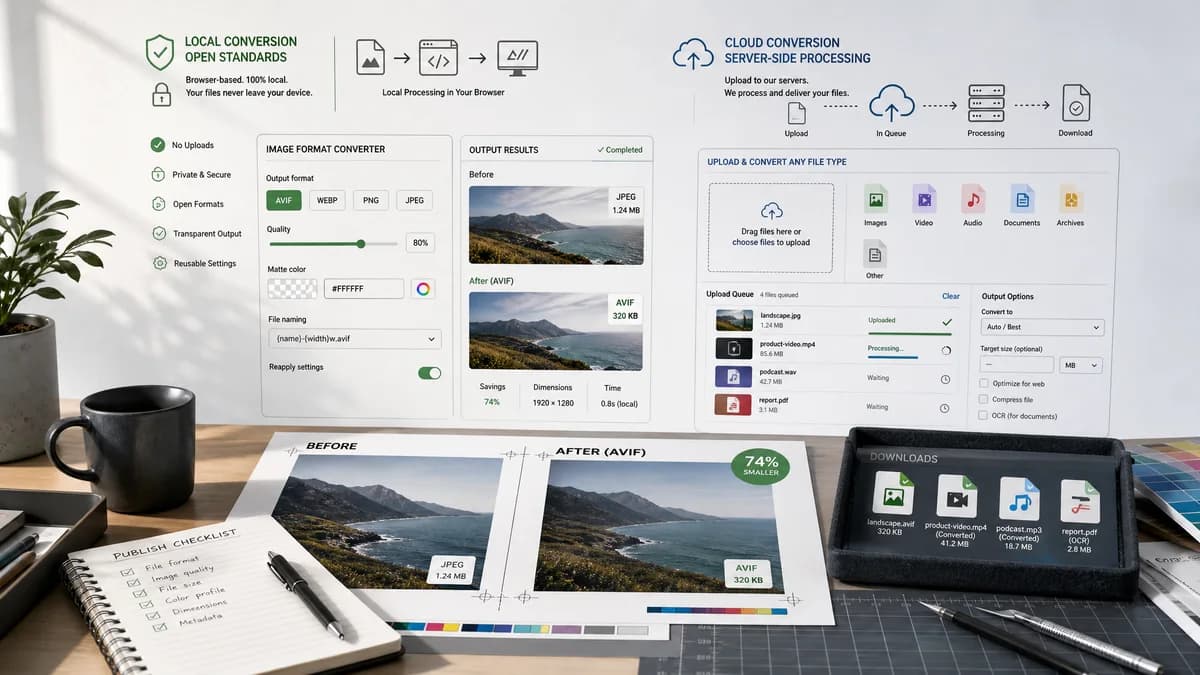
Why Image Format Converter fits
Image Format Converter can offer browser-local conversion, transparent output metrics, and reusable controls for quality, matte color, and naming.
What FreeConvert offers
FreeConvert is an online file converter spanning images, video, audio, documents, and other file types, with security and conversion features described on official pages.
Open alternative signals
Privacy model
Image Format ConverterBrowser-local processing for supported conversions
FreeConvertOnline conversion service
Feature center
Image Format ConverterFormat conversion plus objective output validation
FreeConvertBroad file conversion and compression tools
Output naming
Image Format ConverterDeterministic extension replacement and suffix rules
FreeConvertDownload output from hosted converter
Future reuse
Image Format ConverterShared image conversion core
FreeConvertHosted converter product suite
Decision guide
Private, quick conversions of browser-supported images with deterministic download behavior.
Broader online file conversion and compression workflows with many target categories.
Side-by-side open source alternative comparison
| Decision point | Image Format Converter | FreeConvert | Takeaway |
|---|---|---|---|
| Local processing | Our workflowConvert supported images using browser APIs and open-source-powered code. | Proprietary workflowProvides online conversion through its hosted platform. | Use local processing as the product promise. |
| User trust | Our workflowShow what was generated: type, dimensions, size, filename. | Proprietary workflowUser trusts the downloaded result from the service. | Make verification visible and useful. |
| Output controls | Our workflowOffer compact quality and transparency flattening options when relevant. | Proprietary workflowMay provide broader converter-specific settings. | Keep controls aligned with measurable results. |
| Scope | Our workflowImage-only conversion family foundation. | Proprietary workflowMulti-category converter platform. | A focused tool can be easier to understand and test. |
| Testing | Our workflowUnit-test conversion result objects and output Blob invariants. | Proprietary workflowHosted behavior cannot be tested inside the TextFaker suite. | Local deterministic behavior helps maintain quality. |
| Limits | Our workflowBrowser memory and format support are the practical limits. | Proprietary workflowService-side limits and plan rules may apply. | Explain browser limitations clearly. |
Detailed research
Positioning
The FreeConvert comparison can frame TextFaker as a lean local tool for common image format changes rather than a replacement for a large hosted conversion platform.
- Use privacy and determinism as main differentiators.
- Keep support claims modest.
- Mention measurable output details above subjective quality language.
Implementation Notes
A reusable core exposes capabilities by output MIME and gracefully disable targets that the current browser cannot create.
- Use feature detection for image/webp and image/avif where relevant.
- Flatten alpha before JPG export with a selected matte.
- Preserve dimensions unless resizing is later added intentionally.
Test Strategy
Tests uses small deterministic fixtures so conversion behavior is stable across environments where encoder support exists.
- Check Blob size is greater than zero.
- Check filename extension matches output format.
- Check reported dimensions match expected dimensions.
Content Notes
Avoid saying files are safer than a competitor's service. Say the workflow is local for supported conversions and therefore does not require uploading those files.
- Use neutral competitor descriptions.
- Do not overstate security.
- Explain when a cloud converter may be better.
Research notes
- FreeConvert is proprietary software operating as an online conversion service.
- Official pages frame it as a broad file converter, not only an image tool.
- TextFaker can avoid competing on universal conversion breadth and instead provide a transparent local workflow.
Official source
The proprietary product link is included once here for source checking after the alternative analysis.
Official FreeConvert source