
Open Source Alternatives to iLoveIMG
Image Format Converter is a browser-based alternative for users who need this focused result without installing a proprietary desktop app or entering a larger hosted workflow.
This research compares that workflow with iLoveIMG while keeping the outbound source link at the bottom after the analysis.
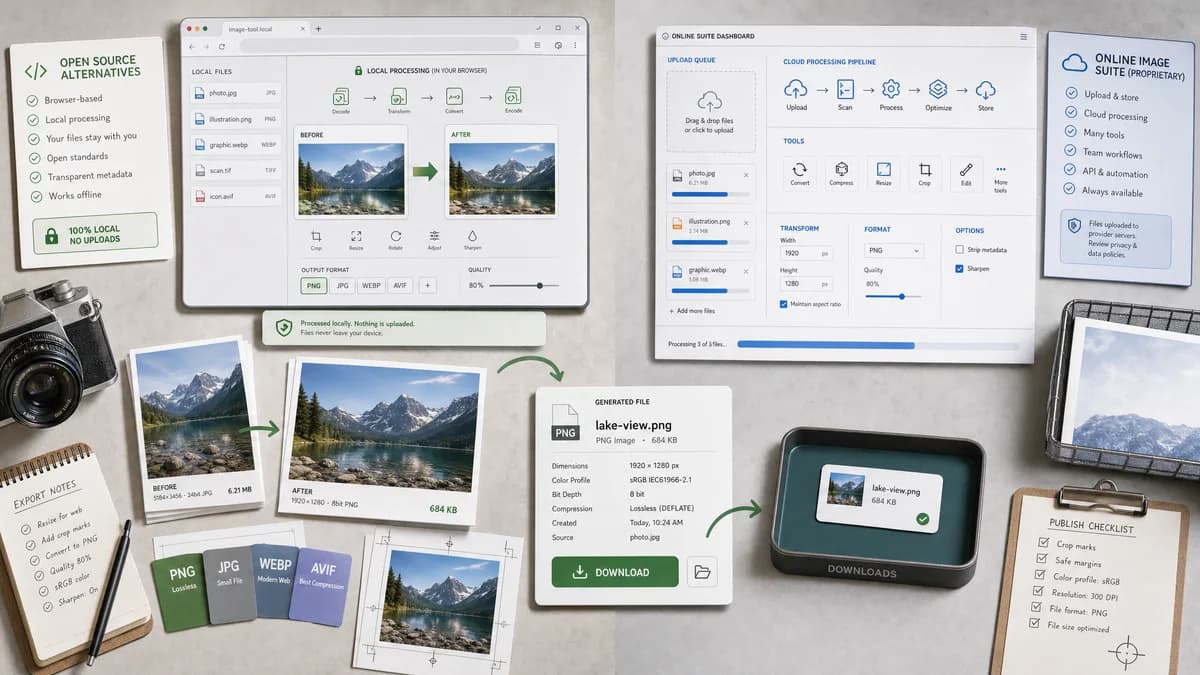
Why Image Format Converter fits
Image Format Converter can convert supported inputs locally and show exactly what file was generated before download.
What iLoveIMG offers
iLoveIMG provides an online image tool suite with conversion, compression, resize, crop, editing, and API-related image workflows.
Open alternative signals
Tool family
Image Format ConverterFirst page in a browser-local conversion family
iLoveIMGHosted image editing and conversion suite
Primary conversion
Image Format ConverterMultiple common output targets where browser support is verified
iLoveIMGProminent convert-to-JPG and convert-from-JPG tools
Privacy
Image Format ConverterLocal for supported conversions
iLoveIMGOnline upload workflow
Validation
Image Format ConverterMIME, extension, dimensions, size, Blob generation
iLoveIMGConverted file download
Decision guide
Local conversion with deterministic output metadata and no subjective quality validation.
Bulk online image workflows, JPG-focused conversion, and access to a broader image tool suite or API.
Side-by-side open source alternative comparison
| Decision point | Image Format Converter | iLoveIMG | Takeaway |
|---|---|---|---|
| Input scope | Our workflowBrowser-decodable and explicitly supported inputs. | Proprietary workflowLists many inputs including PSD, HEIC, RAW, and SVG for JPG conversion. | Do not claim support for advanced formats without real decoder coverage. |
| Output transparency | Our workflowShows technical output facts. | Proprietary workflowFocuses on easy conversion and bulk workflow. | Make result metadata visible to technical users. |
| Conversion objective | Our workflowGeneral image format conversion core. | Proprietary workflowStrong JPG conversion positioning inside an image suite. | TextFaker iscome the neutral base for multiple converter pages. |
| Testing | Our workflowFixture-based local conversion tests. | Proprietary workflowHosted conversion outcome is external. | Local outputs are easier to verify in project tests. |
| User experience | Our workflowDrop image, choose output, convert, download. | Proprietary workflowOnline tool suite with multiple image actions. | Keep UI compact and reusable. |
| Future tools | Our workflowSpecific JPG, PNG, WebP, and alpha-related converters can reuse the same core. | Proprietary workflowiLoveIMG exposes separate image utilities and API offerings. | Design the shared core before expanding pages. |
Detailed research
Positioning
The iLoveIMG comparison can emphasize local conversion and output certainty while acknowledging that an online image suite can be better for broad bulk workflows.
- Mention no-upload for supported conversions.
- Do not overstate RAW, PSD, or SVG support.
- Use objective result metadata as the differentiator.
Implementation Notes
This tool can establish reusable patterns for alpha handling, output quality, and file naming because later pages will likely specialize in JPG and WebP conversions.
- Warn when transparency will be flattened.
- Use selected matte for JPG output.
- Keep output filename rules consistent across the family.
Test Strategy
Tests can validate successful Blob generation and output facts rather than comparing visual previews.
- Use one transparent PNG fixture.
- Use one photographic JPG fixture.
- Assert output extension and MIME are aligned.
Content Notes
Avoid saying TextFaker is an open-source app. The accurate language is browser-based or open-source-powered if the implementation uses open libraries or standards.
- Use neutral competitor descriptions.
- Avoid unsourced privacy criticism.
- Explain browser support limits.
Research notes
- iLoveIMG is proprietary software delivered as an online image suite.
- The official convert-to-JPG page lists PNG, GIF, TIF, PSD, SVG, WebP, HEIC, and RAW inputs for JPG conversion.
- TextFaker can avoid matching broad RAW or PSD claims unless those decoders are implemented.
Official source
The proprietary product link is included once here for source checking after the alternative analysis.
Official iLoveIMG source