
Image Histogram Generator + CSV vs ImageMagick Histogram and Identify
Image Histogram Generator + CSV is the baseline in this comparison: Generate RGB and luminance histograms from an image locally in your browser, then export the 256-bin channel table as CSV.
ImageMagick can report image characteristics, channel statistics, and histogram-related data through command-line tools and APIs.
Quick verdict
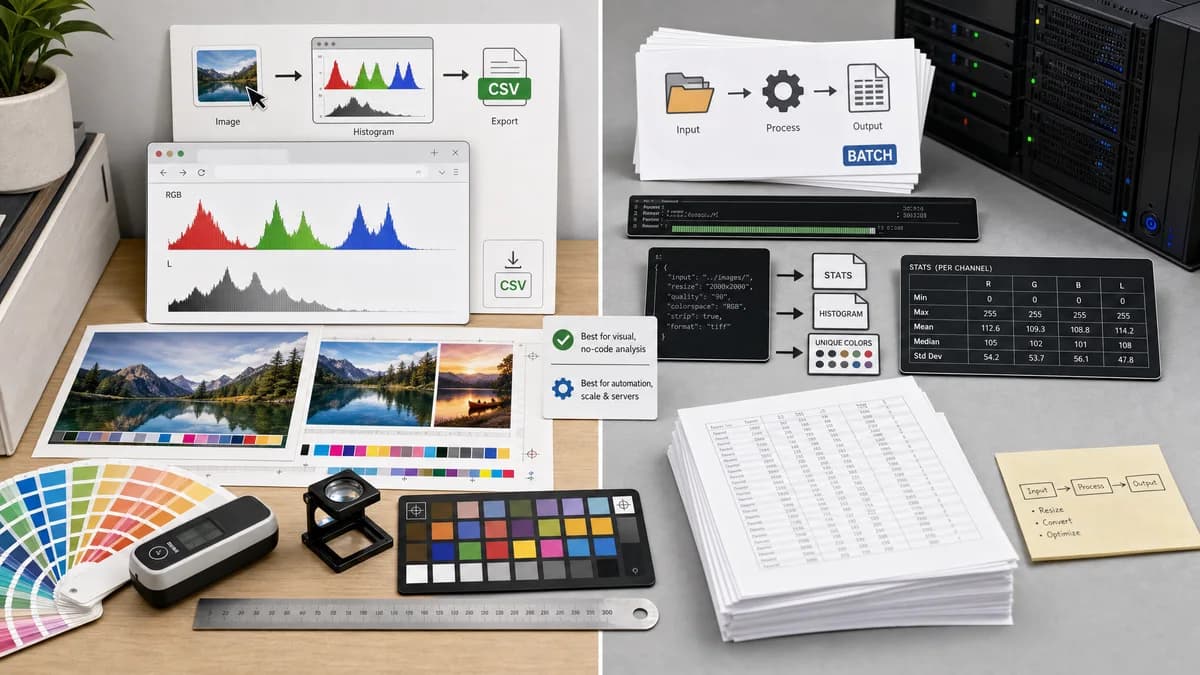
ImageMagick is better for automation and server workflows; TextFaker should be better for visual, no-code histogram analysis and CSV download.
How Image Histogram Generator + CSV fits
TextFaker should provide a no-command browser interface for RGB/luminance visualization and CSV export, serving users who do not want to script ImageMagick output.
How ImageMagick Histogram and Identify fits
ImageMagick is powerful for automated image inspection and processing. Its identify command can output detailed channel statistics, and its API includes histogram functions for unique color distributions.
Side-by-side comparison
| Decision point | Image Histogram Generator + CSV | ImageMagick Histogram and Identify | Takeaway |
|---|---|---|---|
| Interface | Our workflowBrowser upload, visual chart, and CSV button. | Competitor workflowCommand-line tools and programming APIs. | TextFaker is easier for non-technical users. |
| Statistics | Our workflowShould show human-readable stats and export bin counts. | Competitor workflowidentify -verbose reports channel statistics such as min, max, mean, standard deviation, entropy, skewness, and kurtosis. | ImageMagick has deep statistical output. |
| Histogram type | Our workflowPlanned 256-bin RGB/luminance intensity histograms. | Competitor workflowAPI documentation describes unique-color histogram data; examples can also produce color distribution output. | Definitions differ, so TextFaker should clearly define its bins. |
| CSV export | Our workflowPlanned direct CSV file download. | Competitor workflowCan output text suitable for scripting, but CSV generally requires command formatting or post-processing. | TextFaker should be easier for spreadsheet users. |
| Automation | Our workflowManual web workflow unless API support exists separately. | Competitor workflowExcellent for batch scripts and automated pipelines. | ImageMagick wins for automation. |
| Format breadth | Our workflowLimited by browser decoding and implementation choices. | Competitor workflowSupports a very broad range of image formats through ImageMagick libraries. | ImageMagick wins for unusual formats. |
Use Image Histogram Generator + CSV when
- Users who want a chart and CSV without command-line syntax
- Non-developers analyzing one image at a time
- Teams that need a shareable web tool for asset QA
Use ImageMagick Histogram and Identify when
- Developers automating image analysis in scripts
- Server-side image processing pipelines
- Users who need broad format support and command-line control
Detailed comparison
Developer Comparison
This is an adjacent competitor rather than a direct web-tool competitor. It matters because developers may already know how to get image statistics from ImageMagick.
Data Definition
TextFaker should clearly define that its CSV represents intensity bins for RGB and luminance, not necessarily unique-color counts. This avoids confusion with ImageMagick histogram APIs.
Usability Advantage
For users who only need one image analyzed, ImageMagick's power can be overhead. TextFaker can be the faster route from image to chart to spreadsheet.
- No install.
- No terminal.
- No output parsing.
Risk
Power users may expect exact color-management behavior. TextFaker should document browser decoding assumptions and whether embedded profiles are honored by the browser canvas path.
Research notes
- Official ImageMagick identify documentation says identify describes format and characteristics of image files.
- Official documentation shows verbose output with channel statistics including red, green, blue, mean, standard deviation, and entropy.
- Official ImageMagick API documentation says GetImageHistogram returns unique colors in an image.
- ImageMagick is open-source and scriptable, making it a strong automation alternative.
Official source
The only outbound competitor link on this page is placed here for source checking after the comparison.
Official ImageMagick Histogram and Identify source