
Image Histogram Generator + CSV vs OpenCV calcHist
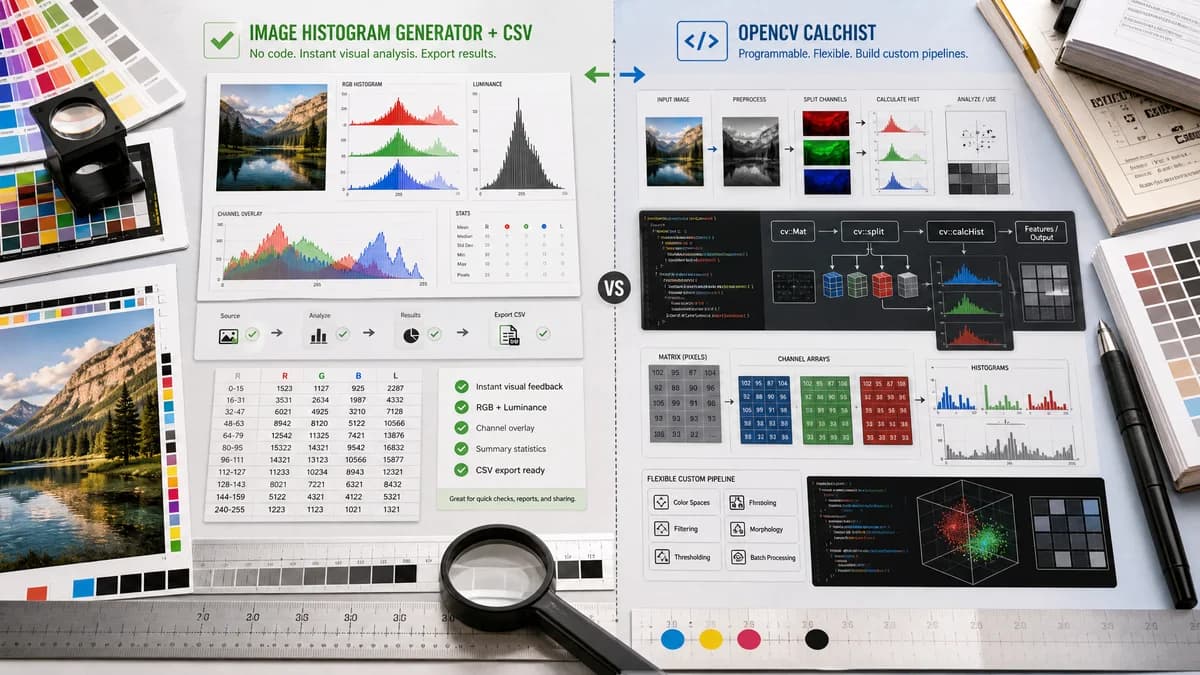
Image Histogram Generator + CSV is the baseline in this comparison: Generate RGB and luminance histograms from an image locally in your browser, then export the 256-bin channel table as CSV.
OpenCV provides calcHist for calculating histograms from image arrays and channels in code.
Quick verdict
OpenCV is better for programmable image processing; TextFaker should be better for immediate visual analysis and export without writing code.
How Image Histogram Generator + CSV fits
TextFaker should package common RGB/luminance histogram needs into a no-code browser tool with CSV export, while OpenCV remains the better choice for custom computer-vision pipelines.
How OpenCV calcHist fits
OpenCV's histogram tutorial shows developers how to split image channels and calculate histograms with cv::calcHist as part of image-processing code.
Side-by-side comparison
| Decision point | Image Histogram Generator + CSV | OpenCV calcHist | Takeaway |
|---|---|---|---|
| User type | Our workflowNon-code and low-code users working in the browser. | Competitor workflowDevelopers working in OpenCV code. | Different audiences, but similar underlying calculation concept. |
| Histogram calculation | Our workflowPrebuilt RGB/luminance calculations with fixed UI choices. | Competitor workflowcalcHist calculates histograms of arrays/images with developer-specified parameters. | OpenCV is more flexible; TextFaker is faster to use. |
| Visualization | Our workflowBuilt-in chart visualization in the web page. | Competitor workflowTutorial demonstrates calculation; plotting requires additional drawing or visualization code. | TextFaker should be easier for visual output. |
| CSV export | Our workflowPlanned direct CSV download. | Competitor workflowDevelopers can write histogram arrays to CSV, but it is not the primary tutorial output. | TextFaker removes boilerplate. |
| Advanced options | Our workflowLikely focused on 256-bin RGB/luminance and practical stats. | Competitor workflowSupports custom bins, ranges, masks, and deeper computer-vision workflows through code. | OpenCV wins for customization. |
| Privacy/locality | Our workflowBrowser-local processing on the user's device. | Competitor workflowLocal or server-side depending on where OpenCV code runs. | Both can be local, but TextFaker should be easier to reason about for web users. |
Use Image Histogram Generator + CSV when
- Users who want histogram data without programming
- Design and QA workflows that need a quick CSV file
- Educational use where a visual output is enough
Use OpenCV calcHist when
- Developers building computer-vision applications
- Users needing custom bins, masks, multidimensional histograms, or pipeline integration
- Teams already using C++, Python, or OpenCV-based tooling
Detailed comparison
Developer Boundary
OpenCV is not a competing web page; it is a library that can build anything from a histogram utility to a full vision pipeline. The comparison should be framed as no-code tool versus coding library.
Implementation Lesson
The TextFaker implementation should follow the same basic idea: split or read channel values, count bins, then render and export the result. The UI should hide that complexity.
CSV Opportunity
A key advantage over OpenCV for casual users is avoiding boilerplate file handling. The CSV export should be immediate and well-labeled.
- Columns: bin, redCount, greenCount, blueCount, luminanceCount.
- Optional percentage columns.
- Metadata summary in the UI, not necessarily in every CSV row.
SEO Angle
Some users search for OpenCV image histogram examples because they only need a result, not a program. TextFaker can capture that intent as an easier alternative.
Research notes
- Official OpenCV tutorial teaches calculating histograms using cv::calcHist.
- The tutorial shows calculating histograms for each one-channel plane after splitting an image.
- OpenCV is an open-source computer-vision library, not a standalone no-code histogram exporter.
- OpenCV is more flexible for custom masks, bins, and code workflows.
Official source
The only outbound competitor link on this page is placed here for source checking after the comparison.
Official OpenCV calcHist source