
Open Source Alternatives to Adobe Lightroom Classic
Image Histogram Generator + CSV is a browser-based alternative for users who need this focused result without installing a proprietary desktop app or entering a larger hosted workflow.
This research compares that workflow with Adobe Lightroom Classic while keeping the outbound source link at the bottom after the analysis.
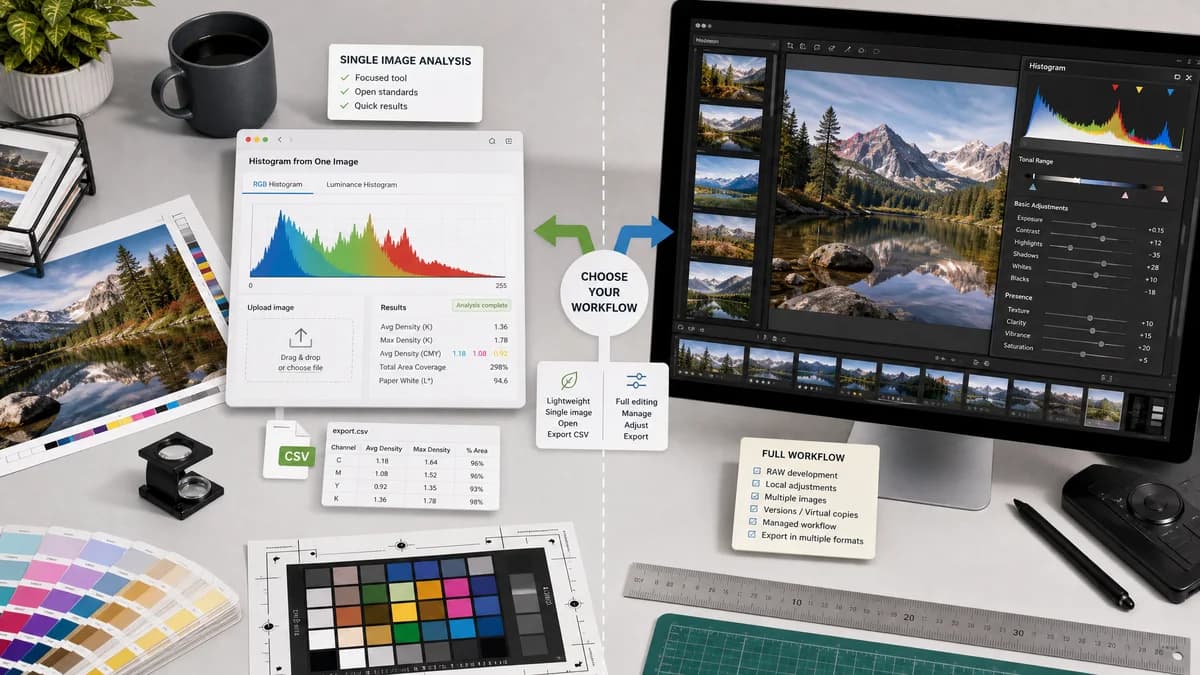
Why Image Histogram Generator + CSV fits
Image Histogram Generator + CSV should serve users who want a quick histogram from one uploaded image, with RGB and luminance views plus CSV output, without importing a catalog or editing a photo library.
What Adobe Lightroom Classic offers
Lightroom Classic includes histogram tools inside a full photo management and RAW editing environment where tonal ranges and clipping indicators support exposure and color adjustments.
Open alternative signals
Primary task
Image Histogram Generator + CSVImage histogram generation and CSV export
Adobe Lightroom ClassicCatalog-based photo editing and management
Setup
Image Histogram Generator + CSVOpen a browser and upload one supported image
Adobe Lightroom ClassicInstall and use a desktop photo workflow
Data output
Image Histogram Generator + CSVCSV should be first-class
Adobe Lightroom ClassicHistogram primarily guides editing decisions
Audience
Image Histogram Generator + CSVDesign QA, educators, developers, and analysts
Adobe Lightroom ClassicPhotographers and photo editors
Decision guide
Fast one-off histogram checks, browser-local analysis, and extracting histogram data for spreadsheets or QA reports.
RAW photo editing, catalog management, batch photo workflows, and exposure correction across large libraries.
Side-by-side open source alternative comparison
| Decision point | Image Histogram Generator + CSV | Adobe Lightroom Classic | Takeaway |
|---|---|---|---|
| Image workflow | Our workflowSingle-image upload and analysis. | Proprietary workflowCatalog import, develop settings, and library management. | The TextFaker tool should feel instant and narrow. |
| Histogram channels | Our workflowRGB and luminance channel visualization should be directly selectable. | Proprietary workflowLightroom uses histograms for tonal and color editing feedback. | Both tools use histogram concepts, but the job to be done is different. |
| Export format | Our workflowCSV lets users move bin data into spreadsheets, scripts, or reports. | Proprietary workflowLightroom's histogram is part of visual editing rather than raw histogram table export. | CSV export is the strongest differentiator. |
| Privacy | Our workflowBrowser-local processing can be emphasized for images users do not want to send to a service. | Proprietary workflowDesktop app processing may be local but exists inside a larger software ecosystem. | Use privacy language tied to implementation details. |
| Feature scope | Our workflowNo catalog, presets, masks, or sliders beyond histogram controls. | Proprietary workflowBroad RAW editing, presets, and library features. | Avoid pretending to be a Lightroom replacement. |
| Best comparison copy | Our workflowFor quick histogram data without a photo catalog. | Proprietary workflowFor editing and managing professional photo libraries. | This phrasing keeps the comparison accurate. |
Detailed research
Why Users Compare Them
Lightroom users are familiar with histograms as exposure and clipping tools. Some of those users only need to inspect a single web image, screenshot, or design asset and export numbers rather than edit a RAW library.
- Frame the tool around quick inspection, not editing.
- Mention CSV export and local browser analysis in the first screen.
- Avoid RAW-specific claims unless real browser RAW support exists.
Implementation Fit
Existing TextFaker image tools already handle local upload, analysis result panels, and download actions. This planned tool can reuse those patterns with a chart surface and a CSV action.
- Use shared upload drop zone behavior.
- Use result sections for channel stats, histogram chart, and export controls.
- Keep the access flow consistent with image tools that process user files.
Open Standards Story
CSV export gives the page a clear open-standards angle even if TextFaker is not described as open source. Browser image decoding and Canvas pixel access can be explained in user-friendly terms.
- Use standard CSV terminology.
- State supported image formats precisely.
- Add a note when browser decoding may normalize color or orientation.
SEO Angle
The page can target Lightroom users who search for a lightweight histogram alternative, especially when they do not need catalog features.
- Use phrases like RGB histogram generator, luminance histogram, and export histogram CSV.
- Include local image processing language.
- Do not use Adobe URLs in body copy.
Research notes
- Adobe's official Lightroom Classic documentation describes the histogram as part of the photo editing interface.
- Lightroom Classic is proprietary software with a much broader catalog and editing workflow than this planned utility.
- The comparison should be careful not to suggest support for Lightroom catalogs or RAW pipelines unless implemented.
Official source
The proprietary product link is included once here for source checking after the alternative analysis.
Official Adobe Lightroom Classic source