
Open Source Alternatives to Adobe Photoshop
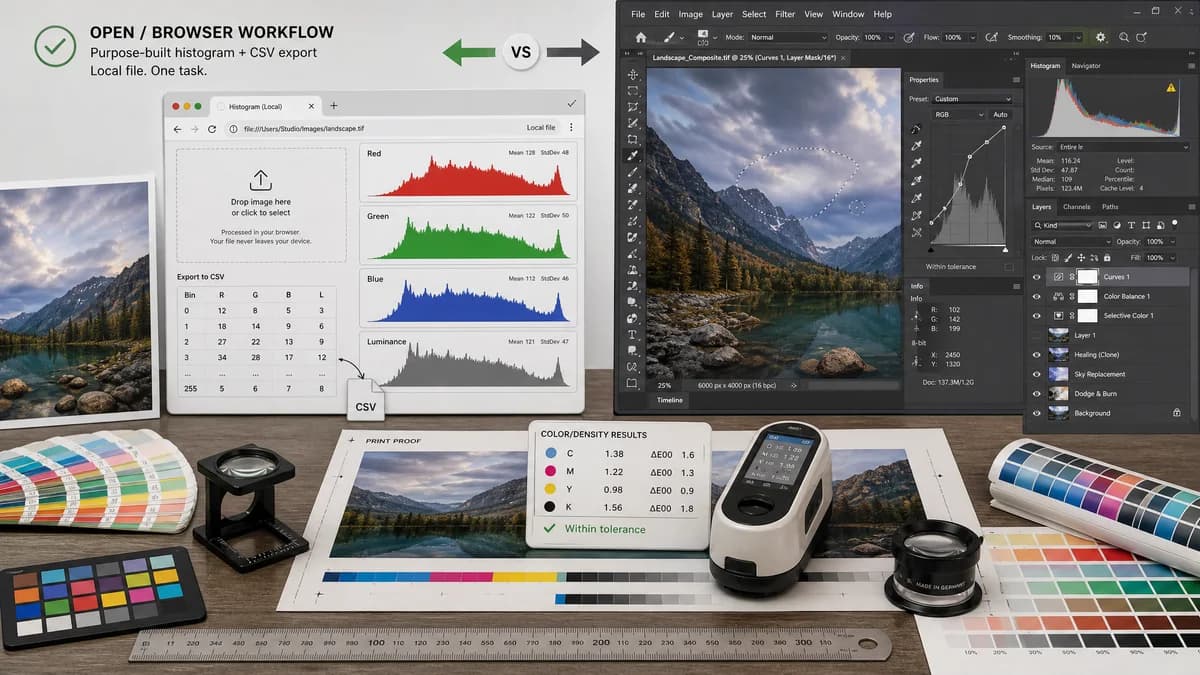
Image Histogram Generator + CSV is a browser-based alternative for users who need this focused result without installing a proprietary desktop app or entering a larger hosted workflow.
This research compares that workflow with Adobe Photoshop while keeping the outbound source link at the bottom after the analysis.
Why Image Histogram Generator + CSV fits
Image Histogram Generator + CSV should focus on one task: upload an image locally in the browser, visualize RGB and luminance channel distributions, and export histogram bins as CSV without a full editing workspace.
What Adobe Photoshop offers
Adobe Photoshop includes histogram and pixel-value tools inside a professional image editing environment, which is useful when histogram inspection is part of retouching, compositing, color correction, or print preparation.
Open alternative signals
Workflow scope
Image Histogram Generator + CSVSingle-purpose histogram visualization and CSV export
Adobe PhotoshopFull professional photo and image editor
File handling
Image Histogram Generator + CSVDesigned for local browser processing
Adobe PhotoshopDesktop application workflow
Data export focus
Image Histogram Generator + CSVCSV bins should be a primary output
Adobe PhotoshopHistogram is mainly an editing and inspection panel
Learning curve
Image Histogram Generator + CSVNarrow controls for upload, channels, bins, and export
Adobe PhotoshopLarge creative toolset with many panels and modes
Decision guide
Quick histogram checks, CSV export, privacy-sensitive browser-local inspection, and users who do not need a layered editing suite.
Professional editing, color correction, retouching, channel inspection inside a broader production workflow, and users already working in Adobe Creative Cloud.
Side-by-side open source alternative comparison
| Decision point | Image Histogram Generator + CSV | Adobe Photoshop | Takeaway |
|---|---|---|---|
| Histogram goal | Our workflowGenerate RGB and luminance histograms for inspection and export. | Proprietary workflowInspect image tonal distribution as part of editing and correction. | TextFaker can win on focused measurement and CSV output. |
| Privacy model | Our workflowBrowser-local processing should keep image pixels on the user's device. | Proprietary workflowDesktop workflow depends on installed software and broader account or application setup. | Local browser processing is easier to explain for quick sensitive-image checks. |
| CSV export | Our workflowCSV export should expose bin, red, green, blue, luminance, and normalized values. | Proprietary workflowPhotoshop's histogram panel is not primarily marketed as a CSV data export tool. | Make tabular export a core feature, not an afterthought. |
| Best user | Our workflowDevelopers, designers, analysts, and QA users who need histogram data quickly. | Proprietary workflowPhotographers, retouchers, and designers editing finished images. | The pages should position this as an analysis utility, not an editor replacement. |
| Cost and setup | Our workflowNo install for a browser-capable image histogram workflow. | Proprietary workflowRequires Adobe software access and a desktop application workflow. | The alternative angle is speed and access, not replacing Photoshop's creative depth. |
| Implementation note | Our workflowUse ToolUploadDropZone, generated tool image workflow, and paywall/access patterns already used by image tools. | Proprietary workflowPhotoshop uses its own native application interface. | Consistency with existing TextFaker image tools matters more than mimicking Photoshop UI. |
Detailed research
Why Users Compare Them
Photoshop users often check histograms while editing exposure, contrast, levels, and channel balance. A TextFaker histogram tool would serve the narrower moment when the user only wants distribution data and a CSV they can inspect elsewhere.
- Keep upload and channel toggles visible immediately after file selection.
- Expose RGB, luminance, alpha-aware notes when relevant, and bin counts in a downloadable CSV.
- Avoid editor-like features that blur the purpose of the tool.
Open-Source-Powered Positioning
The strongest positioning is not that TextFaker itself is open source, but that the workflow can be based on browser APIs and open image/data conventions. The tool can explain local pixel decoding, histogram binning, and CSV export transparently.
- Say browser-local instead of cloud-free unless implementation proves there are no network dependencies.
- Say open-source-powered only when using open-source libraries in the implementation.
- Use CSV and standard channel labels as the interoperability story.
SEO Angle
The comparison page should target users searching for simpler Photoshop alternatives for image histogram data, not users who need a full Photoshop replacement.
- Mention image histogram CSV export early.
- Include RGB histogram, luminance histogram, and browser image analysis language.
- Do not overclaim support for RAW files unless implemented.
Product Notes
The user experience should be closer to the existing color and metadata tools than to a creative editor. It should load a single image, show chart panels, provide numeric summary cards, and offer CSV download.
- Reuse ToolUploadDropZone.
- Keep paywall and access behavior aligned with nearby image tools.
- Consider a generated tool image showing histogram bars and RGB overlays.
Research notes
- Adobe's official documentation describes Photoshop workflows for viewing histograms and pixel values.
- This comparison should avoid claiming TextFaker is open source; describe it as browser-based and open-source-powered.
- Photoshop is proprietary software and is much broader than a lightweight histogram utility.
Official source
The proprietary product link is included once here for source checking after the alternative analysis.
Official Adobe Photoshop source