
Open Source Alternatives to MATLAB Image Processing Toolbox
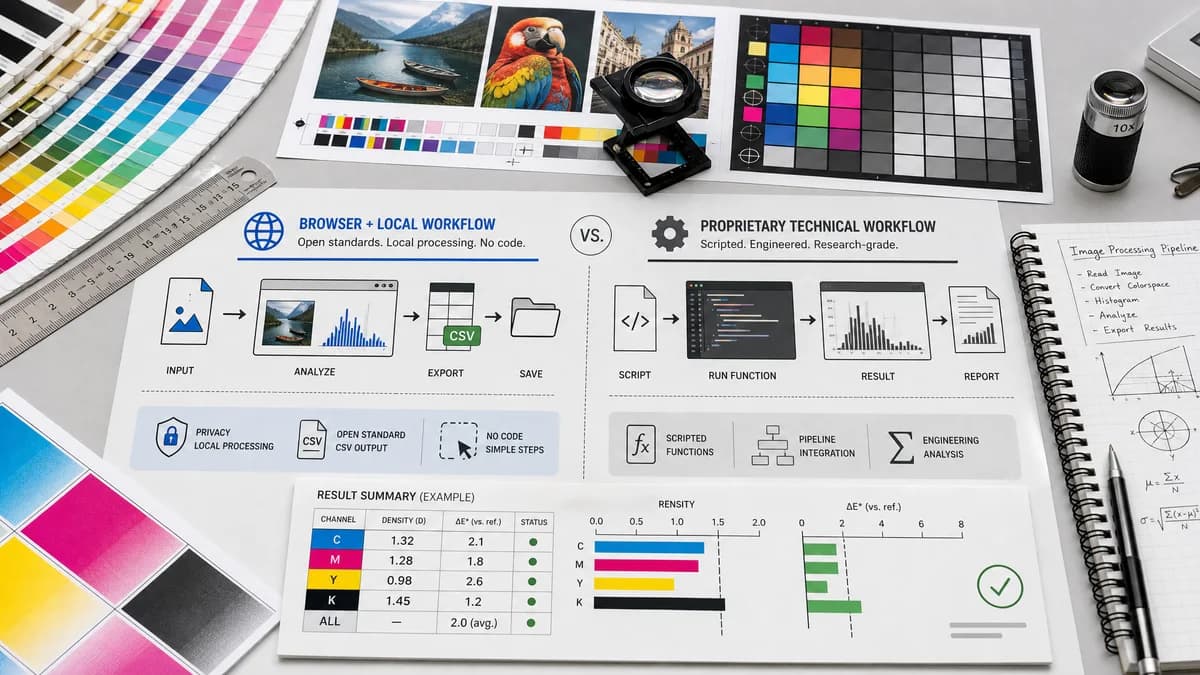
Image Histogram Generator + CSV is a browser-based alternative for users who need this focused result without installing a proprietary desktop app or entering a larger hosted workflow.
This research compares that workflow with MATLAB Image Processing Toolbox while keeping the outbound source link at the bottom after the analysis.
Why Image Histogram Generator + CSV fits
Image Histogram Generator + CSV should help users generate common image histograms and export CSV without writing code, installing MATLAB, or setting up an image-processing script.
What MATLAB Image Processing Toolbox offers
MATLAB Image Processing Toolbox provides programmatic image histogram functions such as imhist for technical computing, research, engineering, and algorithm development.
Open alternative signals
User interface
Image Histogram Generator + CSVNo-code web UI
MATLAB Image Processing ToolboxProgrammatic MATLAB environment
Output
Image Histogram Generator + CSVChart and CSV export
MATLAB Image Processing ToolboxArrays, figures, scripts, and technical workflows
Setup
Image Histogram Generator + CSVBrowser and supported image file
MATLAB Image Processing ToolboxMATLAB installation and toolbox access
Depth
Image Histogram Generator + CSVFocused histogram utility
MATLAB Image Processing ToolboxFull scientific image-processing toolbox
Decision guide
No-code histogram visualization, browser-local analysis, quick CSV export, education, and lightweight reporting.
Programmatic image processing, research workflows, reproducible scripts, numerical computing, and advanced algorithm development.
Side-by-side open source alternative comparison
| Decision point | Image Histogram Generator + CSV | MATLAB Image Processing Toolbox | Takeaway |
|---|---|---|---|
| Coding requirement | Our workflowNo code required for upload, histogram, and CSV. | Proprietary workflowTypically used through MATLAB functions and scripts. | TextFaker can serve non-programmers and fast checks. |
| Reproducibility | Our workflowCSV output can be saved and compared externally. | Proprietary workflowScripts and arrays support deep reproducible workflows. | MATLAB remains stronger for research-grade pipelines. |
| Histogram detail | Our workflowRGB and luminance bins can cover common visual-image needs. | Proprietary workflowMATLAB supports many programmatic image-processing operations. | Do not overclaim algorithmic breadth. |
| Access | Our workflowBrowser-local page for supported images. | Proprietary workflowCommercial computing environment and toolbox. | Lower setup is a key advantage. |
| Education | Our workflowGood for teaching what histograms look like and exporting examples. | Proprietary workflowGood for teaching and implementing full image-processing algorithms. | TextFaker should include clear labels and CSV schemas. |
| Implementation note | Our workflowCSV and chart should be deterministic for the same decoded pixels and settings. | Proprietary workflowMATLAB gives developers control over functions, arrays, and parameters. | Expose enough settings to make the output credible. |
Detailed research
Why Users Compare Them
MATLAB is a natural comparison because image histograms are a standard image-processing operation. TextFaker can address users who need the result but not a coding environment.
- Use no-code language carefully.
- Show the CSV schema.
- Make output easy to reproduce with chosen settings.
Technical Scope
The tool can be educational and practical if it documents binning, channel selection, luminance calculation, normalization, and whether transparent pixels are included.
- Include bin count and channel settings in CSV metadata or filename where possible.
- Show total pixels used.
- Support copyable summary values.
Open Standards Positioning
CSV export is the strongest open-standard link for technical users. The page can also mention browser APIs and open-source-powered charting if that is true in the implementation.
- Avoid saying TextFaker is open source.
- Avoid claiming MATLAB compatibility.
- Use standard CSV and common channel labels.
SEO Angle
Searchers for MATLAB alternatives may want a free or simpler way to generate histograms from images. The page should clarify that TextFaker is a lightweight utility, not a full scientific computing replacement.
- Target image histogram CSV, no-code image histogram, and RGB histogram terms.
- Mention no install for browser-supported images.
- Include a table comparing utility versus technical computing environment.
Research notes
- MathWorks official documentation describes imhist for image histogram computation.
- MATLAB Image Processing Toolbox is proprietary software and is far broader than a web histogram generator.
- This comparison should emphasize no-code browser access while respecting MATLAB's programmatic power.
Official source
The proprietary product link is included once here for source checking after the alternative analysis.
Official MATLAB Image Processing Toolbox source