
Instagram 4:5 Feed Crop Preview vs Adobe Express Instagram Image Resizer
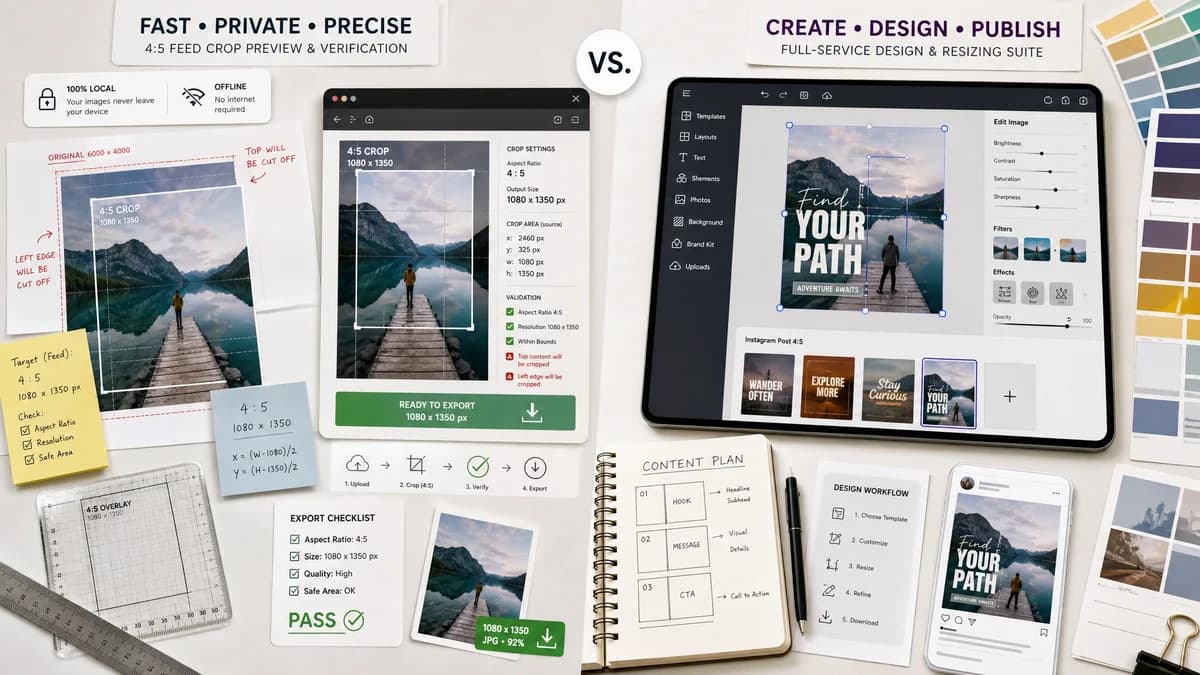
Instagram 4:5 Feed Crop Preview is the baseline in this comparison: Preview an Instagram 4:5 feed crop locally, see exact crop boxes and hidden pixels, and download a tested 1080 x 1350-ready image.
Compare a focused local 4:5 Instagram crop preview with Adobe Express's broader Instagram image resizing workflow.
Quick verdict
Adobe Express is stronger for full design creation; TextFaker can win when users only need fast private 4:5 feed crop proofing with explicit numbers and downloads.
How Instagram 4:5 Feed Crop Preview fits
TextFaker should focus on instant browser-local preview, exact 4:5 crop coordinates, 1080 x 1350 export checks, and deterministic warnings for content that would be cut off.
How Adobe Express Instagram Image Resizer fits
Adobe Express provides a polished design-suite workflow with Instagram presets and broader editing tools, but it is less focused on exposing machine-readable crop math for QA-style validation.
Side-by-side comparison
| Decision point | Instagram 4:5 Feed Crop Preview | Adobe Express Instagram Image Resizer | Takeaway |
|---|---|---|---|
| Primary workflow | Our workflowUpload image, preview the 4:5 feed crop, adjust position, and export a verified file. | Competitor workflowResize or design an Instagram post inside a broader editor. | TextFaker should be narrower and faster for one crop-preview job. |
| Deterministic data | Our workflowShows source dimensions, aspect ratio, crop x/y/width/height, scale factor, and final output size. | Competitor workflowEmphasizes visual resizing and presets more than explicit crop-box data. | TextFaker can be easier to test and trust for exact crop outcomes. |
| Privacy posture | Our workflowDesigned to run locally in the browser without uploading the image. | Competitor workflowA cloud design service workflow may involve account or platform processing depending on use. | Local processing is a differentiator for private photos. |
| Mobile fit | Our workflowSingle-purpose controls can fit comfortably on phone screens. | Competitor workflowA rich editor may be heavier on small screens. | TextFaker should optimize for quick mobile checks before posting. |
| Output validation | Our workflowCan report pass or fail for 4:5, 1080 x 1350 target, minimum width, and crop loss percentage. | Competitor workflowProvides preset-based resizing but less structured validation copy. | Validation messages make TextFaker better for repeatable support and tests. |
| Learning curve | Our workflowNo design canvas knowledge required. | Competitor workflowMore capability means more interface surface. | TextFaker should serve users who only want the crop answer. |
Use Instagram 4:5 Feed Crop Preview when
- Checking whether an existing image fits a 4:5 Instagram feed crop
- Getting exact crop-box coordinates and output dimensions
- Mobile users who want a lightweight no-account utility
- Automated tests that verify deterministic validation messages
Use Adobe Express Instagram Image Resizer when
- Creating designed Instagram posts from templates
- Combining resize with broader design edits
- Users already in the Adobe Express ecosystem
- Brand teams needing polished creative tools
Detailed comparison
Demand Signal
Public creator discussions show that Instagram cropping is still confusing. Photographers describe strong images that do not survive a 4:5 crop, and marketers report text being cut off after layout changes.
- The user problem is not just resizing; it is knowing what will be removed before upload.
- A dedicated preview can answer that faster than a full design editor.
Product Positioning
The tool should present itself as a preview and validation utility rather than a template editor. The strongest promise is: see the exact 4:5 feed crop before Instagram does it.
- Expose exact crop box values.
- Offer centered, top-biased, bottom-biased, and manual position modes.
- Download a verified 1080 x 1350 JPG or PNG.
Implementation Notes
Use Canvas or OffscreenCanvas to decode the image locally, calculate the largest 4:5 crop inside the source image, and export a deterministic output. Preserve no metadata unless the existing site pattern deliberately does so.
- Return cropX, cropY, cropWidth, cropHeight, outputWidth, outputHeight, and cropLossPercent.
- Warn when the source is smaller than 1080 x 1350.
- Allow background padding mode as an alternative to destructive crop.
Testing Path
Automated tests can upload generated fixtures with known dimensions and assert exact crop boxes and validation messages. Visual judgment is not needed.
- 1600 x 1200 landscape should crop to 960 x 1200 for a 4:5 center crop.
- 1200 x 1600 portrait should crop to 1200 x 1500 for 4:5.
- 1080 x 1350 should pass without crop loss.
Research notes
- Official Meta guidance supports 4:5 as a feed placement ratio, making the target dimensions commercially relevant.
- Community sources show demand from photographers, creators, and marketers, not just developers.
- The product should avoid competing with Adobe Express as a full editor and instead win on local processing, exact preview data, and fast validation.
Official source
The only outbound competitor link on this page is placed here for source checking after the comparison.
Official Adobe Express Instagram Image Resizer source