
Instagram 4:5 Feed Crop Preview vs Picsart Instagram Photo Resizer
Instagram 4:5 Feed Crop Preview is the baseline in this comparison: Preview an Instagram 4:5 feed crop locally, see exact crop boxes and hidden pixels, and download a tested 1080 x 1350-ready image.
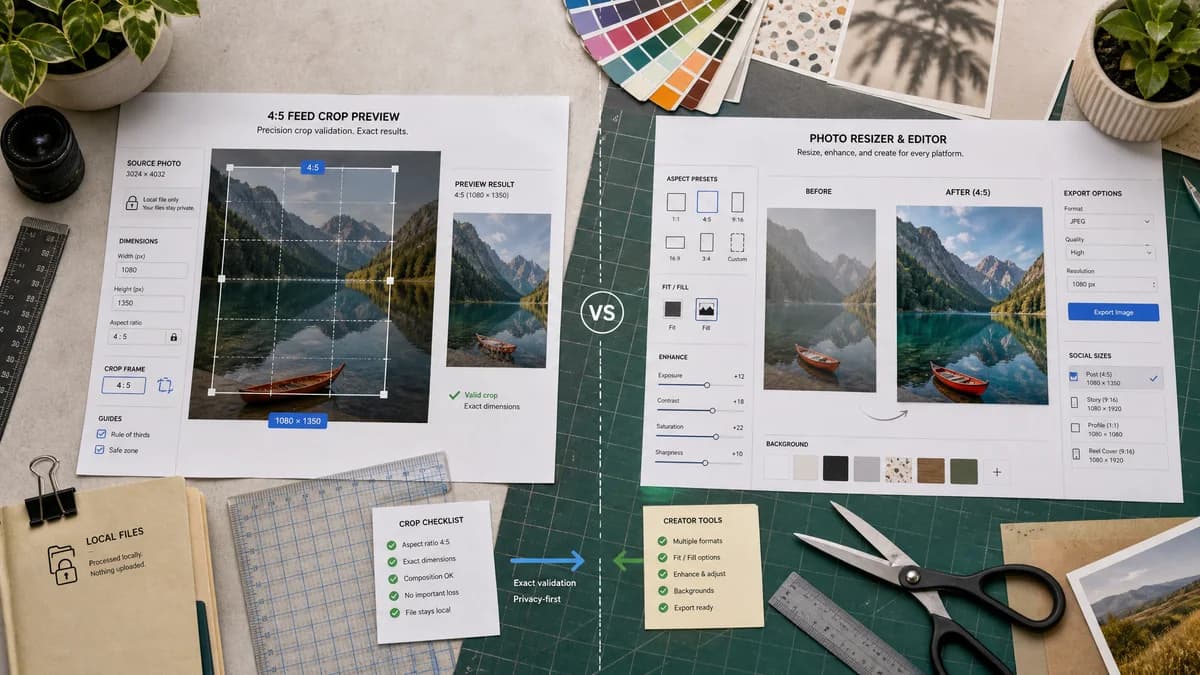
Compare a local deterministic 4:5 crop preview with Picsart's Instagram photo resizing tool.
Quick verdict
Picsart is better for visual enhancement; TextFaker can be better for exact preflight validation and privacy-first cropping.
How Instagram 4:5 Feed Crop Preview fits
TextFaker can offer a focused crop and validation utility with transparent dimensions and local file handling.
How Picsart Instagram Photo Resizer fits
Picsart provides a creator-friendly Instagram photo resizer with broader editing, fit, and background options for social formats.
Side-by-side comparison
| Decision point | Instagram 4:5 Feed Crop Preview | Picsart Instagram Photo Resizer | Takeaway |
|---|---|---|---|
| Core promise | Our workflowPreview Instagram's 4:5 feed crop with exact math. | Competitor workflowResize photos for Instagram with a consumer editing experience. | TextFaker should own the precision-checking niche. |
| Crop transparency | Our workflowShows removed pixels from top, bottom, left, and right. | Competitor workflowPresents resize and fit controls visually. | Exact edge-loss data is the differentiator. |
| Local processing | Our workflowImages should stay in the browser. | Competitor workflowA hosted editor experience may involve upload or account flow. | TextFaker can appeal to privacy-sensitive users. |
| Output modes | Our workflowCrop to fill 4:5 or pad to fit full image inside 4:5. | Competitor workflowOffers resizing and background-assisted fit options. | Both can solve no-crop needs, but TextFaker should make the mode result explicit. |
| Validation | Our workflowPass/fail messages for aspect ratio, minimum resolution, and export readiness. | Competitor workflowMore oriented toward creative editing completion. | TextFaker should help users know when the asset is technically ready. |
| Automation | Our workflowResult values can be used in tests without human visual judgment. | Competitor workflowVisual quality remains the main outcome. | TextFaker fits the site's deterministic tool pattern. |
Use Instagram 4:5 Feed Crop Preview when
- Creators checking whether text or subjects fit inside 4:5
- Users who need exact dimensions and validation messages
- One-off crop exports without a large editor
- QA-friendly deterministic outputs
Use Picsart Instagram Photo Resizer when
- Users who want filters, edits, and creative tools
- Resizing for several Instagram surfaces
- Casual creators already using Picsart
- Visual enhancement before posting
Detailed comparison
Demand Signal
Creators complain publicly that Instagram crops in ways that hide text or important image features. This supports a tool that provides crop warnings before upload.
- Text-heavy graphics need safe-area checks.
- Portrait photos need subject-preserving alignment choices.
Feature Focus
A good first version should include crop preview, output export, and validation. Avoid AI enhancement or filters because they dilute the deterministic promise.
- Source image stats panel.
- 4:5 crop box panel.
- Export stats panel.
- Validation warnings panel.
Implementation Notes
The crop operation should use a predictable algorithm. For center crop, calculate the largest 4:5 rectangle fitting inside the source and center it along the overflowing axis.
- Use floor or round consistently for crop dimensions.
- Clamp manual offsets within source bounds.
- Generate object URLs only after the user processes the image.
Testing Path
Automated tests can compare expected text output and downloadable image dimensions. They do not need to compare perceived crop quality.
- Exact 4:5 image should show no crop warning.
- Small images should show upscaling warning.
- Manual offset should update cropX or cropY numerically.
Research notes
- Picsart validates the consumer demand for Instagram-specific resizing.
- TextFaker should use the same user need but differentiate with transparency, local processing, and no subjective editing features.
- Community discussions about text being cut off make safe-area validation especially relevant.
Official source
The only outbound competitor link on this page is placed here for source checking after the comparison.
Official Picsart Instagram Photo Resizer source