
Instagram 4:5 Feed Crop Preview vs Simple Image Resizer Instagram Tool
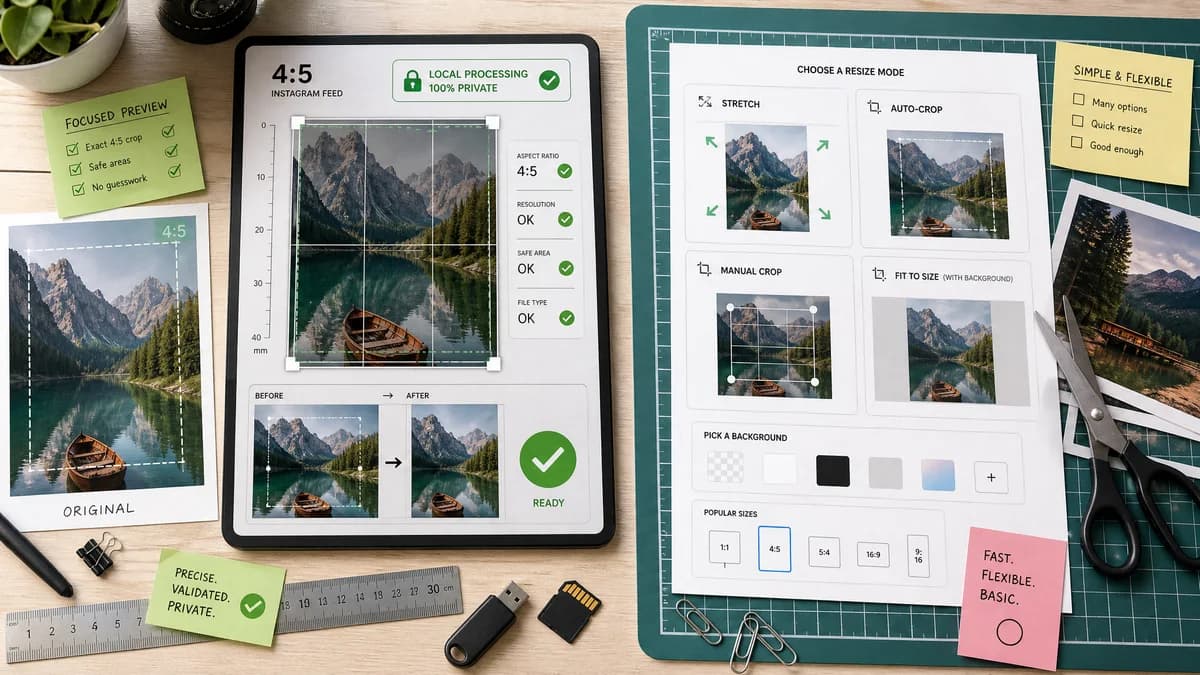
Instagram 4:5 Feed Crop Preview is the baseline in this comparison: Preview an Instagram 4:5 feed crop locally, see exact crop boxes and hidden pixels, and download a tested 1080 x 1350-ready image.
Compare TextFaker's 4:5 crop preview with Simple Image Resizer's Instagram resizing modes.
Quick verdict
Simple Image Resizer is a close utility competitor; TextFaker can differentiate with explicit crop boxes, privacy messaging, and stronger deterministic test outputs.
How Instagram 4:5 Feed Crop Preview fits
TextFaker should offer a similarly simple utility workflow but focus on exact 4:5 preview, crop diagnostics, and local-browser validation.
How Simple Image Resizer Instagram Tool fits
Simple Image Resizer offers Instagram resizing with modes such as stretch, auto-crop, manual crop, and fit-to-size with backgrounds.
Side-by-side comparison
| Decision point | Instagram 4:5 Feed Crop Preview | Simple Image Resizer Instagram Tool | Takeaway |
|---|---|---|---|
| Closest overlap | Our workflowInstagram 4:5 crop preview and export. | Competitor workflowInstagram resize tool with crop and fit modes. | This is one of the most direct competitors. |
| Transparency | Our workflowShould expose exact crop coordinates and edge loss. | Competitor workflowLists modes and target Instagram sizes, with less emphasis on diagnostic output. | TextFaker needs measurable outputs to stand apart. |
| Local-only claim | Our workflowCan clearly state that processing happens in the browser. | Competitor workflowThe page is a web utility, but implementation details may be less central to the workflow. | Privacy-first wording matters for photos. |
| Preview specificity | Our workflowFocused on feed 4:5 preview, not all Instagram sizes. | Competitor workflowCovers multiple Instagram image targets and modes. | TextFaker can be more precise for one common format. |
| Validation messages | Our workflowReports ready, needs crop, needs padding, too small, or unsupported file. | Competitor workflowPrimarily provides transformation choices. | Validation gives TextFaker a testing and UX advantage. |
| Integration with existing tools | Our workflowCan complement TextFaker's Instagram Image Size Checker and image converters. | Competitor workflowStandalone utility site. | TextFaker can cross-link related local tools naturally. |
Use Instagram 4:5 Feed Crop Preview when
- Exact crop math for 4:5 feed posts
- Local processing and privacy positioning
- Validation against 1080 x 1350 output
- Users comparing crop versus padding outcomes
Use Simple Image Resizer Instagram Tool when
- Quick Instagram resizing with several modes
- Users who want stretch, crop, or fit choices
- General-purpose social image preparation
- Simple web resizing without a large editor
Detailed comparison
Demand Signal
Simple Image Resizer's Instagram-specific page confirms search demand for platform-specific resizing. Public creator discussions clarify why: users worry about edge cuts, text loss, and changing preview formats.
- The pain is recurring and practical.
- A utility page can satisfy the need without a design suite.
Feature Focus
TextFaker should include both crop and fit modes but keep the default as crop preview. The result should show what was removed or added.
- Crop mode: fill the 4:5 frame.
- Padding mode: preserve the full image with a chosen matte or blur-like background if already supported locally.
- Validation mode: check existing dimensions without exporting.
Implementation Notes
Do not rely on platform uploads or external APIs. Use browser decoding and canvas export so tests can run locally.
- Make all derived numbers deterministic.
- Keep output file naming predictable.
- Expose dimensions in visible text for tests.
Testing Path
Use known source image sizes and assert the displayed crop rectangle. Export files can be decoded in browser tests to confirm dimensions.
- Landscape source should show left/right crop values.
- Tall portrait source should show top/bottom crop values.
- Exact target source should show zero crop loss.
Research notes
- This competitor is especially relevant because it offers Instagram-specific resize modes rather than a broad editor.
- TextFaker should avoid vague claims and instead show measurable crop and output values.
- A direct comparison page should emphasize privacy, exact metrics, and predictable validation.
Official source
The only outbound competitor link on this page is placed here for source checking after the comparison.
Official Simple Image Resizer Instagram Tool source