
Open Source Alternatives to Canva
Instagram 4:5 Feed Crop Preview is a browser-based alternative for users who need this focused result without installing a proprietary desktop app or entering a larger hosted workflow.
This research compares that workflow with Canva while keeping the outbound source link at the bottom after the analysis.
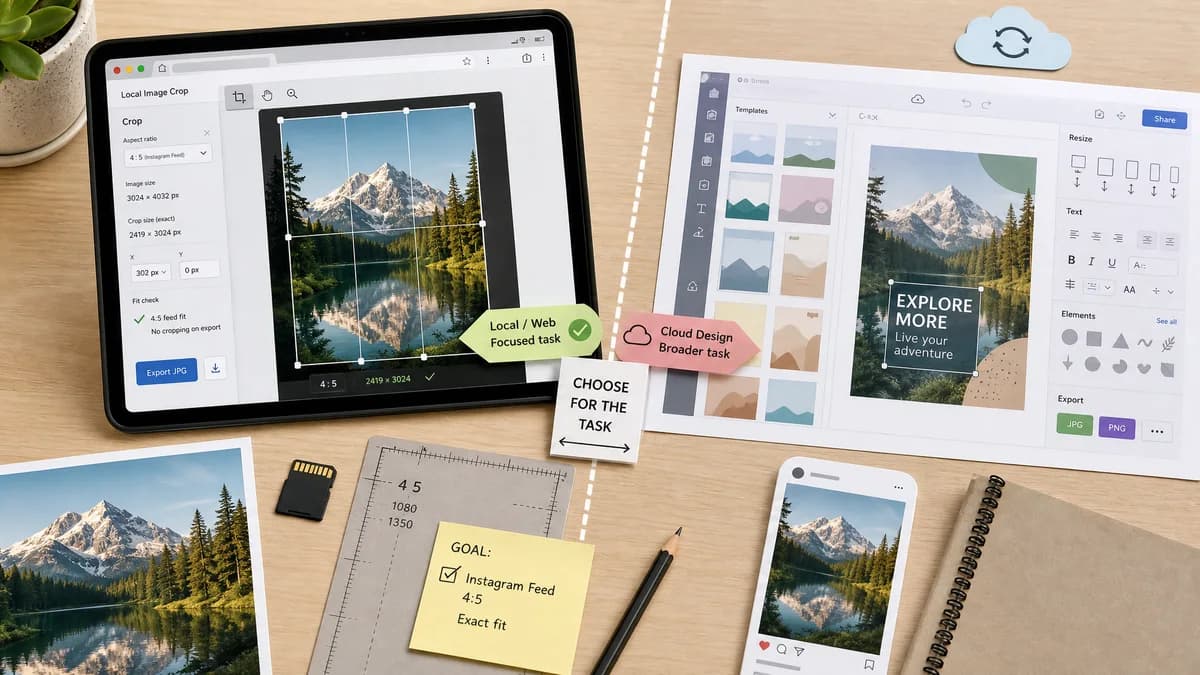
Why Instagram 4:5 Feed Crop Preview fits
TextFaker can offer a narrow, browser-based crop preview that uses local canvas operations and open web standards for deterministic 4:5 checks.
What Canva offers
Canva provides a broader cloud design suite with an image resizer, presets, templates, text, stickers, and JPG/PNG downloads.
Open alternative signals
Processing model
Instagram 4:5 Feed Crop PreviewBrowser-local image decode, canvas crop, and preview overlays.
CanvaCloud-oriented design editor with account, templates, and broader publishing workflows.
Validation fit
Instagram 4:5 Feed Crop PreviewAssert output canvas is exactly 1080 x 1350 or another 4:5 target and crop rectangle stays inside the source image.
CanvaUser visually chooses resize presets and downloads an edited asset.
Scope
Instagram 4:5 Feed Crop PreviewInstagram 4:5 feed crop preview, safe-area overlay, crop or padding export.
CanvaGeneral image resizing plus design editing and template composition.
Privacy posture
Instagram 4:5 Feed Crop PreviewSource photo can remain in the browser without upload.
CanvaOfficial flow invites uploading into Canva's web editor.
Decision guide
Creators who only need a private, fast Instagram 4:5 crop preview and exact dimensions before posting.
Teams that also need branded templates, collaborative design assets, and broader content creation features.
Side-by-side open source alternative comparison
| Decision point | Instagram 4:5 Feed Crop Preview | Canva | Takeaway |
|---|---|---|---|
| Instagram focus | Our workflowPurpose-built for 4:5 feed crop and preview states. | Proprietary workflowOffers many resize and design targets, not only Instagram feed preview. | TextFaker can win on speed and specificity. |
| Deterministic testing | Our workflowTests can verify dimensions, aspect ratio, crop offsets, and Blob type. | Proprietary workflowResults depend on editor state and user design choices. | A narrow tool is easier to validate automatically. |
| Editing depth | Our workflowMinimal controls for crop position, padding color, and export format. | Proprietary workflowFull design surface with templates and creative assets. | Canva remains better for design production. |
| Account dependency | Our workflowCan be usable without a sign-in if implemented as a local tool. | Proprietary workflowMany Canva workflows encourage account-based editing and storage. | TextFaker can reduce friction for one-off checks. |
| Public positioning | Our workflowOpen-source-powered browser workflow based on canvas and image standards. | Proprietary workflowProprietary software and hosted creative platform. | Do not describe TextFaker itself as open source unless that is separately proven. |
| Export confidence | Our workflowShow exact final pixel size, ratio, and file metadata before download. | Proprietary workflowDownload is available after editing, but dimension reporting is less central to the page promise. | TextFaker should foreground measurable output. |
Detailed research
Why Users Compare
Canva is a default option for non-designers who need social media assets, so users searching for Instagram crop help will naturally compare against it. The opportunity is to serve people who do not need templates or a design suite and only want to see whether a photo will be cropped in a 4:5 feed frame.
- Use a fixed 4:5 overlay and live pixel readout.
- Include center, top, bottom, left, and right crop anchors.
- Show whether the source already matches 4:5.
Implementation Notes
The deterministic validation path is simple: decode a test image, compute the largest centered 4:5 rectangle or padded 1080 x 1350 output, render to canvas, and assert exact dimensions plus nonnegative crop coordinates.
- Test square, 3:4, 2:3 portrait, 16:9 landscape, and tiny images.
- Report source aspect ratio, crop loss percentage, and output MIME.
- Keep visual previews secondary to numeric validation.
Positioning
The page should say it is a browser-based, open-source-powered alternative workflow, not an open-source clone of Canva. The useful contrast is privacy, determinism, and narrow Instagram feed-crop previewing.
Demand Evidence
Reddit discussions show photographers and marketers are confused by 4:5 feed limits and newer grid behavior. Users specifically describe wanting images to look normal both in the grid and after opening the post.
- Community users discuss adding borders to avoid cropping.
- Users ask about exact dimensions after Instagram layout changes.
Research notes
- Canva's official resizer says users can upload an image, input dimensions or select a preset, then download JPG or PNG.
- The requested TextFaker tool should avoid claiming to replace Canva as a full design suite; it is a focused browser-based alternative for crop preview math.
- Community feedback shows the problem is not just resizing but predicting what Instagram will crop or occlude.
Official source
The proprietary product link is included once here for source checking after the alternative analysis.
Official Canva source