
Instagram Grid Splitter vs DesignHub Instagram Grid Maker
Instagram Grid Splitter is the baseline in this comparison: Split one uploaded image into numbered Instagram grid tiles with browser-local cropping, exact dimensions, posting order, and downloadable files.
DesignHub provides an online image splitter for Instagram grids and carousels with no signup and mobile-responsive claims.
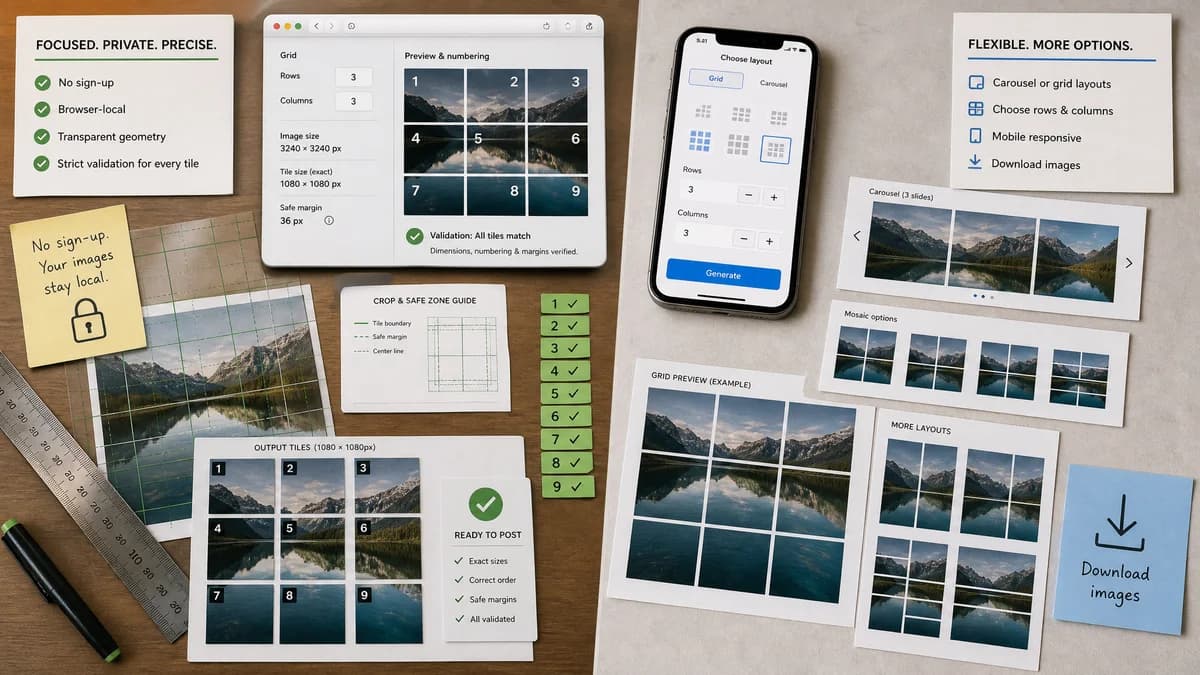
Quick verdict
DesignHub is one of the clearest adjacent benchmarks because it addresses grids, carousels, custom layouts, and mobile use. TextFaker should compete on measurable output transparency and privacy.
How Instagram Grid Splitter fits
TextFaker matches no-signup convenience while adding browser-local guarantees, transparent geometry, and a strict validation contract for every generated tile.
How DesignHub Instagram Grid Maker fits
DesignHub explains how to split images into carousel layouts or mosaic grids, including choosing rows and columns and downloading the resulting images.
Side-by-side comparison
| Decision point | Instagram Grid Splitter | DesignHub Instagram Grid Maker | Takeaway |
|---|---|---|---|
| Signup and access | Our workflowShould be free to use in-browser without account creation. | Competitor workflowStates no signup and free use on the tool page. | No-signup access is expected in this market. |
| Mobile support | Our workflowShould be intentionally responsive and testable on common phone widths. | Competitor workflowStates that the splitter is fully responsive and works on mobile devices. | TextFaker must not treat mobile as optional. |
| Image size guidance | Our workflowShould validate against Instagram-friendly tile targets and explain if the source is too small. | Competitor workflowMentions recommended dimensions and accepts any image dimension for the grid maker. | TextFaker can provide stronger numeric feedback. |
| Layout controls | Our workflowRows, columns, profile-grid mode, carousel mode, crop or pad, and output format should be explicit inputs. | Competitor workflowInstructions describe choosing rows and columns for carousels and mosaics. | Core controls are well-established. |
| Local processing | Our workflowShould make local browser processing part of the product contract. | Competitor workflowThe page is an online tool and does not foreground a no-upload technical guarantee in the visible source text. | Privacy is a plausible TextFaker advantage. |
| Machine-readable result | Our workflowShould offer copyable JSON or CSV manifest with slice count, crop boxes, dimensions, and filenames. | Competitor workflowThe competitor focuses on visual downloads and simple usage instructions. | A manifest gives TextFaker a stronger deterministic testing story. |
Use Instagram Grid Splitter when
- Users who want a privacy-first local splitter
- Creators who need exact output dimensions and crop warnings
- Automated QA around generated image outputs
Use DesignHub Instagram Grid Maker when
- Users who want a free no-signup web splitter
- People following step-by-step Instagram grid instructions
- Mobile browser users who need a quick social export
Detailed comparison
Demand Fit
DesignHub's FAQ-style content mirrors likely user questions: how to split into carousel slides, how to create a mosaic grid, what dimensions are best, and whether the tool works on phones.
- Creator education demand
- Mobile browser demand
- No-signup demand
- Custom rows and columns demand
Implementation Direction
The TextFaker UI exposes enough settings to cover these common questions without becoming a full design suite. A concise result table can show every generated tile.
- Tile index
- Row and column
- Crop box
- Output dimensions
- Download action
Differentiation
DesignHub already covers the high-level user journey well. TextFaker's comparison page focuses on local processing, deterministic output details, and privacy-sensitive image handling.
- No upload required
- Exact math visible
- Validation messages are copyable
- ZIP manifest included
Testing Notes
The deterministic path is straightforward: load a generated 3240x3240 fixture, split 3x3, and assert each tile is 1080x1080 with crop origins increasing by 1080 pixels.
- Expected crop boxes are exact integers
- Expected filenames include posting order
- Expected ZIP entry count equals rows times columns
- Expected warning count is zero for divisible fixtures
Research notes
- DesignHub's page is unusually useful for requirements because it explicitly mentions rows, columns, mobile use, and no signup.
- A TextFaker implementation does not rely on visual inspection to prove success; it shows exact dimensions and crop boxes.
- Public forum sources show that wrong crops and seams are real user problems.
Official source
The only outbound competitor link on this page is placed here for source checking after the comparison.
Official DesignHub Instagram Grid Maker source