
Open Source Alternatives to Canva Image Splitter
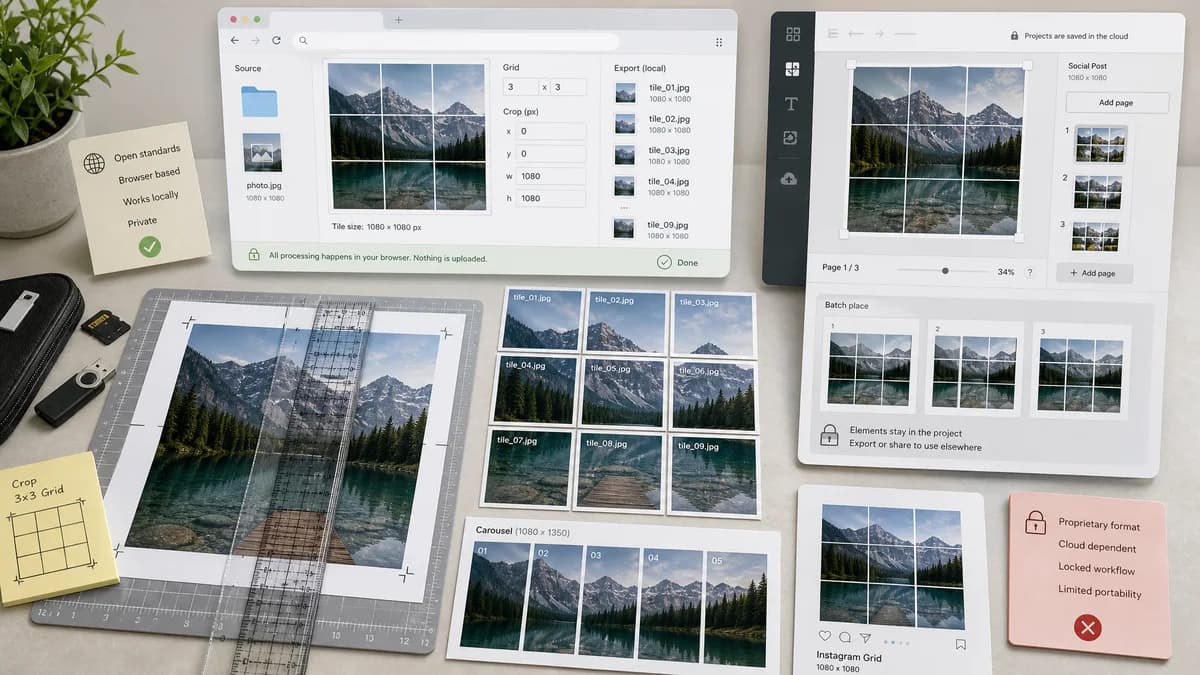
Instagram Grid Splitter is a browser-based alternative for users who need this focused result without installing a proprietary desktop app or entering a larger hosted workflow.
This research compares that workflow with Canva Image Splitter while keeping the outbound source link at the bottom after the analysis.
Why Instagram Grid Splitter fits
The browser tool should accept a finished design or photo, split it locally into Instagram-ready tiles, and expose exact output data such as crop boxes, dimensions, and generated file names.
What Canva Image Splitter offers
Canva Image Splitter is a Canva app that helps split an image into grid or carousel format and batch-add it into a Canva design for social posting.
Open alternative signals
Workflow scope
Instagram Grid SplitterSingle-purpose splitter for uploaded finished images.
Canva Image SplitterEmbedded Canva app inside a broader design editor.
Local processing
Instagram Grid SplitterTarget browser-local crop and export with no server upload requirement.
Canva Image SplitterRuns within Canva's platform environment.
Output proof
Instagram Grid SplitterTile table with rows, columns, dimensions, crop boxes, MIME, and file names.
Canva Image SplitterConvenience-oriented batch add to design workflow.
Mobile friendliness
Instagram Grid SplitterResponsive web controls for upload, preset selection, and download.
Canva Image SplitterDepends on Canva app experience and account context.
Decision guide
Users who already have an image and only need exact slices, ZIP downloads, privacy, and deterministic export metadata.
Users who are already designing inside Canva and want splitting integrated into their Canva project workflow.
Side-by-side open source alternative comparison
| Decision point | Instagram Grid Splitter | Canva Image Splitter | Takeaway |
|---|---|---|---|
| Primary job | Our workflowSplit one uploaded image into downloadable Instagram grid or carousel tiles. | Proprietary workflowSplit an image into a grid or carousel format inside Canva and batch add it to a design. | TextFaker should keep the workflow shorter for users who only need files. |
| Account dependency | Our workflowNo account should be needed for local processing and downloads. | Proprietary workflowCanva workflows generally occur inside the Canva platform. | No-login export is a meaningful alternative for quick one-off jobs. |
| Deterministic data | Our workflowExpose computed rectangles and final pixel sizes in a results table. | Proprietary workflowMarketplace copy focuses on design convenience rather than numeric export validation. | Numeric transparency supports SEO differentiation and automated tests. |
| Best output format | Our workflowPNG, JPEG, and ZIP exports with stable naming such as tile-03-row-1-col-3.png. | Proprietary workflowCanva emphasizes moving split images into designs, not necessarily standalone ZIP behavior. | Download-first output helps creators schedule or post manually. |
| Validation | Our workflowShow warnings for images below recommended combined dimensions and unsupported file types. | Proprietary workflowCanva listing does not expose detailed validation behavior. | Validation should be part of the TextFaker feature set, not an afterthought. |
| Testing path | Our workflowUse a 3240 by 4050 fixture, choose 3x3 portrait preset, assert 9 outputs of 1080 by 1350 and matching file names. | Proprietary workflowCanva app behavior is platform-bound and less directly accessible to TextFaker tests. | TextFaker can make the same basic output easy to verify. |
Detailed research
User Problem
Creators often design in Canva but still need a clean way to split the final exported artwork into postable grid or carousel pieces. A focused tool can reduce the number of steps after the design is finished.
- Upload final PNG/JPG/WebP from any editor.
- Choose Instagram grid or carousel preset.
- Download ordered slices as individual files or ZIP.
Implementation Fit
A local Canvas implementation can match the common grid math without integrating with a design platform. The page should highlight exact dimensions and posting order instead of template editing.
- Calculate combined canvas aspect ratio from rows, columns, and tile ratio.
- Offer cover, contain with padding, and manual crop offsets.
- Persist no image data beyond the browser session.
Positioning
Position the page as a lightweight alternative for users who do not need Canva's full editor. The comparison should be respectful: Canva is better for creating the design, TextFaker is better for quick private splitting and verifiable files.
Demand Evidence
The official Canva app page proves marketplace demand for image splitting inside a mainstream design product. Public Reddit and Adobe support discussions show the same need outside Canva: users ask for exported tiles, quality preservation, and guidance after grid layout changes.
- Creator tutorials mention splitting images for Instagram grids in Canva.
- Forum users ask for equal slices and separate files.
- Instagram users ask for tools that do not degrade quality or force posting access.
Research notes
- Canva's official app page confirms the grid and carousel use case, while YouTube tutorials around Canva image splitting indicate creators look for this workflow inside design tools.
- Public discussions show users also need a lightweight export-only workflow, especially when they do not want another app or account-linked posting step.
- The TextFaker alternative does not compete on Canva's broader design canvas; it should compete on focused local splitting and verifiable output.
Official source
The proprietary product link is included once here for source checking after the alternative analysis.
Official Canva Image Splitter source