
Open Source Alternatives to DesignHub Instagram Grid Maker
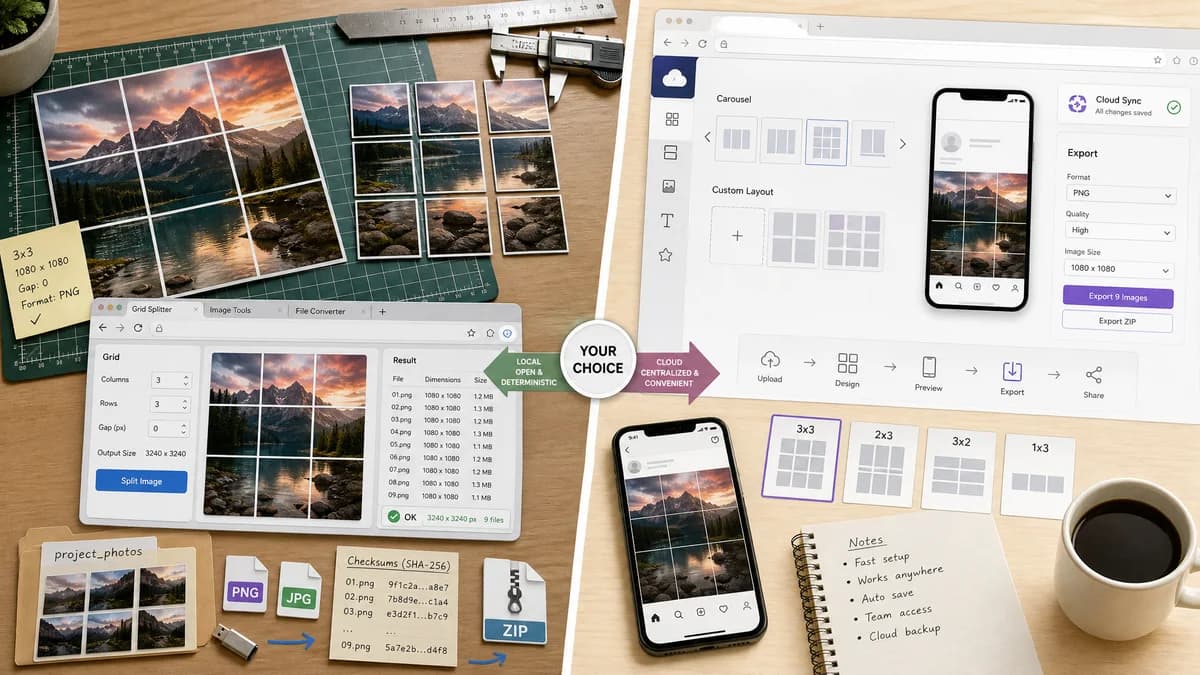
Instagram Grid Splitter is a browser-based alternative for users who need this focused result without installing a proprietary desktop app or entering a larger hosted workflow.
This research compares that workflow with DesignHub Instagram Grid Maker while keeping the outbound source link at the bottom after the analysis.
Why Instagram Grid Splitter fits
The TextFaker version lets users upload an image, choose rows and columns, pick PNG or JPEG, and download individual files or a ZIP while showing exact computed dimensions.
What DesignHub Instagram Grid Maker offers
DesignHub's Instagram Grid Maker is an online tool for splitting images into Instagram grids, carousels, or custom layouts, with rows, columns, JPG/PNG output, individual downloads, ZIP download, and mobile responsiveness.
Open alternative signals
Direct competitor type
Instagram Grid SplitterBrowser-based local splitter for TextFaker users.
DesignHub Instagram Grid MakerOnline web grid maker.
Output modes
Instagram Grid SplitterIndividual files, ZIP, file manifest, crop boxes.
DesignHub Instagram Grid MakerIndividual and ZIP downloads are described.
Dimensions
Instagram Grid SplitterShow recommended and actual generated dimensions side by side.
DesignHub Instagram Grid MakerPublishes recommended grid dimensions for square and newer layouts.
Testing
Instagram Grid SplitterExpose all output facts in deterministic UI text or data attributes.
DesignHub Instagram Grid MakerUser-facing web workflow with less emphasis on automated verification.
Decision guide
Users who want a TextFaker-hosted browser utility with transparent validation and local-first processing.
Users who already use DesignHub resources or want its published dimension recommendations and guided workflow.
Side-by-side open source alternative comparison
| Decision point | Instagram Grid Splitter | DesignHub Instagram Grid Maker | Takeaway |
|---|---|---|---|
| Rows and columns | Our workflowCustom rows and columns with hard validation limits. | Proprietary workflowDesignHub lets users choose rows and columns for grids or carousels. | TextFaker must support custom layout selection. |
| Format output | Our workflowPNG and JPEG exports with MIME and extension verification. | Proprietary workflowDesignHub describes JPG or PNG output. | Format choice is expected for this category. |
| ZIP download | Our workflowZIP download plus individual downloads and a manifest summary. | Proprietary workflowDesignHub offers individual or all-together ZIP downloads. | ZIP is required to be competitive. |
| Mobile | Our workflowResponsive mobile workflow with touch-safe controls. | Proprietary workflowDesignHub says the tool is responsive and works on mobile browsers. | Mobile support is table stakes for web competitors. |
| Testing path | Our workflowVerify a 3x4 preset returns 12 files and that output table matches generated blob dimensions. | Proprietary workflowDesignHub page is not part of TextFaker's test suite. | TextFaker can make its own deterministic guarantees visible. |
| Privacy | Our workflowState and implement browser-local processing where images stay on device. | Proprietary workflowDesignHub says no software or sign-up; page copy does not prove local-only processing in the cited snippet. | Local processing should be clearly implemented and stated. |
Detailed research
User Problem
DesignHub's page shows that users want a no-install web splitter for grids, carousels, and puzzle layouts, including mobile use and ZIP downloads.
- Rows and columns must be obvious controls.
- Recommended dimensions should be visible before upload.
- Downloads should be available as ZIP and individual tiles.
Implementation Fit
This is the closest web-tool benchmark. TextFaker matches the core flow but add a stronger deterministic output report.
- Results table: tile, row, column, x, y, width, height, file name, file size.
- Validation: source too small, unsupported format, memory limit, non-integer tile warning.
- Regression tests: fixture image, preset selection, output metadata assertions.
Positioning
Against DesignHub, the page can credibly emphasize local browser processing, repeatable validation, and simple focused controls.
Demand Evidence
DesignHub's own tool page validates broad web demand, and public Reddit threads show why users compare options: quality, login, grid updates, and correct order.
Research notes
- DesignHub is an especially close comparison because it is also a web tool and explicitly supports rows, columns, format choice, individual downloads, ZIP, and mobile use.
- TextFaker must differentiate on local processing, deterministic testability, and open-source-powered browser APIs rather than claiming to be open source.
- DesignHub's page lists both square and newer grid dimensions, reinforcing the need for preset dimension guidance.
Official source
The proprietary product link is included once here for source checking after the alternative analysis.
Official DesignHub Instagram Grid Maker source