
JPG to PNG Converter vs Adobe Express
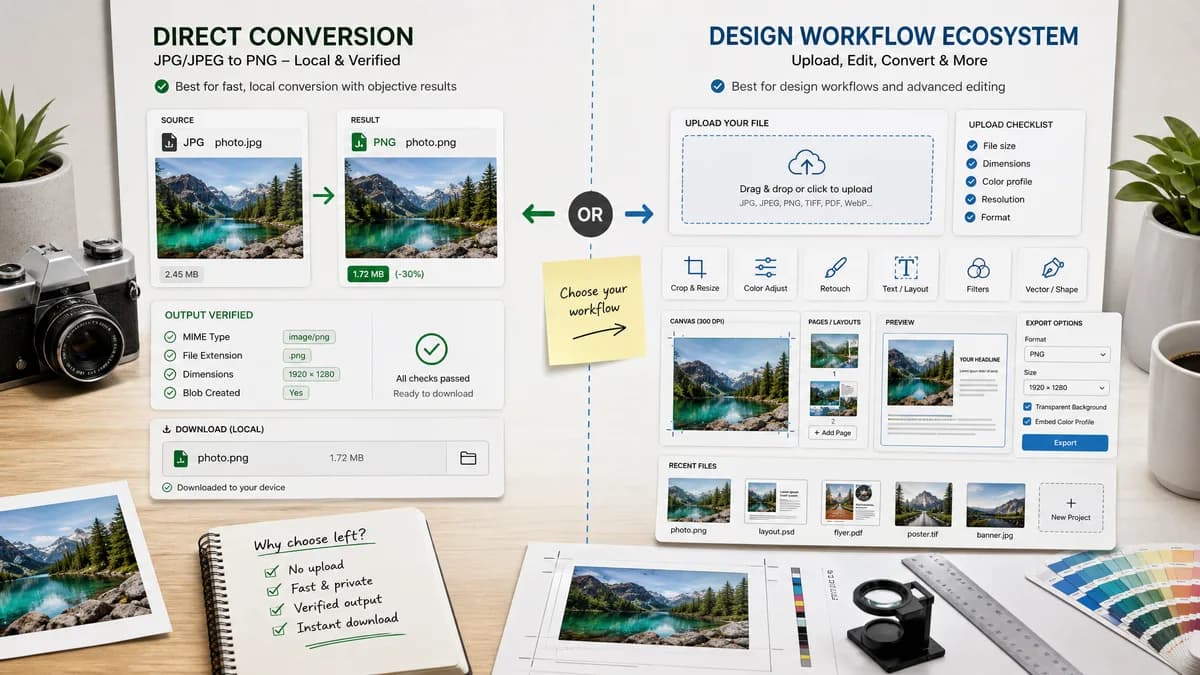
JPG to PNG Converter is the baseline in this comparison: Convert a JPG or JPEG image to PNG in your browser, then confirm the output MIME type, .png filename, dimensions, file size, and generated Blob before download.
Adobe Express offers a branded JPG to PNG conversion flow connected to Adobe's broader online design environment.
Quick verdict
TextFaker is the better fit when the user wants a direct local conversion page with objective result checks. Adobe Express is stronger when conversion is part of a broader design workflow.
How JPG to PNG Converter fits
TextFaker JPG to PNG Converter should be a focused browser-local utility for converting JPG or JPEG files to PNG with verifiable output MIME, filename extension, dimensions, and Blob creation.
How Adobe Express fits
Adobe Express provides a free upload-based converter and routes users into a larger editing and design ecosystem after conversion.
Side-by-side comparison
| Decision point | JPG to PNG Converter | Adobe Express | Takeaway |
|---|---|---|---|
| Processing model | Our workflowDesigned to run conversion in the browser without uploading the image. | Competitor workflowUses an Adobe Express upload flow before download and optional editing. | TextFaker can lead on local privacy and reduced workflow overhead. |
| Scope | Our workflowDedicated JPG/JPEG to PNG page only. | Competitor workflowConverter is part of a larger design suite. | A narrow page can answer the exact search intent more directly. |
| Validation | Our workflowShould display image/png MIME, .png filename, dimensions, and Blob status. | Competitor workflowFocuses on upload and download rather than technical validation details. | TextFaker can serve developers, QA, and careful publishers better. |
| Account pressure | Our workflowShould not require an account for the core conversion. | Competitor workflowAdobe Express commonly encourages continued editing inside the Adobe ecosystem. | TextFaker should keep the conversion complete at the utility layer. |
| Reuse path | Our workflowCan reuse the existing Image Format Converter core with a small JPG-to-PNG adapter. | Competitor workflowUses Adobe's own creative tooling stack. | Implementation can stay small and maintainable. |
| Output intent | Our workflowPNG output should be deterministic and named predictably for testing. | Competitor workflowThe page emphasizes easy download of a PNG result. | TextFaker's differentiator is transparent, repeatable output behavior. |
Use JPG to PNG Converter when
- Private browser-local JPG/JPEG to PNG conversion
- Testable output details such as image/png MIME and .png filename
- Fast utility use without opening a design editor
Use Adobe Express when
- Users already working in Adobe Express
- Converting and then editing or designing with the result
- Brand-backed consumer creative workflows
Detailed comparison
Product Positioning
Position TextFaker as a local, single-purpose JPG to PNG converter rather than a creative editor. The page should reassure users that JPG/JPEG inputs are converted in the browser and that the output can be inspected before download.
- Use language like JPG and JPEG to PNG, not a broad any-format promise.
- Avoid background removal claims because converting JPG to PNG does not create real transparency by itself.
Implementation Notes
Reuse the existing image format converter core and component patterns. Add only the smallest adapter needed to lock the target format to PNG and restrict accepted inputs to JPG/JPEG.
- Target MIME must be image/png.
- Output filename must end in .png.
- Dimensions should match the decoded source unless the shared converter intentionally exposes resizing, which this dedicated page should avoid.
SEO Angle
The competitor page targets simple conversion language. TextFaker can compete with a title and description that combine conversion, local privacy, and validation details.
- Mention browser-local conversion in the meta description.
- Mention JPG and JPEG spelling variants.
- Avoid claiming compression or transparency creation.
Testing Angle
The requested objective checks are a useful differentiator because most public converters do not expose technical output assertions.
- Validate output Blob exists.
- Validate output type is image/png.
- Validate converted dimensions equal source dimensions.
- Validate copy and download labels remain deterministic.
Research notes
- Adobe Express emphasizes fast free conversion and download, with continuation into its editor.
- The page is useful as a comparison because it is high-authority but broader than a utility-only workflow.
- No source found on the page that promises browser-local conversion, so avoid implying Adobe conversion stays on device.
Official source
The only outbound competitor link on this page is placed here for source checking after the comparison.
Official Adobe Express source