
JPG to PNG Converter vs CloudConvert
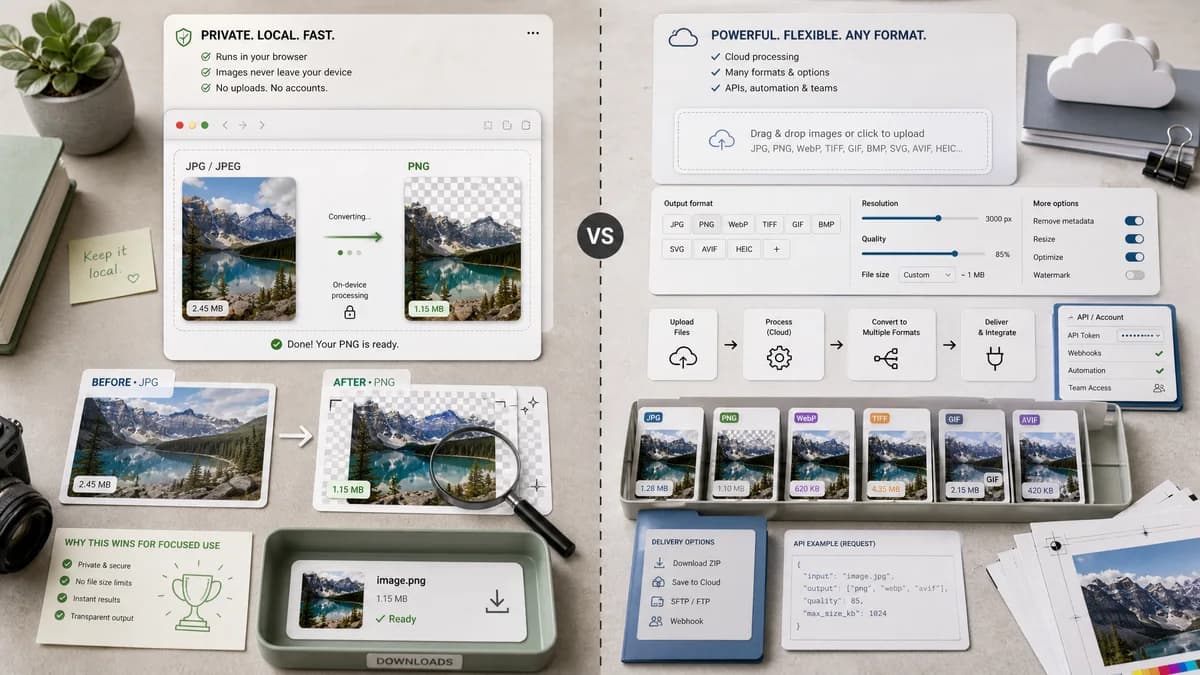
JPG to PNG Converter is the baseline in this comparison: Convert a JPG or JPEG image to PNG in your browser, then confirm the output MIME type, .png filename, dimensions, file size, and generated Blob before download.
CloudConvert offers JPG to PNG conversion inside a larger online file conversion service with configurable image options.
Quick verdict
TextFaker wins for private, focused, on-device conversion. CloudConvert wins for API-driven or broad multi-format conversion needs.
How JPG to PNG Converter fits
TextFaker should provide a no-upload JPG/JPEG to PNG converter for browser users who need a quick, inspectable PNG result.
How CloudConvert fits
CloudConvert supports many image formats and exposes options around resolution, quality, and file size, with a service model that also includes API and account-oriented workflows.
Side-by-side comparison
| Decision point | JPG to PNG Converter | CloudConvert | Takeaway |
|---|---|---|---|
| Product model | Our workflowFree browser-local utility page. | Competitor workflowCloud conversion platform with web and API surfaces. | The products serve different levels of workflow complexity. |
| Options | Our workflowShould keep JPG to PNG conversion dimension-preserving by default. | Competitor workflowOffers controls related to resolution, quality, and file size. | TextFaker should favor simplicity unless shared controls already exist cleanly. |
| Privacy | Our workflowNo upload should be required. | Competitor workflowFile selection starts a cloud conversion flow. | Privacy-sensitive users are a strong TextFaker audience. |
| Output evidence | Our workflowShow output MIME image/png, filename, dimensions, size, and Blob status. | Competitor workflowShows conversion controls and downloadable result. | TextFaker can make the result more auditable. |
| Developer needs | Our workflowBest as a human-facing browser tool. | Competitor workflowBetter suited when an API is needed. | Do not try to compete with API infrastructure. |
| Implementation complexity | Our workflowSmall adapter over existing image-format-converter logic. | Competitor workflowFull cloud service with server-side conversion infrastructure. | TextFaker should not duplicate server-side architecture. |
Use JPG to PNG Converter when
- Private local conversion
- One-off browser use
- Users who need visible output checks
Use CloudConvert when
- API or automation workflows
- Cloud conversion across many formats
- Users needing resize or quality controls during conversion
Detailed comparison
Market Role
CloudConvert is a broad conversion service. TextFaker should be positioned as a precise local utility, not as a replacement for cloud APIs.
- Avoid API-oriented claims.
- Avoid multi-format cloud language.
Feature Scope
The dedicated page should lock the target to PNG and keep user decisions minimal. Quality sliders are less relevant for PNG than for lossy outputs.
- Remove target format picker if the shared component allows it.
- Use source dimensions as output dimensions.
- Show size changes after conversion.
User Trust
A clear no-upload statement matters because users often convert personal photos, screenshots, or client images.
- State that conversion happens in the browser.
- State that files are not sent to a server when implemented that way.
Objective Validation
TextFaker's required checks are especially useful against cloud converters that do not expose the technical output details in page copy.
- Assert image/png in tests.
- Assert .png naming.
- Assert Blob generation.
- Assert dimension preservation.
Research notes
- CloudConvert's official page confirms support for JPG to PNG and options for resolution, quality, and file size.
- Its API positioning makes it an adjacent competitor rather than a pure consumer-only tool.
- TextFaker should not add unnecessary options just to match CloudConvert.
Official source
The only outbound competitor link on this page is placed here for source checking after the comparison.
Official CloudConvert source