
Open Source Alternatives to Adobe Express
JPG to PNG Converter is a browser-based alternative for users who need this focused result without installing a proprietary desktop app or entering a larger hosted workflow.
This research compares that workflow with Adobe Express while keeping the outbound source link at the bottom after the analysis.
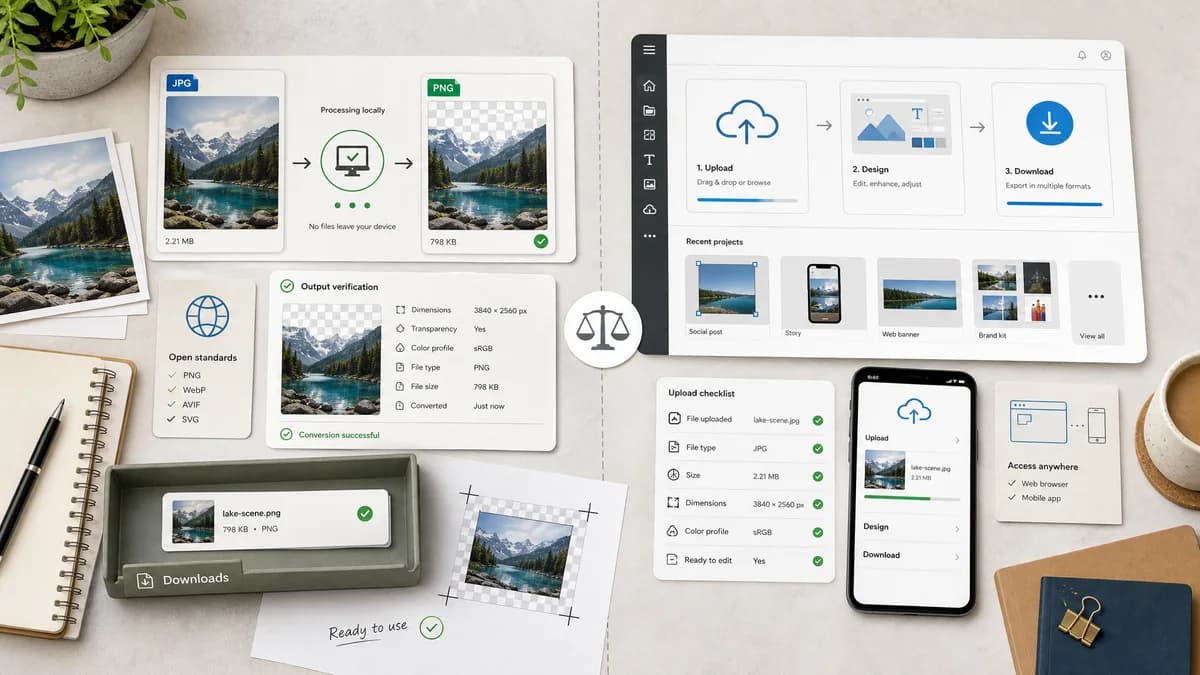
Why JPG to PNG Converter fits
TextFaker can provide a focused conversion utility without a design-suite workflow: select a JPG, generate PNG locally, verify output details, and download.
What Adobe Express offers
Adobe Express offers a free JPG to PNG converter inside a broader creative suite, with browser and mobile access and an upload-to-download workflow.
Open alternative signals
Workflow size
JPG to PNG ConverterFocused utility page for one conversion.
Adobe ExpressCreative suite with converter features.
Local handling
JPG to PNG ConverterDesigned for browser-local conversion.
Adobe ExpressOnline service workflow.
Output proof
JPG to PNG ConverterShows Blob, MIME, extension, and dimensions.
Adobe ExpressProvides downloadable PNG output.
Editing features
JPG to PNG ConverterMinimal conversion-focused controls.
Adobe ExpressBroader image editing and design capabilities.
Decision guide
Quick format conversion when the user does not need templates, design editing, or creative project management.
Users who want PNG conversion as part of a broader creative workflow with design assets, editing, effects, and Adobe ecosystem tools.
Side-by-side open source alternative comparison
| Decision point | JPG to PNG Converter | Adobe Express | Takeaway |
|---|---|---|---|
| Primary job | Our workflowConvert JPG/JPEG to PNG and validate output. | Proprietary workflowConvert images as part of Adobe Express creation workflows. | TextFaker should stay utility-first. |
| Complexity | Our workflowSingle-screen conversion with deterministic labels. | Proprietary workflowBroader creative interface and account ecosystem may be involved. | A lean path matters for users who only need format conversion. |
| Transparency handling | Our workflowPreserve pixels from decoded JPEG; do not imply automatic transparency. | Proprietary workflowAdobe also markets PNG use cases such as transparent backgrounds in related tools. | TextFaker copy should be precise about what simple conversion can and cannot do. |
| Testing | Our workflowObjective assertions for MIME, extension, dimensions, and Blob. | Proprietary workflowPublic converter flow centered on user download. | TextFaker can make verifiable behavior a feature. |
| Integration | Our workflowFits TextFaker's browser tools registry and shared image converter code. | Proprietary workflowFits Adobe Express's creative suite. | Different products serve different workflow depths. |
| Best audience | Our workflowDevelopers, designers, and privacy-conscious users needing a quick PNG export. | Proprietary workflowCreators who want conversion plus design editing. | Target practical conversion intent, not full design creation. |
Detailed research
Positioning
Adobe Express is a strong name for casual image conversion because it bundles conversion with creative editing. TextFaker should position the tool as a faster, narrower utility for users who do not want to enter a design workspace.
- Emphasize local file handling.
- Make output facts visible immediately after conversion.
- Avoid creative-suite language unless comparing workflow depth.
Implementation Notes
A dedicated configuration can set accepted inputs to JPEG and target format to PNG while keeping the shared component and core conversion library intact.
- Reuse existing conversion status states.
- Use deterministic download copy such as Download PNG.
- Use copy text that includes filename, dimensions, MIME, and size.
- Keep visual patterns consistent with the existing image conversion family.
Content Notes
The page should clarify that converting a JPG to PNG preserves raster dimensions and changes container/encoding; it does not recover lost JPEG detail.
- Explain that PNG is useful for crisp graphics and workflows that prefer lossless output.
- Warn that PNG output can be larger than the JPG source.
- Avoid promising background removal.
Comparison Angle
The useful comparison is not whether TextFaker replaces Adobe Express. It is whether a full creative suite is necessary for a single local conversion.
- Best for TextFaker: quick private conversion.
- Best for Adobe Express: conversion plus editing and design assets.
- Keep the tone factual.
Research notes
- The official Adobe Express JPG to PNG page describes upload, conversion, and PNG download in a browser or mobile workflow.
- Adobe Express emphasizes ease of use and high-quality PNG output as part of a creative toolset.
- For TextFaker, the strongest alternative story is a smaller browser-based utility with objective output checks, not a full creative suite replacement.
Official source
The proprietary product link is included once here for source checking after the alternative analysis.
Official Adobe Express source