
Open Source Alternatives to Online-Convert
JPG to PNG Converter is a browser-based alternative for users who need this focused result without installing a proprietary desktop app or entering a larger hosted workflow.
This research compares that workflow with Online-Convert while keeping the outbound source link at the bottom after the analysis.
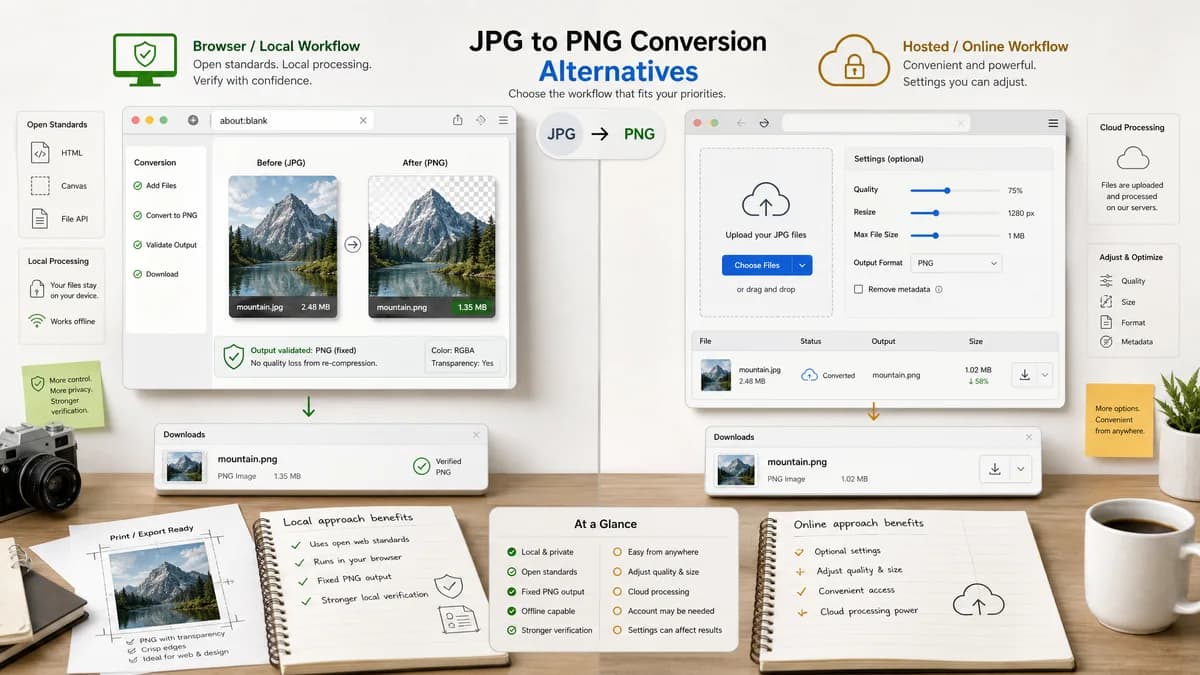
Why JPG to PNG Converter fits
TextFaker can turn the general image conversion core into a dedicated JPG to PNG page with fewer settings and stronger local verification.
What Online-Convert offers
Online-Convert provides a hosted JPG to PNG converter with optional settings such as quality and size changes.
Open alternative signals
Settings approach
JPG to PNG ConverterFixed PNG output with preservation-oriented defaults.
Online-ConvertOptional quality and resize controls.
Processing
JPG to PNG ConverterBrowser-local conversion.
Online-ConvertHosted online conversion.
Validation
JPG to PNG ConverterMIME, extension, Blob, and dimensions shown after conversion.
Online-ConvertConversion settings and download result.
Audience
JPG to PNG ConverterUsers who want exact format change.
Online-ConvertUsers who want format change plus optional adjustments.
Decision guide
Users who want a direct local format conversion without resizing or quality settings.
Users who want hosted conversion with optional resize or tuning controls in the same flow.
Side-by-side open source alternative comparison
| Decision point | JPG to PNG Converter | Online-Convert | Takeaway |
|---|---|---|---|
| Default behavior | Our workflowPreserve dimensions by default. | Proprietary workflowAllows optional size changes. | Dimension preservation should be explicit and test-covered. |
| Output type | Our workflowAlways PNG for this page. | Proprietary workflowSpecific JPG to PNG route inside broader image converter. | The TextFaker page can be very clear about expected output. |
| User confidence | Our workflowShow generated Blob and MIME type. | Proprietary workflowShows converter controls and final download. | Technical validation differentiates TextFaker. |
| Feature restraint | Our workflowAvoid extra settings unless inherited cleanly from the shared component. | Proprietary workflowOffers optional settings directly on the converter page. | A smaller UI is a valid advantage for simple tasks. |
| Privacy model | Our workflowLocal conversion in the browser. | Proprietary workflowOnline hosted conversion page. | Use privacy as a factual local-processing claim. |
| Testing | Our workflowCan validate deterministic UI states in project tests. | Proprietary workflowExternal service behavior not under project control. | Internal testability supports reliability. |
Detailed research
Positioning
Online-Convert gives users more knobs. TextFaker should position itself as a preservation-oriented converter: keep the dimensions, change the output format to PNG, and show exactly what was generated.
- Highlight preserved dimensions.
- Use plain language around fixed output.
- Do not add resize controls just to match competitors.
Implementation Notes
If the shared converter already includes quality controls, the dedicated JPG to PNG variant should hide irrelevant settings. PNG export quality arguments are not consistently meaningful in the same way JPEG quality is.
- Target image/png directly.
- Preserve canvas width and height from decoded input.
- Use a PNG filename derived from source basename.
- Show unsupported file errors for non-JPEG inputs.
Content Notes
The copy should explain that PNG is a lossless raster format but converting from a JPEG does not restore information previously lost by JPEG compression.
- Mention that visual dimensions should remain the same.
- Mention that file size may increase.
- Mention that original file remains unchanged.
Research Implication
Because Online-Convert exposes optional settings, TextFaker's alternative page should be explicit about what it intentionally does not do in the narrow converter.
- No cloud upload workflow.
- No unrelated file types on this page.
- No background removal promise.
Research notes
- The official Online-Convert JPG to PNG page describes converting JFIF/JPG to Portable Network Graphics.
- The page exposes optional settings such as quality and width and height resizing controls.
- TextFaker should keep the dedicated tool simpler unless the existing shared converter already supports safe optional resizing.
Official source
The proprietary product link is included once here for source checking after the alternative analysis.
Official Online-Convert source