
JPG to WebP Converter vs CloudConvert
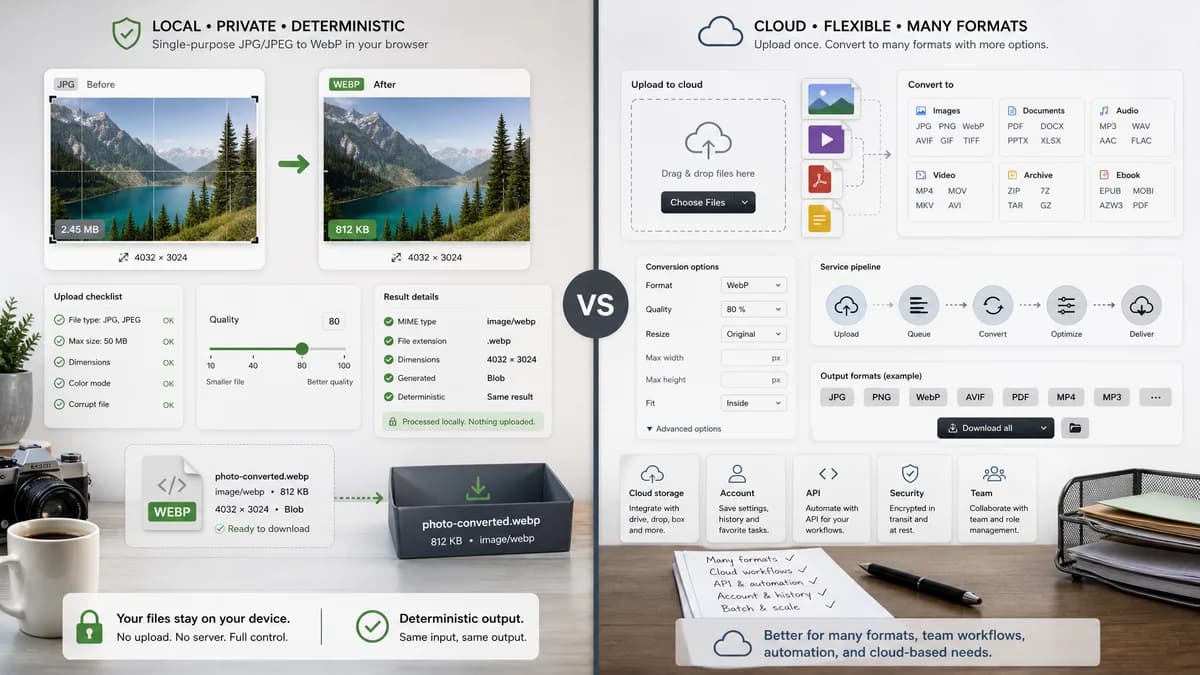
JPG to WebP Converter is the baseline in this comparison: Convert a JPG or JPEG image to WebP in your browser, adjust WebP quality, and verify the output MIME type, .webp filename, dimensions, file size, and generated Blob before download.
CloudConvert is a broad online file conversion service with a direct JPG to WEBP converter and adjustable conversion options.
Quick verdict
CloudConvert is better for users who need a general cloud conversion account, API, or many non-image formats. TextFaker can win the single-purpose privacy and deterministic validation use case.
How JPG to WebP Converter fits
TextFaker should focus on a narrower browser-local JPG/JPEG to WebP workflow with explicit verification of image/webp MIME output, .webp filename, preserved dimensions, generated Blob, deterministic copy/download text, and WebP quality slider behavior.
How CloudConvert fits
CloudConvert supports many image formats and offers options around resolution, quality, and file size, but the workflow is part of a cloud conversion service rather than a dedicated local-only browser tool.
Side-by-side comparison
| Decision point | JPG to WebP Converter | CloudConvert | Takeaway |
|---|---|---|---|
| Processing model | Our workflowBrowser-local conversion using the shared image format converter core | Competitor workflowCloud conversion service | TextFaker should emphasize that selected JPG files do not need to leave the browser. |
| Scope | Our workflowDedicated JPG/JPEG to WebP adapter and page | Competitor workflowMany file and image format converters in one platform | CloudConvert is broader; TextFaker can be clearer for this one conversion. |
| Validation | Our workflowShow image/webp, .webp filename, preserved dimensions, and generated Blob checks | Competitor workflowPresents conversion controls and download flow, but not a local validation panel | Validation is a differentiator for implementation and SEO copy. |
| Quality control | Our workflowWebP quality slider tied directly to output Blob generation | Competitor workflowQuality and size options are available in the converter | Both can expose quality, but TextFaker should make slider effects testable and visible. |
| Account surface | Our workflowNo account surface needed for the dedicated tool | Competitor workflowPart of a sign-in and pricing-backed service | TextFaker should keep the first-use workflow immediate. |
| Download text | Our workflowDeterministic labels such as Download WebP and Copy summary | Competitor workflowService-specific conversion and download states | Stable UI text supports regression tests and content consistency. |
Use JPG to WebP Converter when
- Private one-off JPG/JPEG to WebP conversion in the browser
- QA workflows that need visible MIME, extension, Blob, and dimension checks
- A lightweight SEO page dedicated only to JPG/JPEG to WebP
Use CloudConvert when
- Users already using CloudConvert for many file formats
- Cloud-based batch or API conversion workflows
- Conversions that need many input and output file categories
Detailed comparison
Positioning
The comparison page should frame TextFaker as the narrow local converter for people who only need JPG or JPEG images converted into WebP files.
- Avoid claiming CloudConvert lacks security; focus on the difference between local browser processing and cloud conversion.
- Mention the existing TextFaker image conversion family for consistency.
Feature Gaps
CloudConvert has broader format coverage and account/API workflows that TextFaker does not need to match for this page.
- Do not position TextFaker as a universal file converter on this page.
- Keep multi-format conversion calls secondary and link internally to Image Format Converter when available.
Validation Angle
TextFaker can turn implementation details into user-facing trust signals by reporting WebP MIME, extension, dimensions, and Blob status after conversion.
- Include generated JPEG fixture coverage in tests.
- Assert output filename ends in .webp.
SEO Notes
The page should target direct queries like JPG to WebP, JPEG to WebP, and convert JPG to WebP online while avoiding overlap with PNG to JPG or JPG to PNG pages.
- Use JPG/JPEG synonyms in headings and metadata.
- Keep WebP-specific quality copy separate from PNG lossless language.
Research notes
- CloudConvert's official page describes JPG to WEBP conversion and options for resolution, quality, and file size.
- This is a direct competitor, not an open-source alternative.
- The comparison should not place the competitor URL in body copy outside competitorUrl.
Official source
The only outbound competitor link on this page is placed here for source checking after the comparison.
Official CloudConvert source