
JPG to WebP Converter vs FreeConvert
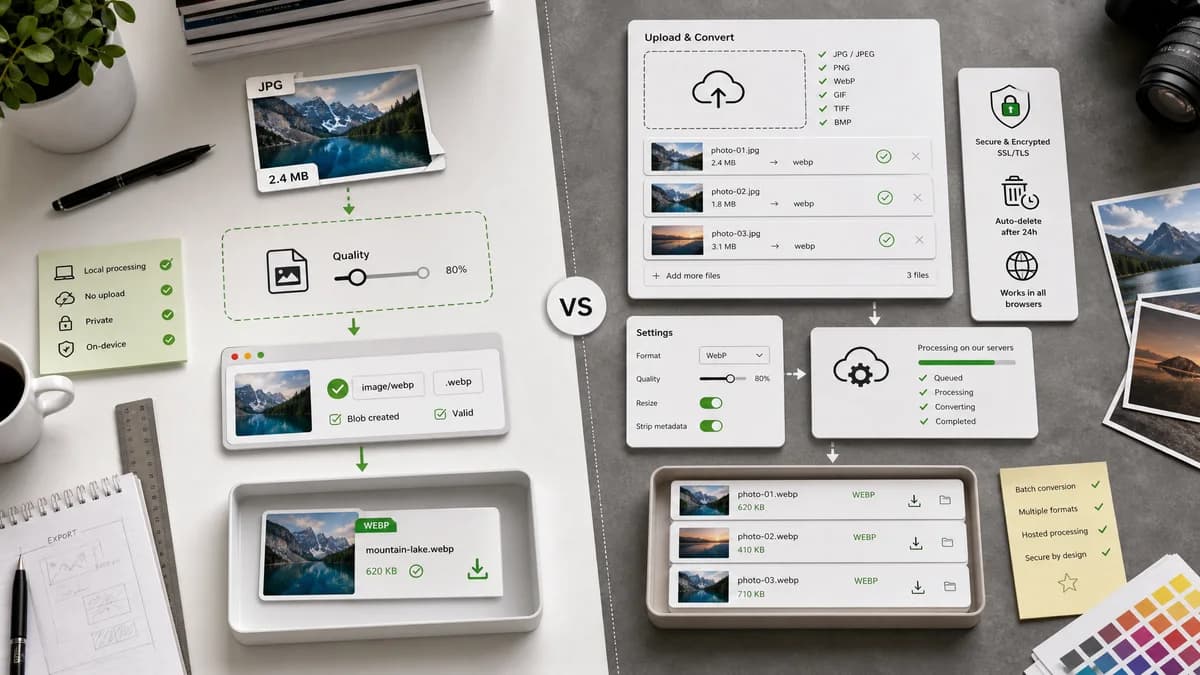
JPG to WebP Converter is the baseline in this comparison: Convert a JPG or JPEG image to WebP in your browser, adjust WebP quality, and verify the output MIME type, .webp filename, dimensions, file size, and generated Blob before download.
FreeConvert offers a direct JPG to WebP converter with batch conversion and optional advanced settings.
Quick verdict
FreeConvert is well-suited for broad online conversion with hosted processing. TextFaker should own the no-upload local validation niche.
How JPG to WebP Converter fits
TextFaker should provide the simpler local path: drop a JPG/JPEG, choose WebP quality, generate a browser Blob, verify image/webp and .webp, then download with stable UI text.
How FreeConvert fits
FreeConvert highlights browser availability, batch conversion, file security messaging, SSL protection, automatic deletion, and conversion settings.
Side-by-side comparison
| Decision point | JPG to WebP Converter | FreeConvert | Takeaway |
|---|---|---|---|
| File handling | Our workflowBrowser-local Blob generation | Competitor workflowOnline upload conversion with security and deletion messaging | Different privacy model; TextFaker should state local processing plainly. |
| Batch conversion | Our workflowCan support the family pattern if existing converter core supports it, but should not overpromise without implementation | Competitor workflowOfficial page says batch conversion is available | FreeConvert may be stronger for hosted batch jobs. |
| Advanced settings | Our workflowKeep a direct WebP quality slider as the primary setting | Competitor workflowAdvanced settings are part of the converter surface | TextFaker should favor clarity over a large settings panel. |
| Validation | Our workflowMIME, extension, dimensions, generated Blob, and text labels are explicit acceptance criteria | Competitor workflowConversion result is downloaded after hosted processing | TextFaker can expose implementation proof that competitors usually hide. |
| Page focus | Our workflowJPG/JPEG to WebP only | Competitor workflowLarge converter ecosystem | TextFaker page can be tighter and less distracting. |
| Testing fit | Our workflowQuality slider can be tested locally against output type and generated Blob | Competitor workflowExternal service behavior is outside project tests | TextFaker has a stronger deterministic testing story. |
Use JPG to WebP Converter when
- No-upload JPG/JPEG to WebP conversion
- Developers and QA users who want visible output details
- A dedicated page that mirrors JPG to PNG and PNG to JPG adapter patterns
Use FreeConvert when
- Users who want hosted batch conversion
- Users who value advanced hosted converter settings
- Users already using FreeConvert for multiple media conversions
Detailed comparison
Implementation Fit
FreeConvert's feature set confirms that users expect batch capability and quality settings, but the TextFaker version should first validate the core single-file behavior objectively.
- Reuse src/lib/image-format-converter.ts.
- Follow the dedicated converter adapter pattern from JPG to PNG and PNG to JPG.
Privacy Copy
FreeConvert uses hosted security language. TextFaker should avoid arguing with that and instead describe local processing in the browser.
- Use no-upload language only if the implementation never sends files to a server.
- Place privacy copy near the drop zone and results panel.
Quality Slider
WebP output is quality-sensitive, so the slider should have visible before/after size feedback where possible.
- Test low and high quality settings produce valid image/webp Blobs.
- Avoid exact compression savings guarantees.
SEO Page
The dedicated page should avoid generic image converter language in its primary title and meta description.
- Suggested title direction: JPG to WebP Converter Online - Convert JPG and JPEG to WebP Locally.
- Suggested description should mention image/webp, .webp, dimensions, Blob, and quality control.
Research notes
- FreeConvert's official page describes batch conversion, browser availability, security messaging, and automatic file deletion after a few hours.
- This is a direct proprietary competitor.
- No unsupported claim should be made about whether FreeConvert converts locally or server-side beyond its upload-oriented wording.
Official source
The only outbound competitor link on this page is placed here for source checking after the comparison.
Official FreeConvert source