
JPG to WebP Converter vs Online-Convert
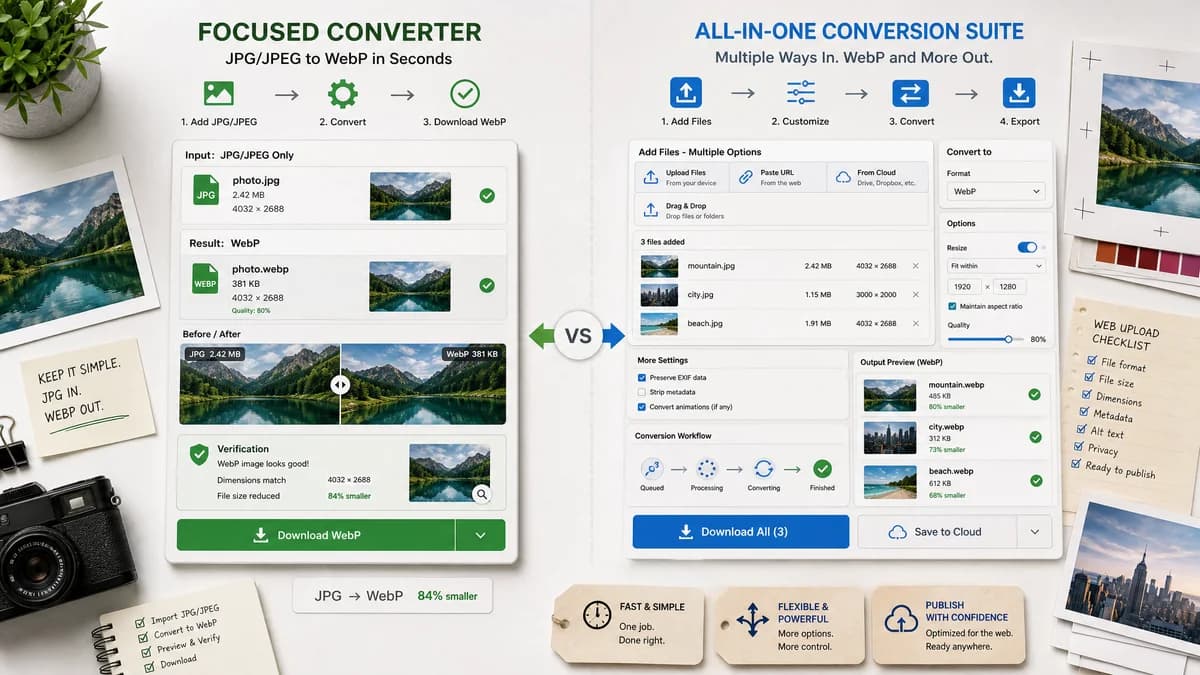
JPG to WebP Converter is the baseline in this comparison: Convert a JPG or JPEG image to WebP in your browser, adjust WebP quality, and verify the output MIME type, .webp filename, dimensions, file size, and generated Blob before download.
Online-Convert offers a general image-to-WebP converter with file upload, URL input, and optional settings such as resizing.
Quick verdict
Online-Convert is better for users needing broad online conversion options and URL-based inputs. TextFaker should focus on local JPG/JPEG uploads and transparent result checks.
How JPG to WebP Converter fits
TextFaker should be a dedicated local JPG/JPEG to WebP converter that avoids broad format complexity and makes WebP output verification visible.
How Online-Convert fits
Online-Convert is a broad conversion service with a WebP target page, optional conversion settings, and many upload/input routes.
Side-by-side comparison
| Decision point | JPG to WebP Converter | Online-Convert | Takeaway |
|---|---|---|---|
| Input methods | Our workflowLocal JPG/JPEG file selection or drop zone | Competitor workflowFile upload and URL-style input options are part of the page | Online-Convert is broader; TextFaker is more private and local. |
| Output focus | Our workflowOnly image/webp output for this page | Competitor workflowConvert to WebP from many inputs | TextFaker can reduce ambiguity for users. |
| Dimension behavior | Our workflowPreserve dimensions and validate them | Competitor workflowOptional resize settings are visible | TextFaker should avoid resize side effects. |
| Quality slider | Our workflowA direct slider controlling WebP Blob creation | Competitor workflowOptional settings vary by converter page | TextFaker should make quality behavior easier to test. |
| Privacy messaging | Our workflowLocal browser conversion if implemented as planned | Competitor workflowOnline service workflow | Different trust model. |
| Registry fit | Our workflowMerge-ready config for TextFaker tool registry | Competitor workflowExternal multi-tool conversion taxonomy | TextFaker's page should fit internal navigation and related tools. |
Use JPG to WebP Converter when
- Browser-local JPG/JPEG conversion
- No URL-fetch or cloud input requirements
- Users who need output MIME and Blob confirmation
Use Online-Convert when
- Users who want URL-based source input
- Users who need optional resize settings
- Users converting many file types online
Detailed comparison
Intent Split
Online-Convert targets 'convert to WebP' broadly. TextFaker should target 'JPG to WebP' and 'JPEG to WebP' specifically.
- Use dedicated slug and metadata.
- Avoid indexing as a generic WebP converter page.
Feature Boundary
URL input and resize controls would require extra validation and privacy explanation. They are not necessary for the fourth browser-local image conversion family tool.
- Keep file input local.
- Keep output dimensions preserved.
Trust Design
The result panel should make the technical output obvious, since users often need to know whether they received a true WebP file.
- Show MIME type image/webp.
- Show filename extension .webp.
Testing Notes
Online-Convert's optional settings reinforce the need to test TextFaker's simpler contract.
- Test quality slider behavior separately from dimension preservation.
- Test copy text independently from file download.
Research notes
- Online-Convert's official page is a general image-to-WebP converter with optional resize settings visible in the crawled content.
- This is a direct but broader proprietary competitor.
- TextFaker should not include URL conversion unless separately scoped.
Official source
The only outbound competitor link on this page is placed here for source checking after the comparison.
Official Online-Convert source