
JPG to WebP Converter vs Pixelied
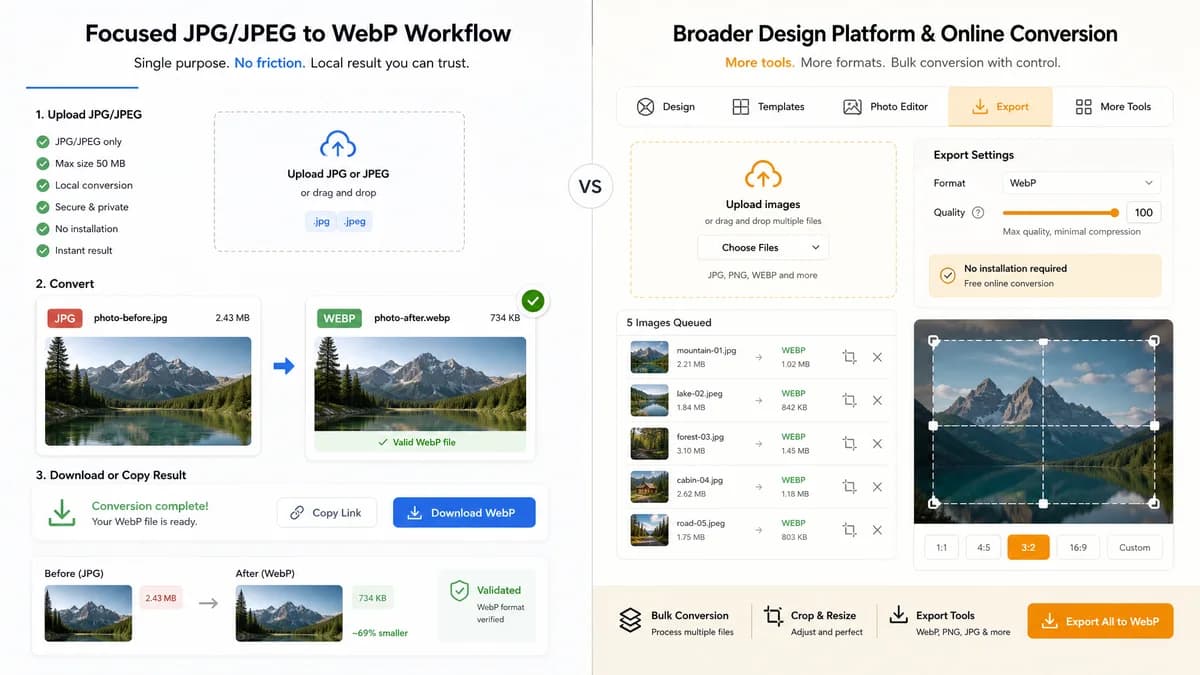
JPG to WebP Converter is the baseline in this comparison: Convert a JPG or JPEG image to WebP in your browser, adjust WebP quality, and verify the output MIME type, .webp filename, dimensions, file size, and generated Blob before download.
Pixelied provides a JPG to WEBP converter with bulk conversion and settings for image quality.
Quick verdict
Pixelied is attractive for users who want a design-platform converter. TextFaker should be better for local, testable, single-purpose conversion with less surrounding product surface.
How JPG to WebP Converter fits
TextFaker should provide a narrower no-friction converter page with strict JPG/JPEG input, WebP output validation, and deterministic copy/download UI.
How Pixelied fits
Pixelied emphasizes free online conversion, no installation, bulk conversion, and setting quality to 100 for minimal compression in its FAQ.
Side-by-side comparison
| Decision point | JPG to WebP Converter | Pixelied | Takeaway |
|---|---|---|---|
| Tool context | Our workflowUtility inside TextFaker's shared registry | Competitor workflowConverter inside a design platform ecosystem | Different product surroundings affect user expectations. |
| Quality setting | Our workflowWebP quality slider behavior is an explicit requirement | Competitor workflowFAQ describes setting image quality to 100 for less compression | Both should address quality; TextFaker should validate it locally. |
| Bulk support | Our workflowShould follow existing local converter patterns if available | Competitor workflowFAQ describes bulk conversion and zip download | Pixelied may lead for bulk packaging. |
| Output validation | Our workflowMust show image/webp and .webp output | Competitor workflowDownload converted files after conversion | TextFaker can be more transparent about output internals. |
| Privacy model | Our workflowBrowser-local conversion is the planned differentiator | Competitor workflowOnline conversion platform | TextFaker should make local processing prominent. |
| SEO focus | Our workflowDedicated JPG/JPEG to WebP only | Competitor workflowPart of JPG converter taxonomy | Both are direct; TextFaker should make browser-local wording sharper. |
Use JPG to WebP Converter when
- Users who want a minimal conversion page
- QA users checking MIME and dimensions
- TextFaker's image conversion family consistency
Use Pixelied when
- Users who want a broader design platform
- Bulk conversion with ZIP-style output
- People who want simple settings inside an online converter
Detailed comparison
Direct Competitor
Pixelied has a direct JPG to WEBP page and covers bulk conversion and quality in page FAQ content.
- TextFaker should not ignore bulk and quality expectations.
- Keep the first release focused on validated local output.
Design Platform Difference
Pixelied may attract users who want editing or design workflows after conversion. TextFaker should stay a conversion utility.
- Avoid adding unrelated image editing controls.
- Keep result metadata and download central.
Quality Copy
Quality 100 does not mean mathematically lossless WebP in all browser encoders, so TextFaker copy should avoid 'without losing quality' unless technically supported.
- Use 'higher quality' rather than 'lossless' for slider copy.
- If adding lossless WebP later, make it a separate setting.
Generated Images
Test fixtures should verify both low and high slider values still produce valid WebP files.
- Do not require exact byte size across browsers unless the encoder is deterministic in the test environment.
- Validate MIME, extension, dimensions, and Blob existence.
Research notes
- Pixelied's official page describes JPG to WEBP conversion, quality settings, bulk conversion, and no installation requirements.
- This is a direct proprietary competitor.
- Use neutral wording around quality because browser and service encoders can differ.
Official source
The only outbound competitor link on this page is placed here for source checking after the comparison.
Official Pixelied source