
JPG to WebP Converter vs toWebP.io
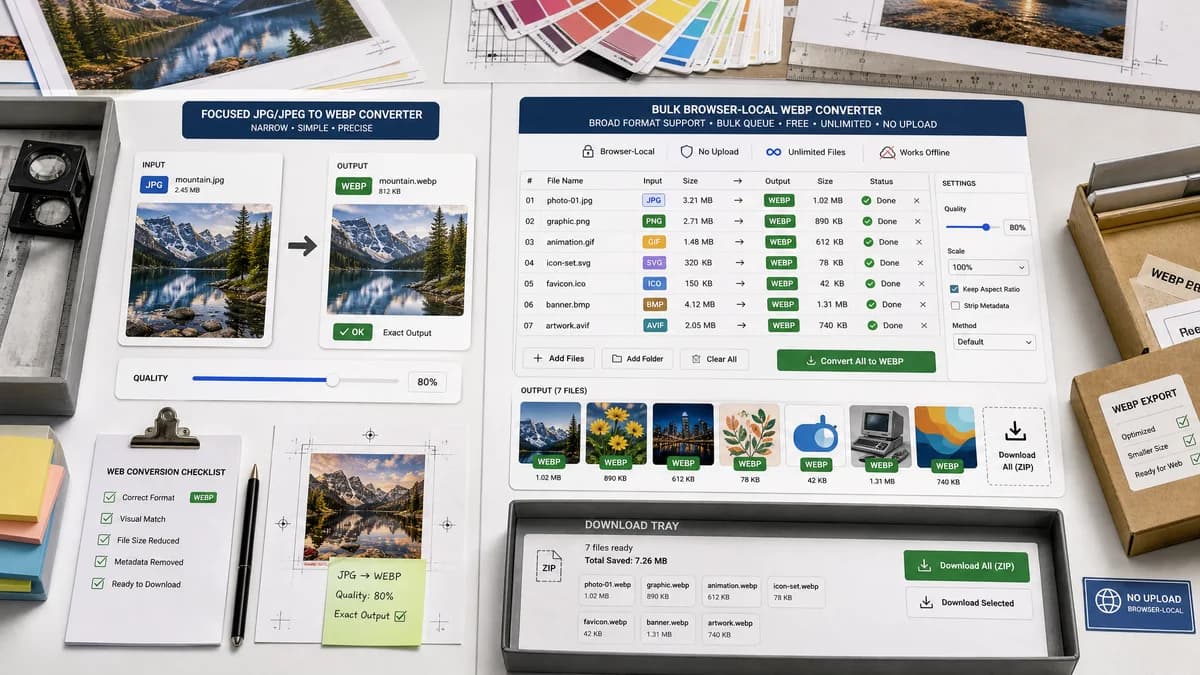
JPG to WebP Converter is the baseline in this comparison: Convert a JPG or JPEG image to WebP in your browser, adjust WebP quality, and verify the output MIME type, .webp filename, dimensions, file size, and generated Blob before download.
toWebP.io is a browser-local bulk converter for converting several image formats, including JPG, PNG, GIF, SVG, ICO, BMP, and AVIF, to WebP.
Quick verdict
toWebP.io is likely stronger for broad bulk-to-WebP workflows. TextFaker should focus on a simpler, testable JPG/JPEG-specific page and registry-ready SEO content.
How JPG to WebP Converter fits
TextFaker should stay narrower: JPG/JPEG in, WebP out, with exact output checks and a quality slider that follows the shared converter adapter pattern.
How toWebP.io fits
toWebP.io emphasizes free, unlimited, no-upload browser conversion with quality and scale controls and a bulk queue interface.
Side-by-side comparison
| Decision point | JPG to WebP Converter | toWebP.io | Takeaway |
|---|---|---|---|
| Source formats | Our workflowJPG/JPEG only for the dedicated page | Competitor workflowMultiple source formats to WebP | toWebP.io is broader; TextFaker is more intent-specific. |
| Bulk workflow | Our workflowCan follow existing TextFaker patterns but should prioritize deterministic single-route conversion | Competitor workflowQueue-based bulk conversion is a central feature | toWebP.io is a strong benchmark for batch UX. |
| Quality controls | Our workflowWebP quality slider required for output behavior tests | Competitor workflowVisible quality choices from 10% to 100% in the crawled page | Both should expose quality; TextFaker should tie it to output validation. |
| Resize controls | Our workflowPreserve dimensions by default and validate that preservation | Competitor workflowScale controls are visible | TextFaker should avoid accidental resizing on this page. |
| Privacy model | Our workflowBrowser-local conversion | Competitor workflowOfficial page says no uploads and files stay private | Privacy is table stakes against this competitor. |
| SEO specificity | Our workflowDedicated JPG/JPEG to WebP page | Competitor workflowGeneral bulk images to WebP page | TextFaker can target narrower search terms. |
Use JPG to WebP Converter when
- Users who only need JPG/JPEG to WebP
- Result validation with MIME, extension, dimensions, and Blob status
- Consistent TextFaker conversion family UX
Use toWebP.io when
- Bulk converting mixed image formats to WebP
- Users who want quality and scale controls in one queue
- No-upload conversion across several source formats
Detailed comparison
Competitive Risk
toWebP.io directly addresses browser-local WebP conversion and quality controls, so TextFaker needs a clear reason to exist beyond 'local'.
- Lead with JPG/JPEG-specific simplicity.
- Expose verification results as a differentiator.
Scope Decision
Adding scale controls would increase overlap and test surface. For this future tool, preserved dimensions are a stated validation requirement, so resize controls should be absent or clearly separate.
- Default behavior must preserve dimensions.
- Tests should fail if output dimensions change unexpectedly.
UX Notes
A bulk queue can be useful but may distract from a dedicated SEO route. If the existing converter adapter already supports multiple files, keep the page copy focused on each output's verification.
- Use stable per-file result rows.
- Keep the download label deterministic.
Generated Images
Generated image fixtures should include dimension assertions because toWebP.io offers scaling and TextFaker's planned behavior is dimension preservation.
- Assert width and height remain unchanged.
- Assert output extension is .webp.
Research notes
- toWebP.io's official page describes browser-local, no-upload bulk conversion and visible quality/scale controls.
- This is a direct local-first competitor.
- TextFaker should not copy the scale-control promise because preserved dimensions are a stated requirement.
Official source
The only outbound competitor link on this page is placed here for source checking after the comparison.
Official toWebP.io source