
Open Source Alternatives to ImageKit
JPG to WebP Converter is a browser-based alternative for users who need this focused result without installing a proprietary desktop app or entering a larger hosted workflow.
This research compares that workflow with ImageKit while keeping the outbound source link at the bottom after the analysis.
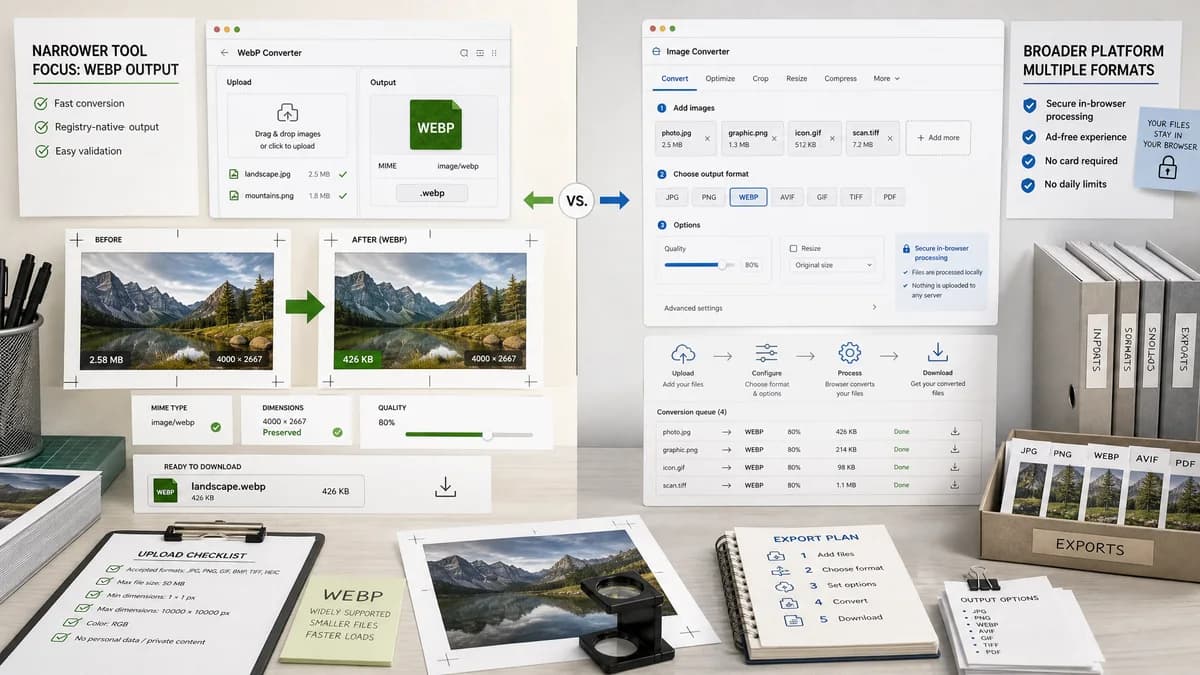
Why JPG to WebP Converter fits
TextFaker can serve the same quick conversion intent with a narrower, registry-native tool. It should make output checks the hero of the experience: a generated WebP Blob, image/webp MIME, .webp filename, preserved dimensions, and quality slider feedback.
What ImageKit offers
ImageKit’s JPG to WebP page offers a secure browser-side format converter, accepts multiple media/image formats, and promotes an ad-free experience with no credit card and no daily limits.
Open alternative signals
Browser-side overlap
JPG to WebP ConverterBrowser-based converter with explicit QA result panel
ImageKitBrowser-side format converter tied to ImageKit brand and broader media tooling
Accepted formats
JPG to WebP ConverterJPG/JPEG only on this dedicated page
ImageKitAccepts many image and media formats on the converter page
Output diagnostics
JPG to WebP ConverterMIME, filename, dimensions, Blob, size, copy text, and download text
ImageKitFast format conversion experience
Platform path
JPG to WebP ConverterUtility page within TextFaker
ImageKitImage/video optimization and delivery platform
Decision guide
Best for TextFaker users who need a straightforward JPEG-to-WebP export with copyable output diagnostics and no broader media delivery setup.
Best for teams that may graduate from conversion into ImageKit’s broader image/video optimization, transformation, and delivery platform.
Side-by-side open source alternative comparison
| Decision point | JPG to WebP Converter | ImageKit | Takeaway |
|---|---|---|---|
| Scope | Our workflowFocused JPG/JPEG to WebP conversion. | Proprietary workflowImageKit converter accepts many formats and sits near a broader platform. | TextFaker should avoid becoming a second general converter page. |
| Execution | Our workflowBrowser-based and open-source-powered with local output checks. | Proprietary workflowImageKit describes secure browser-side conversion. | Validation, not just browser-side execution, should differentiate TextFaker. |
| Output proof | Our workflowShow generated Blob and image/webp MIME directly. | Proprietary workflowImageKit emphasizes instant conversion and limits messaging. | TextFaker can appeal to QA and developer handoff users. |
| Quality slider | Our workflowQuality control should be first-class for WebP output. | Proprietary workflowImageKit page focuses on conversion rather than a detailed public quality test contract. | Slider behavior must be covered in tests and content. |
| Generated-image QA | Our workflowUse generated images to assert output dimensions and compare quality settings. | Proprietary workflowNo public generated fixture validation is stated. | Generated-image tests strengthen the page’s objective claims. |
| Download behavior | Our workflowStable Download WebP control with .webp filename. | Proprietary workflowConversion UI returns output from the web tool. | Deterministic text and naming should be part of acceptance criteria. |
Detailed research
Overlap
ImageKit is another close comparison because its page says conversion is browser-side. TextFaker should avoid generic browser-side claims as the only differentiator and instead make the validation checklist visible.
- Generated Blob exists.
- Blob.type is image/webp.
- Filename ends in .webp.
- Decoded dimensions match.
SEO Copy
The page should target users who specifically search for converting JPG or JPEG to WebP. Mentions of broader format conversion should point users to TextFaker’s Image Format Converter instead of expanding this page’s scope.
- Use JPG/JPEG in headings and metadata.
- Use WebP quality slider language in supporting copy.
Tests
Do not assert exact compression percentages from browser output. Assert positive Blob size, valid MIME type, extension, preserved dimensions, and observable quality-control wiring.
- High-quality and low-quality outputs should both decode as WebP.
- If size ordering differs in a browser, tests should still prove the slider value is passed into the converter adapter.
Product Boundary
ImageKit’s broader platform includes optimization and delivery. TextFaker’s tool should remain a local conversion utility and should not claim CDN, transformation URL, or delivery features.
Research notes
- Official page confirms ImageKit offers JPG to WebP conversion and describes it as secure browser-side format conversion.
- Official page accepts multiple formats beyond JPG, including PNG, AVIF, WebP, GIF, PSD, and MP4.
- Because ImageKit overlaps on browser-side conversion, comparison should emphasize TextFaker’s dedicated JPEG-only scope and explicit validation.
- Generated images should verify that the quality slider changes WebP output while preserving decoded dimensions.
Official source
The proprietary product link is included once here for source checking after the alternative analysis.
Official ImageKit source