
Open Source Alternatives to Online-Convert
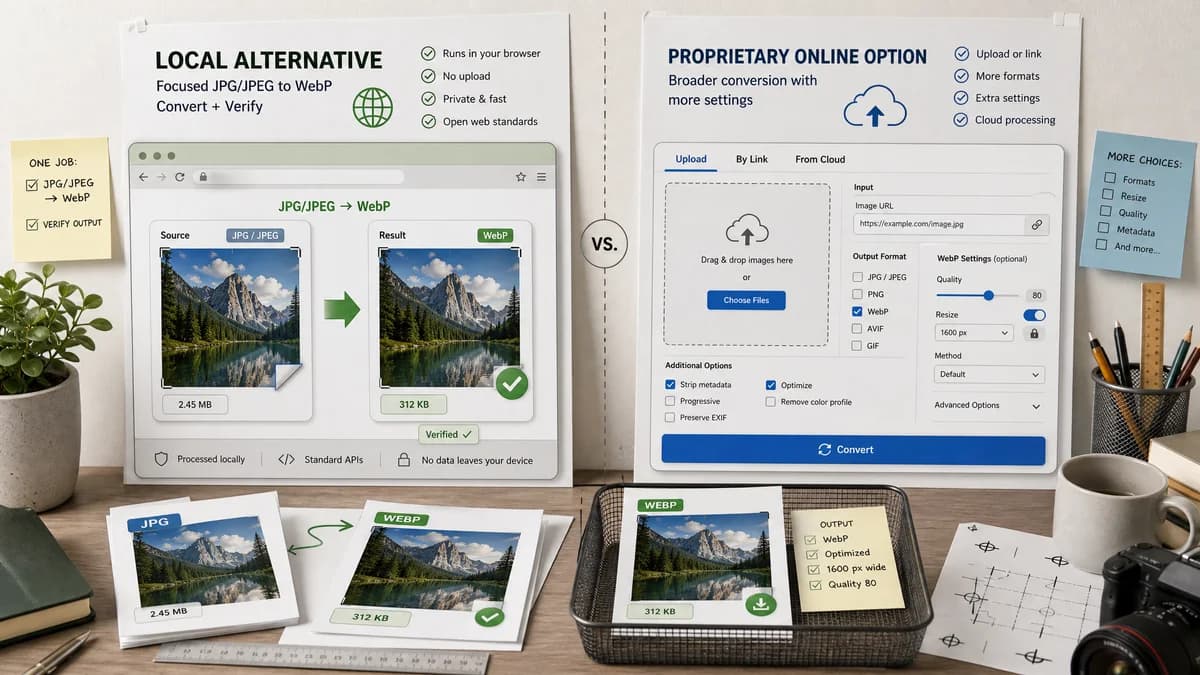
JPG to WebP Converter is a browser-based alternative for users who need this focused result without installing a proprietary desktop app or entering a larger hosted workflow.
This research compares that workflow with Online-Convert while keeping the outbound source link at the bottom after the analysis.
Why JPG to WebP Converter fits
TextFaker should provide a simple local alternative for users who only need JPG/JPEG to WebP conversion. Optional resize and multi-format features should stay out of this dedicated page unless already supported by the shared conversion family, because the primary value is a verified WebP output.
What Online-Convert offers
Online-Convert’s WebP converter page lets users upload a file or provide an image link, convert it to WebP, and use optional settings such as size changes.
Open alternative signals
Dimension behavior
JPG to WebP ConverterPreserve source dimensions by default and verify after output decode
Online-ConvertOffers optional size changes on the conversion page
Input source
JPG to WebP ConverterLocal selected JPG/JPEG files
Online-ConvertFile upload or image link input
Tool breadth
JPG to WebP ConverterDedicated JPG/JPEG to WebP page
Online-ConvertBroad online converter suite
Validation surface
JPG to WebP ConverterVisible output MIME, extension, Blob, dimensions, and quality
Online-ConvertConversion settings and download-focused result
Decision guide
Best for local conversion where preserving original dimensions and checking the generated WebP file are the main requirements.
Best for users who want a broad online conversion suite, URL-based inputs, optional resizing, or conversion formats beyond JPG/JPEG to WebP.
Side-by-side open source alternative comparison
| Decision point | JPG to WebP Converter | Online-Convert | Takeaway |
|---|---|---|---|
| Resize options | Our workflowPreserve dimensions for this dedicated converter and validate that behavior. | Proprietary workflowOnline-Convert exposes optional size settings. | Dimension preservation should be a clear TextFaker promise. |
| Remote URL input | Our workflowLocal file selection only unless the existing family already supports URL inputs safely. | Proprietary workflowOnline-Convert supports providing a link to an image. | Avoid cross-origin and privacy complexity for this focused page. |
| Output type | Our workflowAlways WebP with image/webp validation. | Proprietary workflowThe page converts images to WebP inside a broader converter family. | The TextFaker result panel can be simpler and more explicit. |
| Quality | Our workflowQuality slider should use the browser’s WebP encoder quality parameter. | Proprietary workflowOnline-Convert has optional conversion settings. | TextFaker should test the exact local slider behavior rather than list many settings. |
| Generated-image QA | Our workflowGenerate dimension-known JPEG fixtures and decode output to verify same dimensions. | Proprietary workflowThe public page does not provide deterministic fixture-based validation. | Generated fixture tests support the claim that dimensions are preserved. |
| Copy behavior | Our workflowCopy details should include MIME, filename, dimensions, and output size in stable text. | Proprietary workflowHosted converter result copy is not the main product promise. | Stable copy text helps developers and QA reviewers. |
Detailed research
Page Scope
Online-Convert’s page is broader because it includes optional conversion settings and link input. TextFaker’s dedicated page should not inherit every possible image-converter option; it should stay centered on reliable JPG/JPEG to WebP output.
- Default to preserved dimensions.
- Keep settings limited to quality unless the existing adapter pattern requires more.
Validation
Dimension preservation must be tested by reading the converted WebP, not by trusting the original file dimensions. The test should fail if the output canvas or encoder changes width or height unexpectedly.
- Generate source JPEGs with known sizes.
- Convert to WebP.
- Decode result and compare dimensions.
- Confirm .webp filename.
SEO Notes
The comparison content should state that TextFaker is browser-based and open-source-powered, while Online-Convert is an online conversion suite. Do not use unsupported claims about server retention or internal processing.
UX Notes
A focused converter should use a compact upload area, a direct quality slider, and a result summary. Avoid dense advanced options that would blur the tool with the general Image Format Converter.
Research notes
- Official page confirms WebP conversion from uploaded files or image links and shows optional settings including size changes.
- Online-Convert is a broad hosted conversion suite and should be compared as proprietary software in this context.
- For TextFaker, preserve dimensions by default; do not add resizing to this dedicated SEO page unless inherited safely from shared code.
- Generated images should include fixed 320x180, 800x600, and 1600x900 JPEGs to prove dimension preservation.
Official source
The proprietary product link is included once here for source checking after the alternative analysis.
Official Online-Convert source