
Open Source Alternatives to TinyIMG
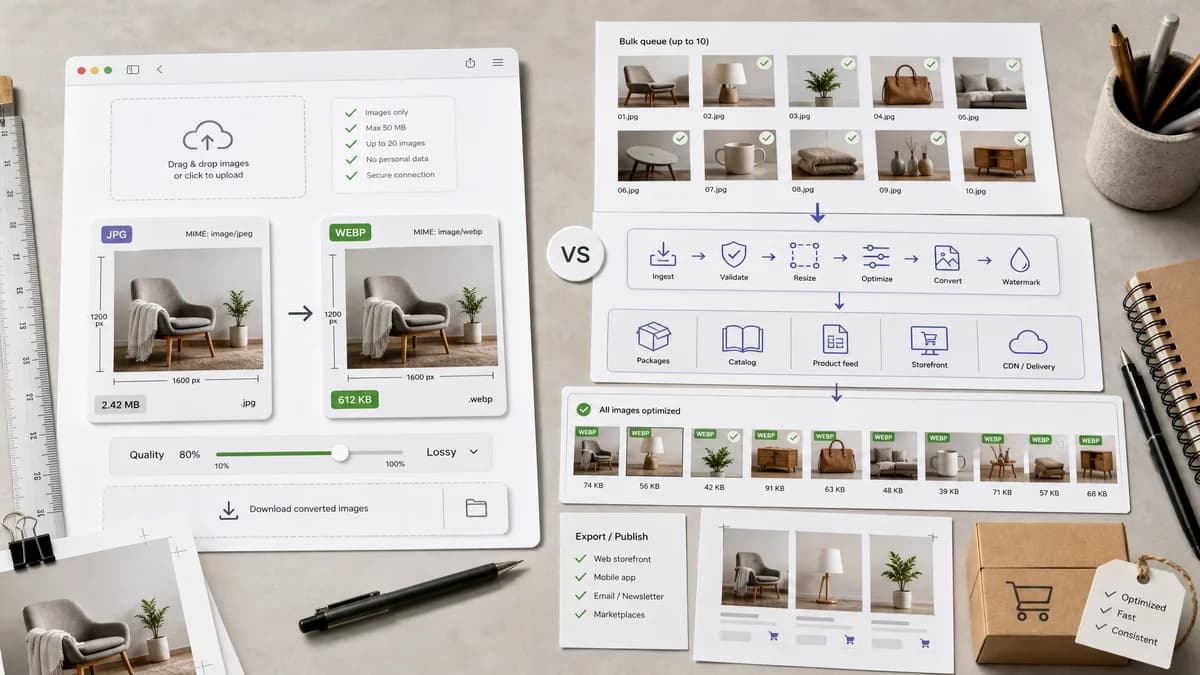
JPG to WebP Converter is a browser-based alternative for users who need this focused result without installing a proprietary desktop app or entering a larger hosted workflow.
This research compares that workflow with TinyIMG while keeping the outbound source link at the bottom after the analysis.
Why JPG to WebP Converter fits
TextFaker should serve users who need to turn a JPEG into a WebP without a larger ecommerce image optimization workflow. The tool should preserve dimensions, let users tune WebP quality, and make the generated file’s MIME type and extension visible.
What TinyIMG offers
TinyIMG’s JPG to WebP page supports converting JPG images to WebP in bulk up to 10 files and positions WebP as smaller at similar quality compared with JPEG files. TinyIMG also offers broader image optimization tooling.
Open alternative signals
Ecommerce workflow
JPG to WebP ConverterGeneral browser utility for JPG/JPEG to WebP conversion
TinyIMGImage optimization service with ecommerce-oriented tooling
Bulk limit positioning
JPG to WebP ConverterPrioritize per-output validation whether single or multi-file
TinyIMGAdvertises bulk conversion up to 10 files
Compression claims
JPG to WebP ConverterShow actual output size and avoid guaranteed savings
TinyIMGPositions WebP as smaller at similar quality
File contract
JPG to WebP Converterimage/webp Blob, .webp filename, preserved dimensions
TinyIMGConverted WebP output through hosted tool
Decision guide
Best for local browser conversion, deterministic output details, and users who want a simple WebP file for a website or content handoff.
Best for ecommerce users who want bulk optimization, Shopify-style image workflows, or a service focused on site image performance beyond one local conversion.
Side-by-side open source alternative comparison
| Decision point | JPG to WebP Converter | TinyIMG | Takeaway |
|---|---|---|---|
| Market focus | Our workflowUtility for local conversion and verification. | Proprietary workflowTinyIMG is tied to image optimization and ecommerce performance workflows. | TextFaker should not overbuild ecommerce features. |
| Bulk conversion | Our workflowValidate every output row if multiple files are supported. | Proprietary workflowTinyIMG advertises bulk conversion up to 10 files. | Per-file facts matter more than a headline batch limit. |
| Quality and size | Our workflowLet users set WebP quality and inspect actual byte size. | Proprietary workflowTinyIMG emphasizes reduced size at similar quality. | TextFaker should be factual and result-driven. |
| Generated-image QA | Our workflowUse generated product-photo JPEGs to test common ecommerce image scenarios. | Proprietary workflowThe public page does not publish fixture-level validation. | Generated ecommerce-style fixtures make comparisons relevant. |
| Metadata | Our workflowDo not promise original metadata preservation unless shared converter supports and tests it. | Proprietary workflowTinyIMG page focuses on conversion and quality/size benefits. | State only what the generated WebP output proves. |
| SEO boundary | Our workflowJPG/JPEG to WebP only. | Proprietary workflowTinyIMG has multiple converter and optimization pages. | Keep page intent narrow to avoid cannibalizing TextFaker’s general converter. |
Detailed research
Use Case
TinyIMG comparisons are useful for ecommerce and website owners optimizing product photos. TextFaker can meet the simpler need: convert the source JPEG locally and verify that the output WebP is ready to download.
- Show source and output size side by side.
- Use a quality slider suitable for photos.
- Include a clear Download WebP action.
Generated Images
Generated product-photo fixtures should be part of the validation plan. They avoid licensing concerns and make the quality slider test meaningful for real website imagery.
- White-background product JPEG.
- Textured product JPEG.
- Large hero-photo JPEG.
Implementation
Reuse the shared image-format converter instead of creating a separate encoder. The dedicated adapter should constrain accepted input and target output while inheriting robust decoding and Blob generation behavior.
- Accepted input: image/jpeg, .jpg, .jpeg.
- Output MIME: image/webp.
- Output extension: .webp.
Copy Guidance
Avoid saying WebP is always smaller. The UI should show actual savings or growth after conversion so users can adjust quality based on their file.
Research notes
- Official page confirms TinyIMG converts JPG images to WebP in bulk up to 10 files.
- Official page states WebP offers smaller file sizes at similar quality compared to JPEG files.
- TinyIMG is proprietary software in this comparison because it is a hosted optimization/conversion service with broader ecommerce tooling.
- Generated images should include ecommerce-like product photos and flat-background photos because TinyIMG’s market includes website image optimization.
Official source
The proprietary product link is included once here for source checking after the alternative analysis.
Official TinyIMG source