
Passport Photo Size Checker vs U.S. Department of State Photo Tool
Passport Photo Size Checker is the baseline in this comparison: Check passport photo dimensions, aspect ratio, file type, size, DPI, and head-height measurements locally before printing or uploading.
Compare local size diagnostics with the official U.S. passport photo crop helper.
Quick verdict
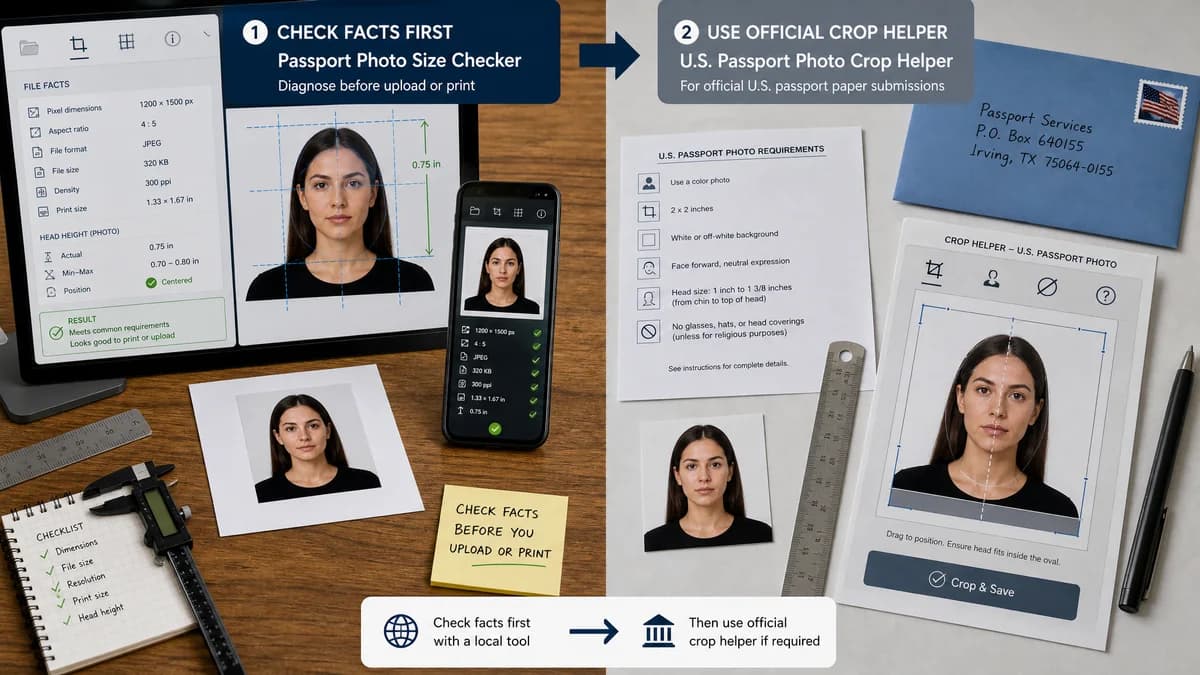
Use TextFaker to diagnose file facts before upload or print; use the official tool when the U.S. paper or mail workflow specifically asks for that crop helper.
How Passport Photo Size Checker fits
Passport Photo Size Checker reads the selected file locally and reports measurable facts: pixels, aspect ratio, format, file size, density metadata, print size, and optional head-height numbers.
How U.S. Department of State Photo Tool fits
The State Department Photo Tool is an official crop helper for U.S. passport-photo workflows. It is authoritative for its narrow use case, but it is not a broad multi-country diagnostic checker.
Side-by-side comparison
| Decision point | Passport Photo Size Checker | U.S. Department of State Photo Tool | Takeaway |
|---|---|---|---|
| Primary workflow | Our workflowBrowser-local measurement report for prepared images. | Competitor workflowOfficial U.S. crop helper for a specific application context. | TextFaker diagnoses; the official tool crops. |
| Jurisdiction coverage | Our workflowU.S., UK, Canada, India-style, and other measurable presets can be compared. | Competitor workflowFocused on U.S. passport-photo composition. | TextFaker is broader for preflight checking. |
| File handling | Our workflowDesigned to decode the file locally in the browser. | Competitor workflowRuns as a hosted official government web tool. | Local diagnostics are useful for sensitive identity photos. |
| Output | Our workflowCopyable pass, review, or needs-changes report with exact numbers. | Competitor workflowCropped photo workflow and composition aid. | Choose by whether you need numbers or a crop aid. |
| Limits | Our workflowDoes not promise official acceptance or judge subjective quality. | Competitor workflowAuthoritative but still limited to the official workflow it supports. | Neither replaces the final issuing-authority decision. |
| Mobile troubleshooting | Our workflowWorks as a compact upload and result flow for phone files. | Competitor workflowBuilt around the official web crop experience. | TextFaker is easier for quick file diagnostics. |
Use Passport Photo Size Checker when
- Checking exact file facts without uploading the image to a hosted editor.
- Comparing one photo against several country and portal presets.
- Copying a diagnostic report with the exact failed rule.
- Reviewing density and print-size metadata before going to a printer.
Use U.S. Department of State Photo Tool when
- Applicants following the official U.S. crop workflow.
- Users who need a government-provided composition template.
- Paper or in-person workflows where the official helper is referenced.
Detailed comparison
Decision context
The official U.S. tool is the right reference when a U.S. application flow directs users to crop a photo there. TextFaker answers a different question: what exactly is inside this file, and which measurable rule is causing trouble?
Numeric diagnostics
TextFaker exposes dimensions, ratio, file type, file size, density metadata, calculated print size, and optional head-height math. Those outputs are deterministic and can be copied into a support conversation.
Where the official tool still wins
The government crop helper remains the better choice when the applicant needs an official U.S. composition workflow rather than a neutral measurement report.
Privacy and setup
A local checker is valuable when the photo contains sensitive identity information and the immediate need is only to verify size facts before deciding what to do next.
Research notes
- The official State Department photo guidance lists 2 x 2 inch U.S. passport photos.
- The U.S. digital image guidance gives square 600-1200 px JPEG constraints suitable for deterministic checks.
- This comparison does not claim TextFaker is an official government approval service.
Official source
The only outbound competitor link on this page is placed here for source checking after the comparison.
Official U.S. Department of State Photo Tool source