
Photo Border Maker vs Adobe Express Borders
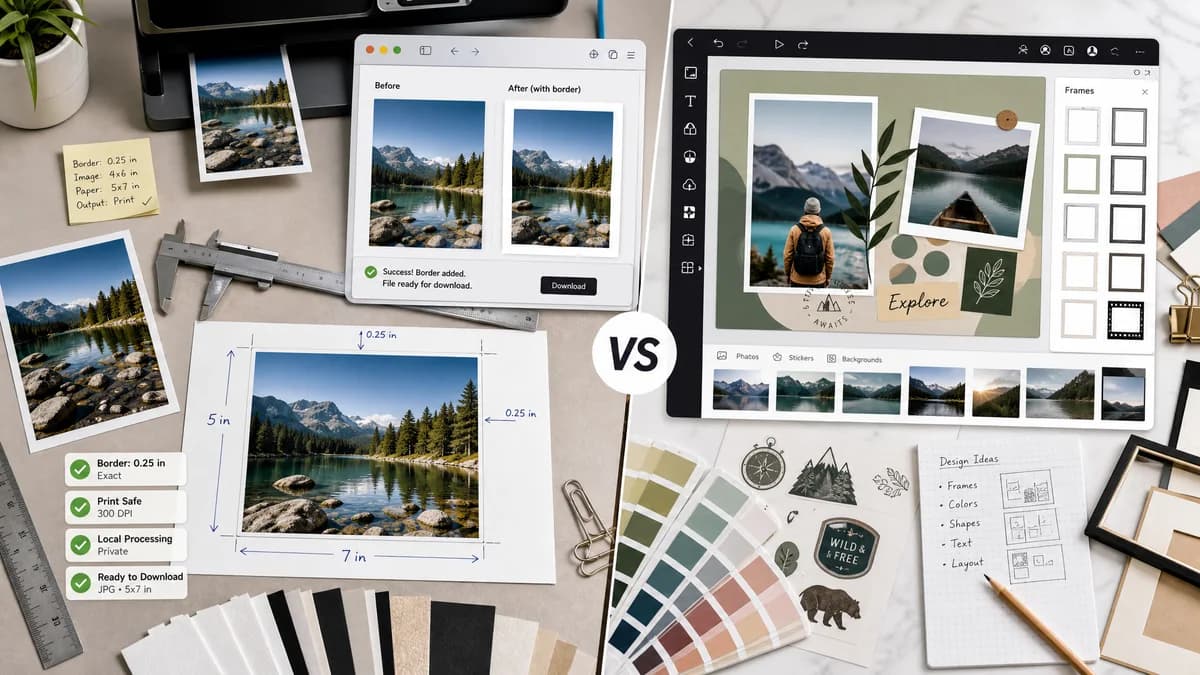
Photo Border Maker is the baseline in this comparison: Add exact photo borders locally with pixel, percent, or print-size controls and download a verified image file with output dimensions and border values.
Adobe Express offers free online borders and frames as part of a broader design editor with image upload, Adobe Stock options, frame styles, color, size, and placement controls.
Quick verdict
TextFaker can be the better fit for simple, private, measurable borders; Adobe Express is better for creative layouts and users who want a full editor.
How Photo Border Maker fits
TextFaker Photo Border Maker focuses on direct local output generation with exact border measurements, print-safe status, and download validation instead of a broader template editor.
How Adobe Express Borders fits
Adobe Express is well suited for users who want a polished design environment with stock assets, branded graphics, frames, and a familiar Adobe ecosystem.
Side-by-side comparison
| Decision point | Photo Border Maker | Adobe Express Borders | Takeaway |
|---|---|---|---|
| Workflow complexity | Our workflowSingle-purpose upload, configure, validate, and download flow. | Competitor workflowDesign-editor flow with image selection, frames, effects, placement, and project saving. | TextFaker reduces steps for users who only need a border file. |
| Precision reporting | Our workflowReports exact canvas dimensions, per-side border values, destination rectangle, and export checks. | Competitor workflowAdobe documents border and frame controls, but the official feature positioning is creative rather than measurement-first. | TextFaker makes exact numeric output visible. |
| User feedback signal | Our workflowShould address support-style questions with an obvious border tool and no workaround language. | Competitor workflowAdobe Community threads show users asking how to add borders to objects, images, or the whole graphic and receiving workaround guidance. | A focused tool satisfies users who expected a simple border button. |
| Privacy | Our workflowDesigned for local browser processing with no image upload required. | Competitor workflowAdobe Express is an online service centered on cloud design workflows. | TextFaker is more appropriate for private personal or client images. |
| Print readiness | Our workflowIncludes DPI input, inches or millimeters, bleed warning, and safe-zone pass/fail status. | Competitor workflowAdobe Express is stronger for creative design, but its public border pages do not center print validation math. | Print utility is an opening for TextFaker. |
| Automation | Our workflowTest fixtures assert generated Blob MIME, dimensions, border pixel bands, and validation text. | Competitor workflowAdobe Express results are primarily interactive and visual. | TextFaker aligns with deterministic testable outputs. |
Use Photo Border Maker when
- Simple colored, transparent, or matte borders around uploaded photos
- Print-safe and bleed-aware border calculations
- Browser-local generation without project setup
- Repeatable output validation for automated tests
Use Adobe Express Borders when
- Users already working in Adobe Express
- Creative frame styles and branded designs
- Combining borders with templates, text, and stock imagery
- Saving work as an editable design project
Detailed comparison
Demand Evidence
Adobe has official pages for borders and frames, and Adobe Community threads show real users asking how to add borders to images, objects, and whole graphics in Express.
- One support thread about borders to objects and images had thousands of views.
- Another thread asks for a simple colored border after an app update, showing the need is basic and practical.
TextFaker Angle
The strongest position is a no-project border generator that gives exact dimensions and downloadable files. The UI ask for measurable intent, not design intent.
- Borders are set by pixels, percent, print units, or target canvas size.
- Validation panel with pass, warning, and fail states.
- Copyable summary for print shops or upload requirements.
Implementation Notes
The browser calculates all geometry before rendering. The export path is deterministic for standard test fixtures.
- Compute outer canvas as input width plus left and right borders, and input height plus top and bottom borders.
- Support target-ratio canvas mode with explicit fit rectangle.
- Expose JSON-like result data in the DOM for tests.
Risks
Adobe has brand trust and a mature editor. TextFaker avoids presenting itself as a frame library or creative suite.
- Keep creative frame presets secondary.
- Prioritize exact border and canvas math.
- Make mobile input controls simpler than a full editor.
Research notes
- Official Adobe Express pages confirm border and frame functionality as part of a mainstream consumer design workflow.
- Adobe Community posts provide public demand evidence: users ask for simple border controls and sometimes need workarounds.
- Best comparison framing: local deterministic border utility versus cloud-oriented creative design editor.
Official source
The only outbound competitor link on this page is placed here for source checking after the comparison.
Official Adobe Express Borders source