
Photo Border Maker vs BeFunky Photo Frames
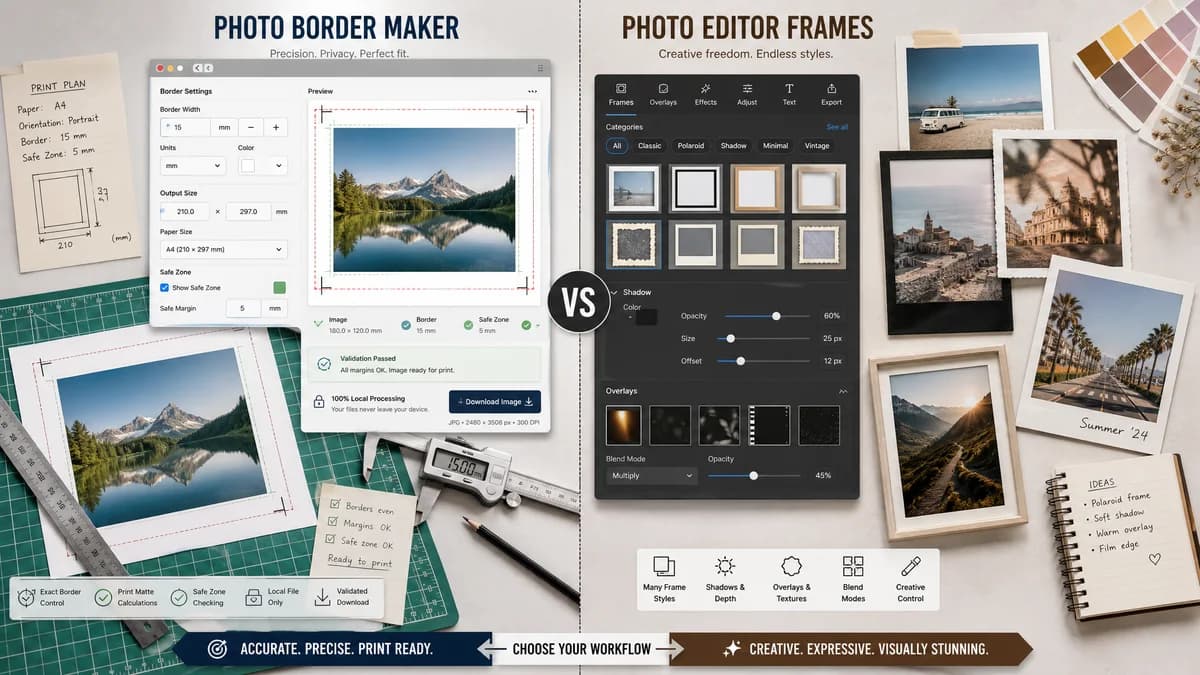
Photo Border Maker is the baseline in this comparison: Add exact photo borders locally with pixel, percent, or print-size controls and download a verified image file with output dimensions and border values.
BeFunky provides photo frames, simple borders of any width and color, drop shadows, Polaroid-style frames, and editor help for frame settings.
Quick verdict
TextFaker is preferred for exact border math and privacy; BeFunky is preferred for creative frame effects and a full photo editor experience.
How Photo Border Maker fits
TextFaker Photo Border Maker focuses on exact local border generation, print matte calculations, safe-zone checking, and downloadable image validation.
How BeFunky Photo Frames fits
BeFunky is stronger for users who want a polished photo editor with frame categories, shadows, overlays, blend modes, and visual styling options.
Side-by-side comparison
| Decision point | Photo Border Maker | BeFunky Photo Frames | Takeaway |
|---|---|---|---|
| Border model | Our workflowNumerical border generator with equal, per-side, target-ratio, and print units. | Competitor workflowFrame and border editor with visual categories, settings, overlays, position, and opacity. | TextFaker is utility-first; BeFunky is style-first. |
| Print preparation | Our workflowReports print size, DPI, bleed, safe zone, and final canvas size. | Competitor workflowBeFunky has matte border educational content, but its feature page emphasizes frames and visual effects. | TextFaker owns practical print validation. |
| Privacy | Our workflowProcesses files locally in the browser. | Competitor workflowBeFunky is an online photo editor service. | TextFaker has a clearer privacy story for personal photos. |
| Customization | Our workflowSolid colors, transparency, sampled colors, radius, and optional inner stroke with exact numeric values. | Competitor workflowBeFunky offers frame categories, color overlays, blend mode, orientation, position, and opacity. | BeFunky is richer creatively; TextFaker is richer numerically. |
| Mobile use | Our workflowA compact utility keeps all settings visible in a single responsive page. | Competitor workflowA full editor may require more panels and visual selection steps. | TextFaker is quicker on mobile for simple borders. |
| Testability | Our workflowDimensions, color values, border widths, and validation states can be asserted automatically. | Competitor workflowFrame appearance is mostly judged visually. | TextFaker satisfies deterministic tool requirements more directly. |
Use Photo Border Maker when
- Matte border sizing for print and framing
- Exact per-side border output
- Private browser-local processing
- Measurable validation messages
Use BeFunky Photo Frames when
- Decorative photo frames and shadows
- Visual photo editing with multiple frame categories
- Users who want a ready-made framed look
- Creative projects beyond border math
Detailed comparison
Demand Evidence
BeFunky has official feature and help pages for frames and borders, including simple borders with any width and color and frame settings such as overlays and opacity.
- The existence of educational content around matte borders points to print and framing demand.
- Frame categories show demand beyond basic outlines, but not every user needs those extras.
TextFaker Angle
TextFaker builds around common practical cases: add a white border for social sharing, create a matte border for printing, add transparent padding for stickers, or fit a photo into a target canvas without cropping.
- Include presets for square social posts and common print sizes.
- Include numeric border fields and an output summary.
- Make download available immediately after successful validation.
Implementation Notes
A deterministic renderer supports simple shadows later, but the first version makes solid and transparent borders robust.
- Compute border layers separately from image scaling.
- Use device-independent canvas output, not CSS scaling, for final dimensions.
- Test exported image corners and center placement.
Risks
BeFunky users may expect decorative frame catalogs. TextFaker sets expectations around practical borders and measured outputs.
- Avoid subjective style labels as primary features.
- Keep decorative presets minimal.
- Lean into exact dimensions and privacy.
Research notes
- BeFunky's official pages are a direct competitor source because they describe simple borders of any width and color plus frame categories.
- The BeFunky help center confirms users can tune frame-related settings, which overlaps with border customization but is broader than the TextFaker concept.
- Best comparison framing: precise local border maker versus visual photo frame editor.
Official source
The only outbound competitor link on this page is placed here for source checking after the comparison.
Official BeFunky Photo Frames source