
Photo Border Maker vs Borderize PNG Border Generator
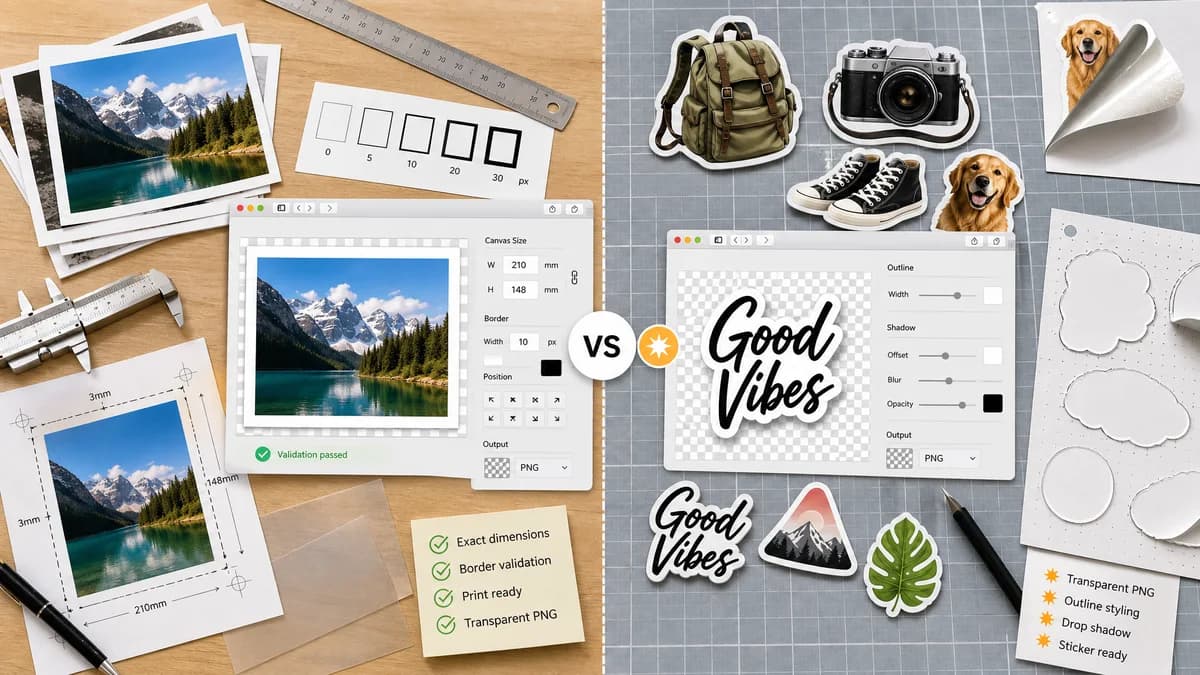
Photo Border Maker is the baseline in this comparison: Add exact photo borders locally with pixel, percent, or print-size controls and download a verified image file with output dimensions and border values.
Borderize focuses on transparent PNG images, adding borders and small shadows to create sticker-like images, and can also convert typed text into transparent PNG output with borders and shadows.
Quick verdict
TextFaker is better for general photo and print border needs; Borderize is more specialized for sticker effects and transparent PNG styling.
How Photo Border Maker fits
TextFaker Photo Border Maker supports transparent PNG border workflows but keeps the core focused on photo borders, exact canvas dimensions, and validation rather than text-to-sticker generation.
How Borderize PNG Border Generator fits
Borderize is best for creators who want sticker-style transparent PNGs with outlines and shadows around existing PNG assets or text.
Side-by-side comparison
| Decision point | Photo Border Maker | Borderize PNG Border Generator | Takeaway |
|---|---|---|---|
| Primary asset type | Our workflowPhotos and browser-decodable images, with PNG transparency support. | Competitor workflowTransparent PNG images and text converted to PNG sticker-style output. | Borderize is more specialized; TextFaker is more general. |
| Effect style | Our workflowSolid, transparent, matte, rounded, and exact border modes first. | Competitor workflowBorder plus small shadow for sticker appearance. | TextFaker can add shadows later but prioritizes exact geometry. |
| Output reporting | Our workflowDimensions, border sizes, crop or fit box, MIME type, file size, and validation messages. | Competitor workflowThe official page emphasizes instantly creating bordered PNGs rather than measurement reports. | TextFaker better supports deterministic requirements. |
| Text generation | Our workflowNot needed for the core photo border maker. | Competitor workflowSupports typed text converted into transparent PNG with border and shadows. | TextFaker avoids unrelated text-to-image scope. |
| Privacy | Our workflowLocal browser processing without uploading source photos. | Competitor workflowBorderize is an online generator; the cited page does not establish local-only processing. | TextFaker states local execution as a product constraint. |
| Testing | Our workflowTests inspect output dimensions, alpha behavior, and exact border regions. | Competitor workflowSticker shadows can require tolerance-based visual checks. | TextFaker keeps deterministic modes central. |
Use Photo Border Maker when
- General photos and print borders
- Exact per-side canvas padding
- Transparent PNG padding with validation
- Social and upload-size requirements
Use Borderize PNG Border Generator when
- Sticker-style PNG outlines
- Transparent PNG assets
- Small shadow effects
- Text-to-transparent-PNG border generation
Detailed comparison
Demand Evidence
Borderize's official page shows demand for border generation on transparent PNGs and sticker-style output. That is adjacent to photo borders because creators often need outlined assets for social posts, thumbnails, and overlays.
- Transparent PNG handling is important for creator workflows.
- Shadow and sticker effects are useful, but they introduce less deterministic rendering.
TextFaker Angle
TextFaker includes transparent border support and alpha reporting, but it does not become a text sticker generator.
- Transparent padding preset for PNG assets.
- Optional solid outline around the rectangular canvas.
- Alpha preservation and JPEG flattening warnings.
Implementation Notes
Transparent PNG output can be verified with alpha-channel checks. Shadow effects are optional and clearly separated from exact border math.
- Use PNG for transparent output.
- Report whether border pixels are transparent, translucent, or opaque.
- Keep shadow blur out of the default deterministic path.
Risks
Sticker users may expect contour-aware outlines around non-transparent shapes, which is harder than rectangular borders. The tool name makes clear that it creates photo borders and canvas padding.
- Avoid promising subject-aware outlines in the first release.
- Use rectangular border terminology.
- Add transparent PNG warnings where useful.
Research notes
- Borderize is an adjacent competitor because it handles PNG borders, shadows, and sticker-like output, not just rectangular photo mattes.
- Its official page helps identify creator demand around transparent PNG border generation.
- Best comparison framing: general exact photo border maker versus sticker-style transparent PNG border generator.
Official source
The only outbound competitor link on this page is placed here for source checking after the comparison.
Official Borderize PNG Border Generator source