
Photo Border Maker vs Fotor Photo Frame Editor
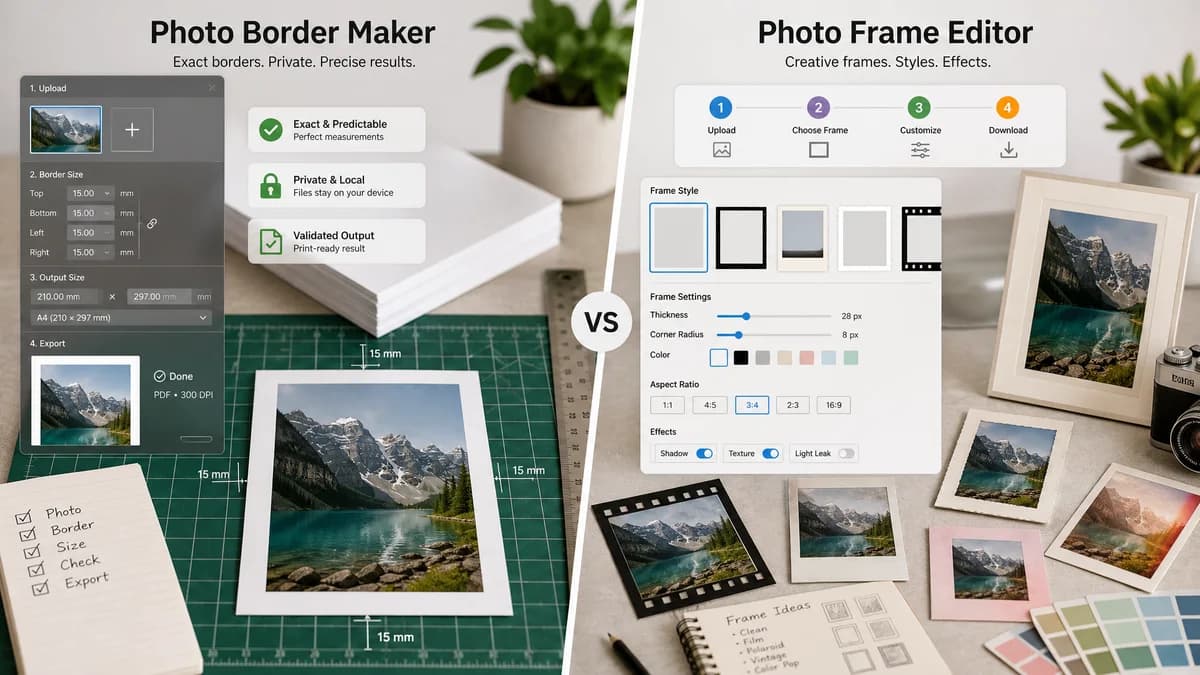
Photo Border Maker is the baseline in this comparison: Add exact photo borders locally with pixel, percent, or print-size controls and download a verified image file with output dimensions and border values.
Fotor's online frame editor offers curated frames such as Polaroid and film edges, plus controls for colors, aspect ratios, thickness, corner radius, and high-resolution saving.
Quick verdict
TextFaker is a better fit for exact border sizes and private utility output; Fotor is better for visually styled frames and creative effects.
How Photo Border Maker fits
TextFaker Photo Border Maker emphasize plain, exact borders for photos and print layouts, with browser-local processing and deterministic file validation.
How Fotor Photo Frame Editor fits
Fotor is stronger for users who want a polished photo editor with multiple frame styles, creative effects, and a guided four-step frame workflow.
Side-by-side comparison
| Decision point | Photo Border Maker | Fotor Photo Frame Editor | Takeaway |
|---|---|---|---|
| Feature focus | Our workflowPrecise border and canvas generation. | Competitor workflowCreative photo frame editor with multiple frame categories and styling controls. | TextFaker stays focused on utility rather than style volume. |
| Measurable output | Our workflowDisplays input size, output size, border thickness, fit box, and export metadata. | Competitor workflowFotor describes precision controls but its public page is aimed at creative customization and high-resolution saving. | TextFaker makes the measurement report the main result. |
| Local processing | Our workflowRuns locally in the browser for image privacy. | Competitor workflowFotor is a web photo editor service and app ecosystem. | TextFaker appeals to privacy-conscious users. |
| Print use | Our workflowCan calculate border sizes in inches or millimeters from DPI and warn if safe margins fail. | Competitor workflowFotor is strong for visual frames but does not foreground bleed or safe-zone validation on the cited page. | TextFaker is more practical for print handoff. |
| Mobile workflow | Our workflowShould use compact controls, presets, and immediate dimension feedback on phones. | Competitor workflowFotor has web and app presence, with app listing features including border width, shadow, and rounded corners. | Both serve mobile users, but TextFaker is lighter. |
| Testing | Our workflowAutomated tests can validate file type, dimensions, border pixel colors, and warning messages. | Competitor workflowFotor's value is more visual and creative, making exact automated verification less central. | TextFaker better matcheses deterministic TextFaker tool requirements. |
Use Photo Border Maker when
- Exact borders by side with copyable measurements
- Printing and framing prep with DPI and safe-zone checks
- Local processing of private images
- Regression-testable outputs
Use Fotor Photo Frame Editor when
- Decorative frames and curated style options
- Polaroid, film-edge, and rounded-corner looks
- Users who want a general online photo editor
- High-resolution creative exports
Detailed comparison
Demand Evidence
Fotor maintains a dedicated photo frame feature page and app marketplace copy that mentions border color, border designs, border width, shadow effects, and rounded corners.
- The feature set indicates consumer demand for quick frame and border customization.
- Fotor's aspect ratio and thickness language overlaps with a measurable utility use case.
TextFaker Angle
The tool chooses practical border presets, not a large style catalog. It supports simple matte, outline, transparent padding, rounded-corner clipping, and print border modes.
- Offer white, black, sampled-color, and transparent border presets.
- Include optional inner stroke and outer matte as separate numeric layers.
- Show exact output dimensions before download.
Implementation Notes
Canvas rendering creates solid, transparent, and flattened borders. A color picker can include manual HEX input and optional sampled average or corner color from the image.
- Use deterministic geometry functions independent of UI state.
- Validate all numeric inputs against image and browser canvas limits.
- Expose downloadable Blob checks.
Risks
Fotor has stronger creative polish and many styles. TextFaker avoids subjective frame quality and instead makes exactness, privacy, and speed the product.
- Limit decorative presets.
- Do not require account creation for the core utility.
- Make the output summary copy-ready.
Research notes
- Fotor's official page is a strong competitor source because it explicitly names frame styles, border thickness, color, corner radius, aspect ratios, and high-resolution export.
- The App Store listing reinforces that border controls are expected on mobile photo editors.
- Best comparison framing: exact browser-local border maker versus creative online photo frame editor.
Official source
The only outbound competitor link on this page is placed here for source checking after the comparison.
Official Fotor Photo Frame Editor source