
Photo Border Maker vs Kapwing Add Border to Image
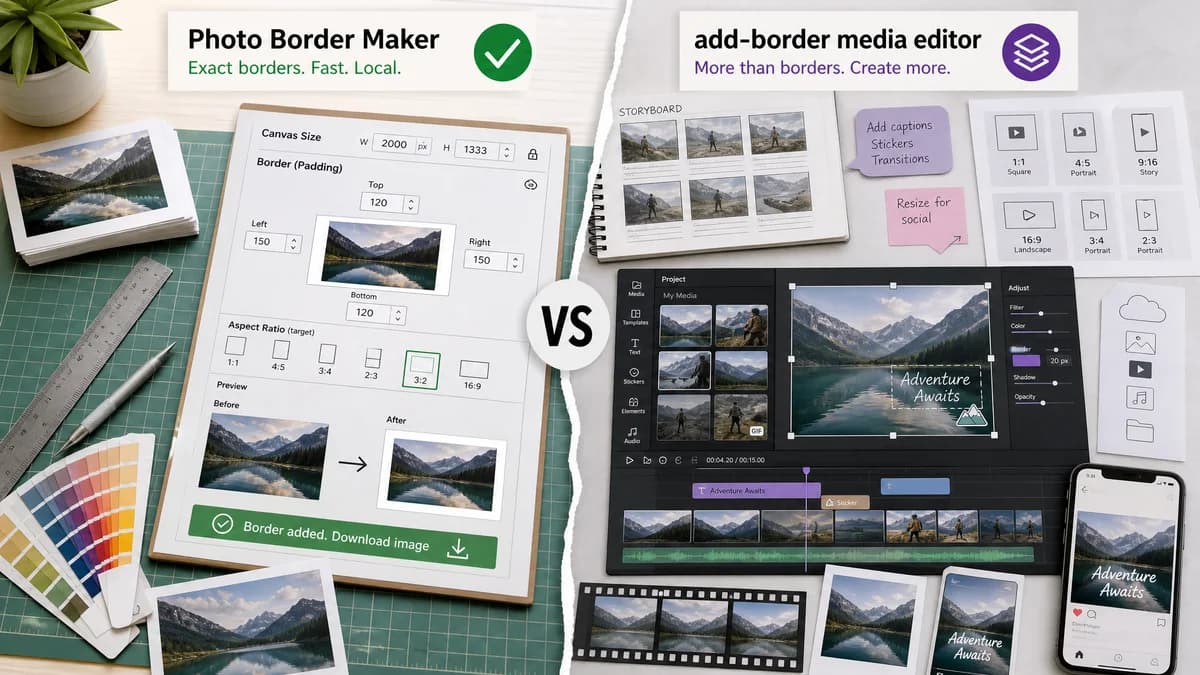
Photo Border Maker is the baseline in this comparison: Add exact photo borders locally with pixel, percent, or print-size controls and download a verified image file with output dimensions and border values.
Kapwing's add-border image tool uses a canvas editor workflow where users upload an image, resize or expand the canvas, choose preset sizes, and add padding or borders.
Quick verdict
TextFaker wins for quick exact image border generation; Kapwing remains better for multimedia projects and social content editing.
How Photo Border Maker fits
TextFaker Photo Border Maker is a smaller local browser tool for exact canvas padding, per-side border sizes, aspect-ratio targets, and verified downloads.
How Kapwing Add Border to Image fits
Kapwing is stronger for users working across images, GIFs, and video who need templates, captions, timeline editing, resizing, and cloud media features around the border task.
Side-by-side comparison
| Decision point | Photo Border Maker | Kapwing Add Border to Image | Takeaway |
|---|---|---|---|
| Media scope | Our workflowStill-image border generation for PNG, JPEG, WebP, and browser-decodable formats. | Competitor workflowKapwing supports image borders and adjacent video or GIF border workflows. | Kapwing is broader; TextFaker is sharper for still images. |
| Canvas control | Our workflowExplicit border fields for top, right, bottom, and left plus target aspect ratio or final size. | Competitor workflowKapwing describes expanding canvas, preset sizes, padding, and layer adjustment. | TextFaker makes border math more direct. |
| Output report | Our workflowFinal dimensions, border sizes, fit rectangle, MIME type, file size, and pass/fail validation. | Competitor workflowKapwing's public page emphasizes editor workflow and creative control rather than a structured measurement report. | TextFaker provides more inspectable results. |
| Privacy | Our workflowRuns in-browser locally with no server upload for processing. | Competitor workflowKapwing is an online media editing platform with project workflows. | Local processing differentiates TextFaker for sensitive photos. |
| Mobile friendliness | Our workflowKeep controls one-purpose and form-based for phone use. | Competitor workflowKapwing's editor is powerful but can involve canvas and layer manipulation. | TextFaker reduces interaction complexity. |
| Automated verification | Our workflowTests assert generated dimensions and border bands from fixed fixtures. | Competitor workflowKapwing's full editor makes outcomes more dependent on project state and visual layout. | TextFaker is easier to test as a deterministic utility. |
Use Photo Border Maker when
- Exact image-only border output
- Private local photo handling
- Simple mobile form controls with downloadable output
- Validation covers target dimensions and aspect ratios
Use Kapwing Add Border to Image when
- Adding borders to media projects beyond still images
- Social video and GIF workflows
- Template-driven media editing
- Collaborative or cloud project workflows
Detailed comparison
Demand Evidence
Kapwing maintains a dedicated image border tool page and help content for outlines, borders, resizing canvas, and lock-ratio behavior. This shows demand for borders as a concrete social media editing task.
- Users often need to add padding so images fit social canvases without cropping.
- Canvas resizing and lock-ratio issues reveal a practical pain point TextFaker simplifies.
TextFaker Angle
TextFaker provides the same underlying geometry as a canvas editor, but without requiring users to drag layers.
- Numeric inputs for exact padding.
- One-click social aspect presets such as square, story, portrait, and landscape.
- Clear warnings appear when target ratio would require uneven borders.
Implementation Notes
The tool can compute the destination rectangle and border sizes from a selected fit mode. The UI shows the math before rendering.
- Modes: add fixed border, fit into target canvas, extend to target aspect ratio, print matte.
- Validation: negative borders, zero-size output, unsupported export, too-large canvas.
- Download: PNG for transparency, JPEG/WebP with quality controls.
Risks
Kapwing covers video, GIFs, and social templates, so the TextFaker page avoids claiming parity across media types.
- Keep the first release image-only.
- Mention browser-decodable formats clearly.
- Use exact output data as the main differentiator.
Research notes
- Kapwing's official tool page is directly adjacent because it explains adding image borders by expanding canvas and using padding.
- Kapwing help content identifies a common issue: resizing canvas can crop or zoom media unless ratio and layer settings are handled carefully.
- Best comparison framing: numeric local image utility versus online multimedia editor.
Official source
The only outbound competitor link on this page is placed here for source checking after the comparison.
Official Kapwing Add Border to Image source