
Photo Border Maker vs Online PNG Tools Add PNG Border
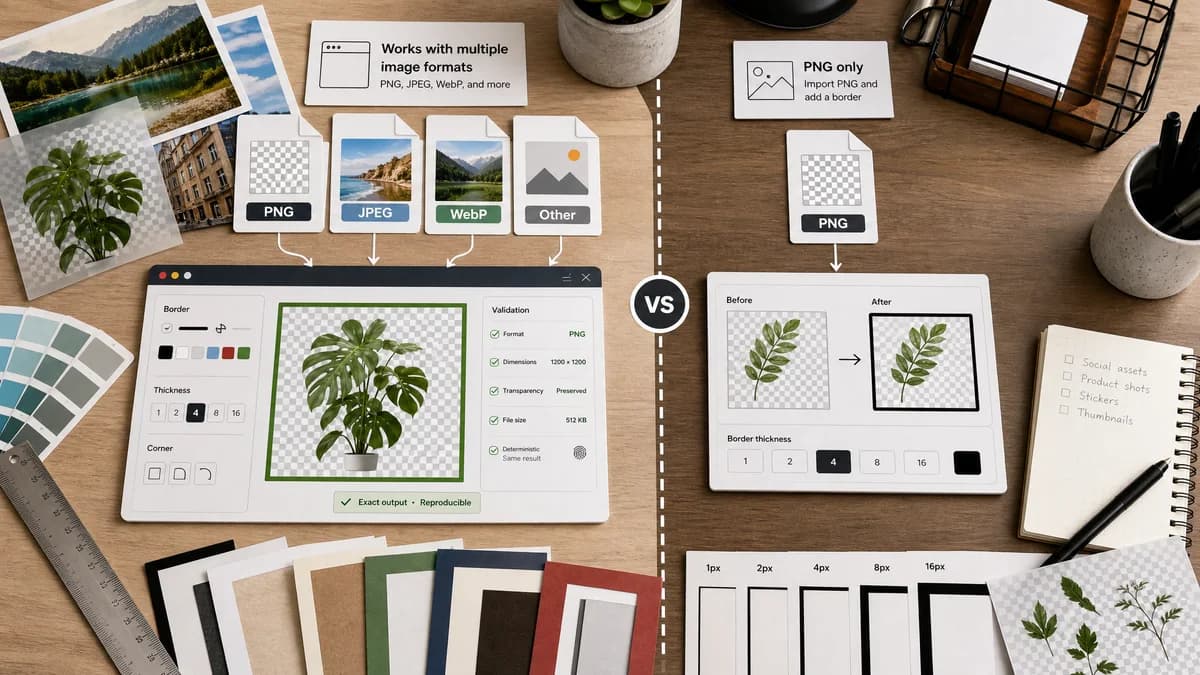
Photo Border Maker is the baseline in this comparison: Add exact photo borders locally with pixel, percent, or print-size controls and download a verified image file with output dimensions and border values.
Online PNG Tools provides a focused utility that imports a PNG and adds a border around it, positioning itself as a quick and powerful PNG border creator.
Quick verdict
TextFaker offers broader image format support and richer deterministic validation; Online PNG Tools is tighter for PNG-only border tasks.
How Photo Border Maker fits
TextFaker Photo Border Maker handle PNG plus JPEG, WebP, and other browser-decodable formats while preserving transparent PNG workflows and reporting exact output validation.
How Online PNG Tools Add PNG Border fits
Online PNG Tools is useful for users who specifically need to add a border to a PNG with a simple import-and-result workflow.
Side-by-side comparison
| Decision point | Photo Border Maker | Online PNG Tools Add PNG Border | Takeaway |
|---|---|---|---|
| Supported input intent | Our workflowDesigned for photos and browser-decodable image files including PNG, JPEG, and WebP. | Competitor workflowFocused on PNG input and PNG border output. | TextFaker serves more general photo users. |
| Transparency | Our workflowPreserves PNG alpha when exporting PNG and reports alpha-preserving behavior. | Competitor workflowPNG-focused tooling is naturally suited to transparency. | TextFaker must handle PNG transparency carefully to compete. |
| Border controls | Our workflowControls include per-side sizes, uniform lock, radius, color, transparency, target canvas, and print units. | Competitor workflowThe official page states import a PNG and add a border around it, with quick result positioning. | TextFaker offers more measurable controls. |
| Output validation | Our workflowShows MIME type, extension, Blob size, dimensions, border math, and validation messages. | Competitor workflowOnline PNG Tools emphasizes instant transformation rather than a full validation report. | TextFaker is stronger for requirement-driven uploads. |
| Privacy | Our workflowLocal browser processing without upload. | Competitor workflowOnline PNG Tools is an online tool; the cited page does not position it as local-only. | Local processing differentiates TextFaker. |
| Audience | Our workflowGeneral photo, print, social, and creator utility users. | Competitor workflowPNG users who know they need a PNG-specific tool. | TextFaker uses broader language while retaining PNG precision. |
Use Photo Border Maker when
- Mixed photo formats, not only PNG
- Transparent and solid border modes
- Exact file and dimension validation
- Print and social aspect-ratio presets
Use Online PNG Tools Add PNG Border when
- PNG-only utility workflows
- Users who want a very direct import-result page
- Transparent PNG border tasks
- Quick browser-based PNG transformations
Detailed comparison
Demand Evidence
Online PNG Tools has a dedicated Add PNG Border page, proving demand for a highly focused import-and-border workflow. Its simplicity is a useful product benchmark for TextFaker.
- PNG borders matter for transparent assets, stickers, icons, and web graphics.
- A focused utility can rank and serve users without a full editor.
TextFaker Angle
TextFaker keeps the same directness but expands beyond PNG and add explicit validation. It also avoids accidental alpha loss.
- Default PNG export when transparency is present.
- Warn when JPEG export would flatten alpha.
- Show transparent, semi-transparent, and opaque border behavior in text.
Implementation Notes
The implementation uses canvas for most browser-decodable images. PNG output preserve alpha in transparent border mode.
- Check image/png output Blob type.
- Verify final canvas dimensions exactly.
- Use deterministic test fixtures with transparent corners.
Risks
PNG-specific users may prefer a tool that only speaks PNG. TextFaker clearly explains format handling and alpha preservation.
- Avoid hiding format conversions.
- Make output format explicit before download.
- Use PNG-first presets for transparent assets.
Research notes
- Online PNG Tools is a direct, format-specific competitor and useful benchmark for minimal UX.
- The official page provides enough evidence for the core transformation: import PNG, add border, get result.
- Best comparison framing: multi-format local photo border maker versus PNG-only online utility.
Official source
The only outbound competitor link on this page is placed here for source checking after the comparison.
Official Online PNG Tools Add PNG Border source