
Photo Border Maker vs Tuxpi Image Border Editor
Photo Border Maker is the baseline in this comparison: Add exact photo borders locally with pixel, percent, or print-size controls and download a verified image file with output dimensions and border values.
Tuxpi provides a browser-based image border editor for adding clean borders, adjusting border width and colors, and creating thin outlines, stronger frames, or layered border styles.
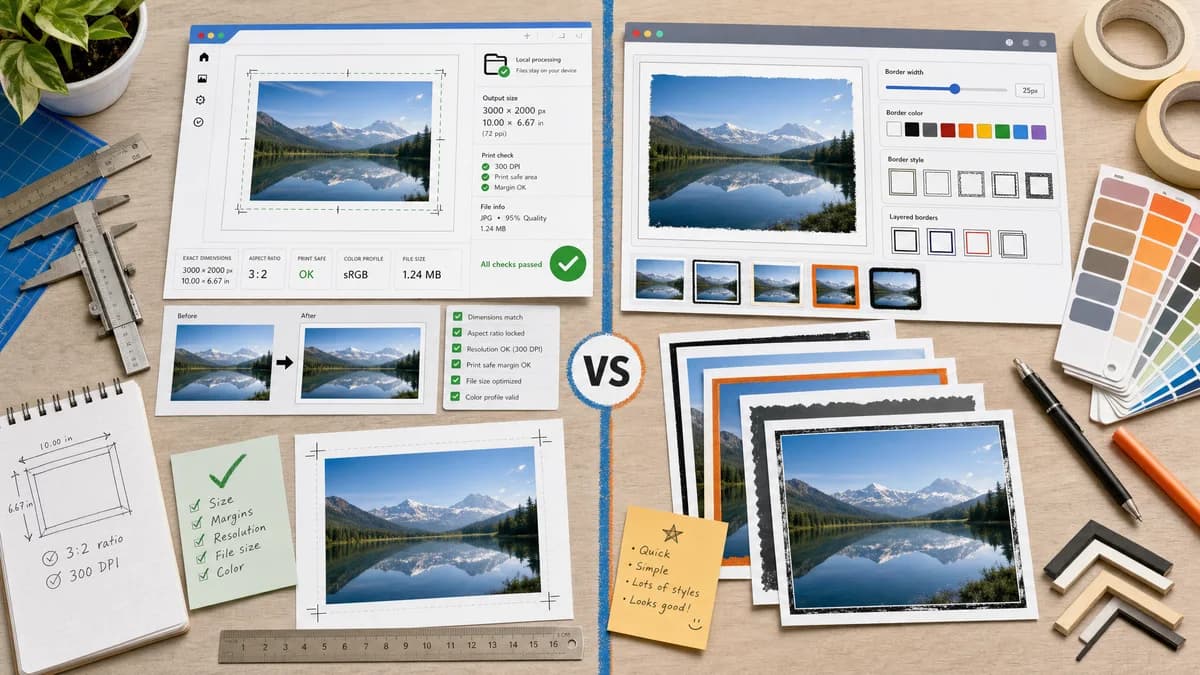
Quick verdict
TextFaker improves on the single-purpose utility category by making output math explicit and testable while keeping the workflow fast.
How Photo Border Maker fits
TextFaker Photo Border Maker offer the same quick utility feel while adding local processing, modern mobile layout, exact dimension reports, print-safe checks, and automated validation data.
How Tuxpi Image Border Editor fits
Tuxpi is a lightweight online editor for users who want a simple border effect without installing software or learning a full design tool.
Side-by-side comparison
| Decision point | Photo Border Maker | Tuxpi Image Border Editor | Takeaway |
|---|---|---|---|
| Tool scope | Our workflowSingle-purpose border maker with structured geometry and validation outputs. | Competitor workflowSingle-purpose border editor focused on adding a visual border effect. | Both are focused; TextFaker is more measurable. |
| Border controls | Our workflowControls include per-side values, equal border lock, color, radius, transparent padding, and target canvas modes. | Competitor workflowTuxpi describes border width and color adjustments for clean, stronger, or layered borders. | TextFaker supports more exact layout cases. |
| Processing promise | Our workflowRuns locally in the browser without uploading the source image. | Competitor workflowTuxpi is an online photo editor; the cited page emphasizes browser access, not local-only processing. | TextFaker states privacy clearly. |
| Output validation | Our workflowShows final dimensions, export format, file size, and validation messages. | Competitor workflowTuxpi emphasizes editing and visual output rather than machine-checkable reports. | TextFaker better matches automated test requirements. |
| Mobile readiness | Our workflowResponsive controls designed for phone upload, numeric input, and download. | Competitor workflowTuxpi is simple but older-style online editors can feel less structured on phones. | A modern mobile-first layout differentiates TextFaker. |
| Print readiness | Our workflowDPI and print-unit border calculations with bleed and safe-zone status. | Competitor workflowTuxpi mentions printing as a possible use but does not foreground print math. | TextFaker makes print prep concrete. |
Use Photo Border Maker when
- Privacy-sensitive local border creation
- Exact output dimensions and border measurements
- Print, social, and transparent padding validation
- Modern testable utility interface
Use Tuxpi Image Border Editor when
- Fast simple border effects
- Users who want minimal editor friction
- Layered border styling without a full design suite
- Basic browser access
Detailed comparison
Demand Evidence
Tuxpi's dedicated image border editor shows that a small, single-purpose border tool has a clear web search market. Its copy explicitly mentions sharing, printing, and design placement.
- The use cases overlap strongly with the proposed TextFaker tool.
- A focused competitor validates that not all users want a full design suite.
TextFaker Angle
TextFaker keeps the same low-friction approach while modernizing the output report and privacy model.
- No account and no upload for core processing.
- Exact numeric result table.
- Download buttons for PNG, JPEG, and WebP where supported.
Implementation Notes
A direct canvas implementation is enough for basic and layered borders. Layered borders can be represented as an ordered list of numeric bands.
- Each band has width, color, and optional alpha.
- Final size is sum of image dimensions plus all border bands.
- Tests verify corner pixels for each band.
Risks
Tuxpi already owns a simple border editor search niche. TextFaker must be clearly different through deterministic validation and local processing.
- Avoid generic-only copy.
- Lead with exact dimensions and privacy.
- Include print and social presets.
Research notes
- Tuxpi is a direct competitor because it is a dedicated browser photo border editor rather than a broad design suite.
- Its official page names sharing, printing, design placement, border width, colors, and layered styles.
- Best comparison framing: modern local deterministic border maker versus simple online effect editor.
Official source
The only outbound competitor link on this page is placed here for source checking after the comparison.
Official Tuxpi Image Border Editor source