
Open Source Alternatives to Canva
Photo Border Maker is a browser-based alternative for users who need this focused result without installing a proprietary desktop app or entering a larger hosted workflow.
This research compares that workflow with Canva while keeping the outbound source link at the bottom after the analysis.
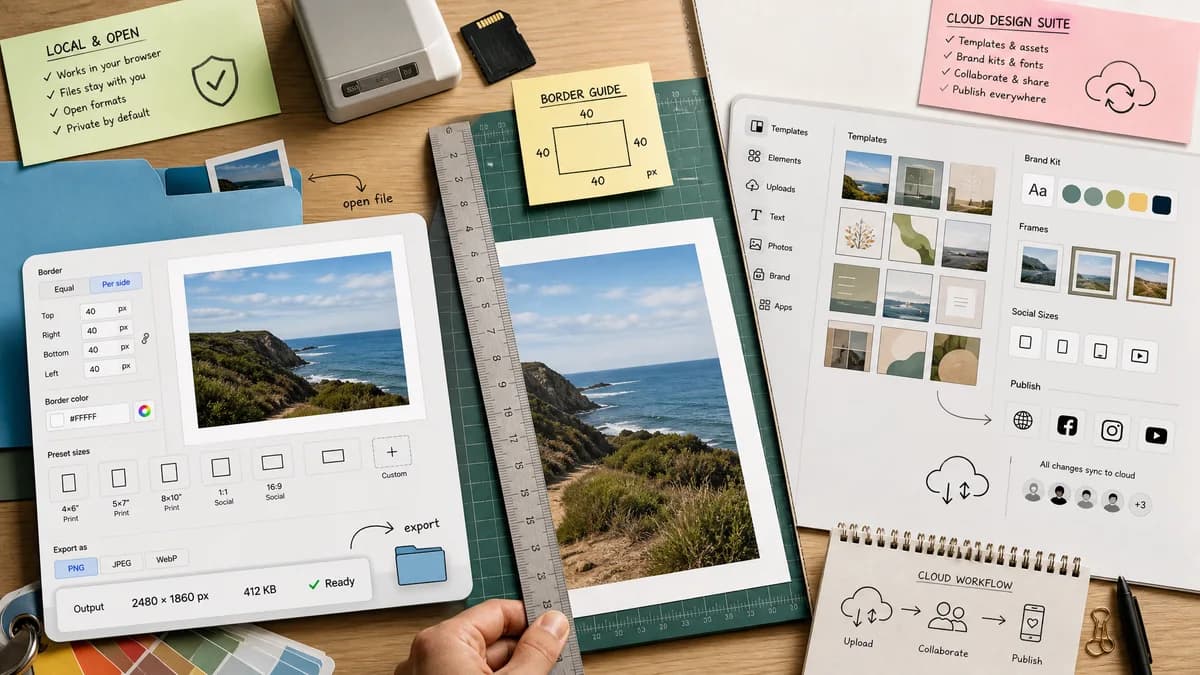
Why Photo Border Maker fits
TextFaker Photo Border Maker focuses on exact, testable border generation: upload a photo locally, choose equal or per-side border sizes, set color, fit to print or social presets, and export PNG/JPEG/WebP with reported output dimensions and file size.
What Canva offers
Canva offers a broad cloud design editor with photo borders, frames, social templates, brand assets, and direct publishing workflows.
Open alternative signals
Processing model
Photo Border MakerLocal browser canvas workflow; no source upload required for core border rendering.
CanvaCloud account-based editor with uploaded assets and hosted design projects.
Deterministic outputs
Photo Border MakerReports source dimensions, output dimensions, per-side border pixels, color value, crop box, MIME type, and file size.
CanvaOptimized for visual editing and templates, with fewer explicit validation fields for automated tests.
Mobile workflow
Photo Border MakerSingle-purpose responsive interface with large numeric controls and downloadable output.
CanvaFull mobile editor with many design features beyond border creation.
Precision scope
Photo Border MakerPrint and social presets expose exact safe-zone and bleed pass/fail messages.
CanvaStrong creative templates, but border setup often rely on editor workarounds.
Decision guide
Fast private border creation, print margins, exact pixel output, repeatable settings, and automated validation.
Template-heavy social posts, branded design workflows, team collaboration, and decorative frame libraries.
Side-by-side open source alternative comparison
| Decision point | Photo Border Maker | Canva | Takeaway |
|---|---|---|---|
| Privacy | Our workflowKeeps photo decoding, canvas drawing, and export in the browser. | Proprietary workflowUses Canva's hosted editor and asset library. | TextFaker appeals to users who only need a quick border and do not want to upload personal photos. |
| Border controls | Our workflowEqual/per-side borders, color, corner radius, fit mode, and preset output size are numeric and copyable. | Proprietary workflowCanva offers many border styles, frames, and creative elements. | Canva wins on design variety; TextFaker is strongest on exact border math. |
| Testing path | Our workflowAutomated tests assert output width equals source width plus left/right border and verify Blob MIME/size. | Proprietary workflowVisual editor output usually requires manual inspection. | TextFaker exposes machine-readable result fields. |
| Use case | Our workflowBest for repeatable image padding, print borders, and local export. | Proprietary workflowBest for complete social graphics and layouts. | Position as a focused utility rather than a full Canva replacement. |
| Cost and friction | Our workflowNo account be required for the core local workflow. | Proprietary workflowCanva's broader features may require sign-in or paid plan access. | The lightweight path is a useful alternative for one-off border jobs. |
| Output confidence | Our workflowShows validation messages like safe for 4x6 at 300 DPI or border too small for bleed. | Proprietary workflowCanva is oriented around design preview and download. | Deterministic print checks are a differentiator. |
Detailed research
Demand Angle
Users already search for and discuss Canva border workarounds, especially simple keylines and white borders. This points to a narrow utility need that is faster than opening a full design suite.
- Support social presets such as square, 4:5, 9:16, and original ratio.
- Expose exact border dimensions in pixels, percent, inches, and millimeters when DPI is known or selected.
Implementation Notes
Use browser image decoding and Canvas or OffscreenCanvas. Keep decorative options secondary to deterministic output and validation.
- Test equal border math, per-side border math, transparent PNG borders, JPEG matte flattening, and preset output dimensions.
- Return structured results for output width, output height, crop box, border box, safe zone, bleed status, MIME type, and generated filename.
SEO Positioning
The page targets people who want a Canva-like border result but only need one local operation, not a full project editor.
- Avoid claiming TextFaker is open source unless the repository and license are public.
- Use open-source-powered and browser-based language.
Product Boundary
Keep templates, stickers, and brand kits out of the initial scope so the tool remains measurable and reliable.
- Prioritize border color, size, radius, output format, DPI estimate, and print preset validation.
Research notes
- Official Canva material describes photo borders for presentations, social content, portfolios, Instagram feeds, Polaroid effects, and printing.
- A public Canva discussion asks how to add a keyline or border around photos, with users sharing workaround steps through shadows and glow settings.
- This comparison emphasizes that TextFaker is browser-based and open-source-powered, not that TextFaker itself is open source.
Official source
The proprietary product link is included once here for source checking after the alternative analysis.
Official Canva source