
Open Source Alternatives to Kapwing
Photo Border Maker is a browser-based alternative for users who need this focused result without installing a proprietary desktop app or entering a larger hosted workflow.
This research compares that workflow with Kapwing while keeping the outbound source link at the bottom after the analysis.
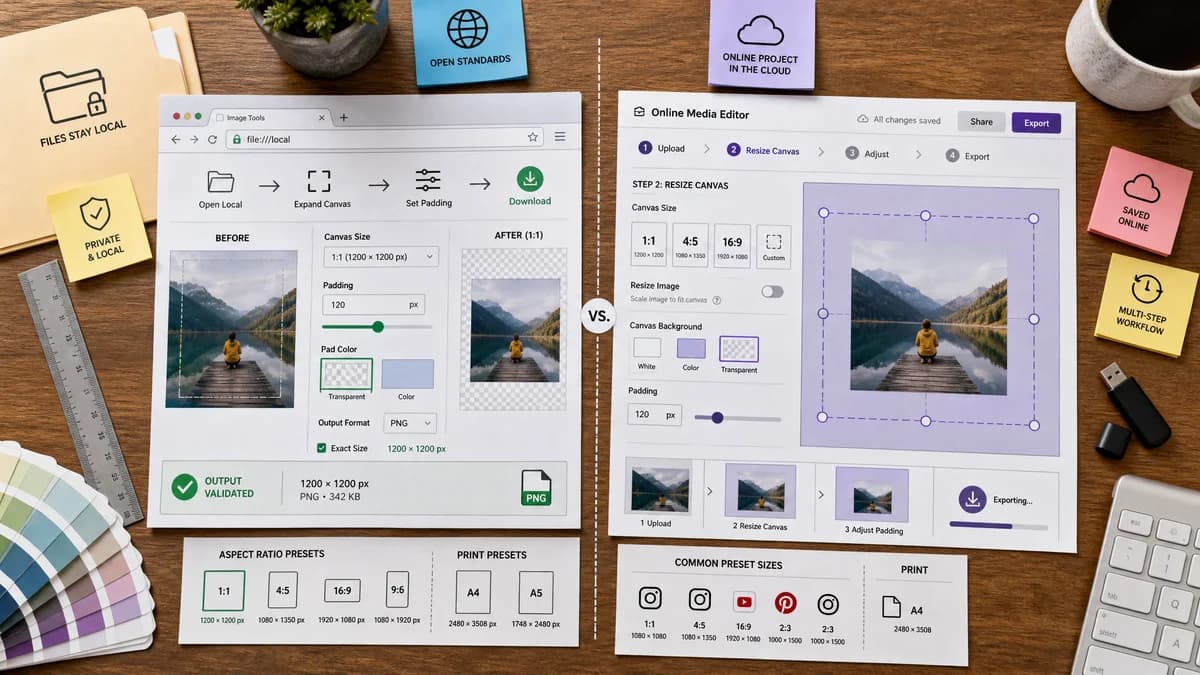
Why Photo Border Maker fits
TextFaker offers direct canvas expansion, color or transparent padding, social and print presets, and deterministic output values without creating a hosted media project.
What Kapwing offers
Kapwing's official tool adds borders by enlarging canvas, using preset sizes, resizing the image, or expanding padding in the editor.
Open alternative signals
Media scope
Photo Border MakerStill images only for a stable, deterministic first release.
KapwingImages, GIFs, videos, templates, captions, and larger projects.
Output math
Photo Border MakerExact border and canvas dimensions are first-class result fields.
KapwingCanvas and padding are controlled visually in the editor.
Local processing
Photo Border MakerNo upload needed for browser-supported still images.
KapwingOnline editor workflow for media projects.
Testing
Photo Border MakerFixture images verify pixel colors and dimensions automatically.
KapwingVisual editor behavior is harder to test externally.
Decision guide
Private still-image borders, print margins, exact output dimensions, and simple downloads.
Video, GIF, meme, caption, and multi-layer media projects where borders are part of a larger edit.
Side-by-side open source alternative comparison
| Decision point | Photo Border Maker | Kapwing | Takeaway |
|---|---|---|---|
| Core task | Our workflowAdd borders and padding to one image with exact settings. | Proprietary workflowAdd borders as part of a broader online media editor. | TextFaker is narrower and more predictable. |
| Video/GIF | Our workflowOut of scope initially unless later added as a separate tool. | Proprietary workflowKapwing supports video and GIF border workflows. | Kapwing is stronger for moving media. |
| Privacy | Our workflowLocal image processing in browser. | Proprietary workflowHosted editing service. | TextFaker is attractive for personal or client photos. |
| Presets | Our workflowSocial and print presets expose exact generated dimensions. | Proprietary workflowKapwing offers preset sizes and editor canvas controls. | Match common presets, then add validation details. |
| Downloads | Our workflowReports output MIME, filename, dimensions, and file size. | Proprietary workflowDownload is part of the editor export flow. | TextFaker makes export status machine-readable. |
| Mobile | Our workflowUse direct upload, sliders, numeric inputs, and large download target. | Proprietary workflowA full media editor interface on mobile. | The focused utility can be easier for a quick image-only task. |
Detailed research
Demand Angle
Kapwing's image, GIF, and video border pages show that borders are used for social formats, memes, and presentation context. TextFaker captures the image-only segment with less friction.
- Include presets for Instagram square/post/story, YouTube thumbnail, Pinterest, and print sizes.
- Allow color, transparent, and blurred-background modes only if each mode has deterministic output fields.
Implementation Notes
The workflow starts with still images because the existing TextFaker image tooling already favors local browser transforms and deterministic validation.
- Support PNG, JPEG, WebP, AVIF where browser decode and encode are available.
- Fail with clear validation when the browser cannot decode or export the selected format.
Automation
The test suite assert the same values the user sees, making this tool suitable for the registry's validation approach.
- Verify generated width, height, crop box, background color, MIME, extension, and file size range.
Product Boundary
Do not compete with Kapwing's video editor in the initial page. Keep GIF/video border maker as possible future tools.
Research notes
- Kapwing's official image border page describes adding borders by making the canvas larger and using preset size or padding controls.
- Kapwing help describes outlines or borders for pictures or videos, showing the product spans multiple media types.
- Kapwing resources discuss borders for videos, GIFs, photos, seasonal styling, branded borders, and device frames.
Official source
The proprietary product link is included once here for source checking after the alternative analysis.
Official Kapwing source